
UR28MUR824UR44UR22mkII Firmware Update Guide
|
|
|
- みそら うすい
- 7 years ago
- Views:
Transcription
1 Steinberg UR28M/ UR824/ UR44/ UR22mkII Firmware Update Guide (For Windows/Mac) Thank you for choosing a Steinberg product. This document explains how to update the firmware of the device (with the UR28M as an example) by using a computer connected to the device via USB. This is the same procedure as on the UR28M when using the UR824, UR44 and UR22mkII. Precautions - Please note that the device may be damaged if you fail to follow these instructions properly, or turn off the device, operate the device, or disconnect the cable while the update is in progress. - The user assumes full responsibility for the update. - If the update fails, and the device still does not operate correctly even after you execute the update once again, please contact your dealer. - Copyrights of this software and documentation are owned exclusively by Yamaha Corporation. - Reproducing or modifying all or parts of this software or its documentation without permission is strictly prohibited. - The screen shots in this guide are for use with this update procedure only and may be different from the actual screen shots. - Windows is a registered trademark of Microsoft Corporation in the United States and other countries. - Apple, Mac and Macintosh are trademarks of Apple Inc. registered in the U.S. and other countries. - The company names and product names in this document are the trademarks or registered trademarks of their respective companies. System requirements TOOLS for UR28M/ UR824/ UR44 or Yamaha Steinberg USB Driver (UR22mkII) is installed and works properly on the computer. Included Files UpdateGuide.pdf ReleaseNotes.pdf For Windows; UR28M_firmware_Vxxx.exe This document (PDF file). Describes the update history. The update program. The letters xxx
2 For Mac; UR28M_firmware_Vxxx.app indicates the version number. Preparing for the update - Connect only one device when updating. Only one device can be updated at a time. - Before starting the update program, quit all other programs. While the update is in progress, do not start any other programs or switch between windows. - If your computer enters the sleep or energy-save mode, the update may fail. Therefore, you should disable these functions to prevent this from happening. We also recommend that you do not use any screen saver or similar background programs. Update procedure 1. Disconnect all USB devices other than the mouse and keyboard from the computer. 2. Connect a computer directly to a device by using an USB cable. 3. Double-click the file UR28M_firmware_Vxxx.exe for Windows or UR28M_firmware_Vxxx.app for Mac. The following screen will appear (example screen is from Windows). The letters x.xx indicate the old version number and y.yy indicate the updated version number. 4. Click [Start] to start the update process. The update process may take approximately two minutes to complete. 5. When Completed! is shown in the Status section, click [Close].
3 The update is now completed. Messages displayed in progress The messages and help are described below. Message The latest firmware is already installed. Please wait until the update process is complete. Error: UR is not detected. Please check the connection and reboot this software. Error: Update failed. Please check the connection and reboot this software. Then try again. Help You do not need the update. Quit the software. - Reconnect the device to the computer to start the update process again. If the same error message appears each time you try to update, the device may need repairing, in which case you should contact your dealer.
4 Steinberg UR28M/ UR824/ UR44/ UR22mkII ファームウェアアップデートガイド (Windows/Mac 版 ) スタインバーグ製品をご愛用いただきまして まことにありがとうございます このガイドでは UR28M を例に 本体ファームウェアを USB で接続したコンピューターからアップデートする方法を説明します UR824 UR44 UR22mkII の場合も UR28M と同じ手順です ご注意 - アップデート作業中に本体の電源を切ったり 本体を操作したり ケーブルを抜いたりしないでください 本体が故障する場合があります - アップデート作業は お客様ご自身の責任において行なってください - アップデート作業に失敗し もう一度アップデート作業を実行しても本体が正しく動作しない場合は ヤマハ修理ご相談センターにお問い合わせください - このソフトウェアおよびガイドの著作権は すべてヤマハ株式会社が所有します - このソフトウェアおよびガイドの一部 または全部を無断で複製 改変することはできません - このガイドに掲載されている画面は すべて操作説明のためのもので 実際の画面と異なる場合がありますので ご了承ください - Windows は 米国 Microsoft Corporation の米国およびその他の国における登録商標です - Mac または Macintosh は 米国および他の国々で登録された Apple Inc. の商標です - その他掲載されている会社名および商品名は 各社の商標および登録商標です 動作環境 TOOLS for UR28M/ UR824/ UR44 または Yamaha Steinberg USB Driver (UR22mkII) がインストールされ 正常に動作しているコンピューター ファイルの構成 UpdateGuide.pdf ReleaseNotes.pdf Windows の場合 UR28M_firmware_Vxxx.exe Mac の場合 UR28M_firmware_Vxxx.app この PDF ガイドです リリースノートです アップデートプログラムです xxx はバージョンを示します アップデートの準備 - 必ず 1 台ずつ本体を接続してアップデート作業を行なってください - アップデートプログラムを実行する前に 必ずすべてのプログラムを終了してください また アップデート作業中は 別のプログラムを実行したり ウィンドウを切り替えたりしないでください - コンピューターを待機状態に移行しないように設定してください 省電力モードなどでコンピュー
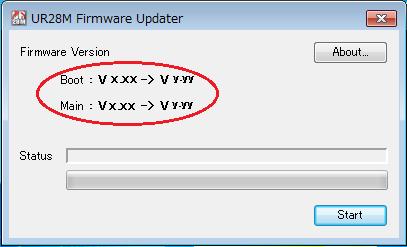
5 ターが待機状態になると アップデートに失敗する場合があります スクリーンセーバーなどもお使いにならないことをおすすめします アップデートの手順 1. キーボード マウスを除く USB 機器をコンピューターからはずします 2. 付属の USB ケーブルを使って 本体をコンピューターに直接接続します 3. UR28M_firmware_Vxxx.exe (Windows 用 ) または UR28M_firmware_Vxxx.app (Mac 用 ) をダブルクリックします 次のような画面が表示されます ( 画面は Windows 版のものです ) x.xx は古いバージョン y.yy は新しいバージョンを示します 4. [Start] をクリックして アップデートを開始します アップデートには約 2 分かかります 5. Status に Completed! と表示されたら [Close] をクリックして終了します
6 以上でアップデートは完了です アップデート作業中に表示されるメッセージメッセージは英語で表示されます 以下に メッセージ 内容 対処方法を記します メッセージ 内容 対処方法 The latest firmware is already installed. 最新のファームウェアがインストールされています アップデートの必要はありません アップデートを終了してください Please wait until the update ファームウェアの更新が終了す - process is complete. るまでお待ちください Error: UR is not detected. Please check the connection and reboot this software. エラー :UR 本体が接続されていません UR 本体が正しく接続されているかを確認し ソフトウェアを再起動してください UR 本体を再接続し もう一度アップデートを実行してください 繰り返しアップデート作業を Error: Update failed. Please エラー : ファームウェアの更新に 実行してもこれらのエラーメッ check the connection and reboot this software. Then try again. 失敗しました UR 本体が正しく接続されているかを確認し ソフトウェアを再起動してください セージが表示される場合は ハードウェアの修理が必要なことがあります ヤマハ修理ご相談センターにお問い合わせください Manual Development Department 2011 Yamaha Corporation Published 10/2015 YJ-A0
UR28M/UR824/UR44/UR12/UR22mkII Firm UG
 Steinberg UR28M/ UR824/ UR44/ UR12/ UR22mkII Firmware Update Guide (For Windows/Mac) Thank you for choosing a Steinberg product. This document explains how to update the firmware of the device (with the
Steinberg AXR4T Firmware Update Guide
 Steinberg AXR4T Firmware Update Guide (For Windows, Mac) Thank you for choosing a Steinberg product. This document explains how to update the firmware of the device by using a computer connected to the
TOOLS for UR44 Release Notes for Windows
 TOOLS for UR44 V2.1.2 for Windows Release Notes TOOLS for UR44 V2.1.2 for Windows consists of the following programs. - V1.9.9 - Steinberg UR44 Applications V2.1.1 - Basic FX Suite V1.0.1 Steinberg UR44
NSR-500 Installation Guide
 NSR Installation Guide This information has been prepared for the professional installers not for the end users. Please handle the information with care. Overview This document describes HDD installation
Flash Loader
 J MA1309-A プロジェクターファームウェア更新ガイド 本書はお読みになった後も大切に保管してください 本書の最新版は下記ウェブサイトに公開されております http://world.casio.com/manual/projector/ Microsoft Windows Windows Vistaは米国 Microsoft Corporationの米国およびその他の国における登録商標または商標です
fx-9860G Manager PLUS_J
 fx-9860g J fx-9860g Manager PLUS http://edu.casio.jp k 1 k III 2 3 1. 2. 4 3. 4. 5 1. 2. 3. 4. 5. 1. 6 7 k 8 k 9 k 10 k 11 k k k 12 k k k 1 2 3 4 5 6 1 2 3 4 5 6 13 k 1 2 3 1 2 3 1 2 3 1 2 3 14 k a j.+-(),m1
Microsoft Word - Win-Outlook.docx
 Microsoft Office Outlook での設定方法 (IMAP および POP 編 ) How to set up with Microsoft Office Outlook (IMAP and POP) 0. 事前に https://office365.iii.kyushu-u.ac.jp/login からサインインし 以下の手順で自分の基本アドレスをメモしておいてください Sign
DWR-S01D Updater 取扱説明書 発行日 :2011/2/28
 DWR-S01D Updater 取扱説明書 発行日 :2011/2/28 目次 概要概要...3 機能機能...3 準備準備するものするもの...3 本ソフトウェアソフトウェアについてについて...3 インストールインストール手順手順...4 USB ドライバーのインストールインストール手順手順...8 デバイスマネージャーデバイスマネージャーからの USB ドライバーのインストールインストール手順手順...11
Microsoft Word - DWR-S01D_Updater_取扱説明書_120514A.doc
 DWR-S01D Updater 取扱説明書 発行日 :2012/5/14 目次 概要...3 機能...3 準備するもの...3 本ソフトウェアについて...3 インストール手順...4 USBドライバーのインストール手順...8 デバイスマネージャーからのUSBドライバーのインストール手順...11 アップデート手順...16 アップデート後の確認...17 アップデートに失敗した場合...17
DSP5Dアップグレードガイド
 DSP5D アップグレードガイド このガイドでは DSP5D の各種ファームウェアを最新にアップデートする手順を説明します 必ずお読みください アップデート作業は お客様ご自身の責任において行なっていただきます アップデートを実行する前に 必要なデータはバックアップしておいてください PM5D とカスケード接続している場合は DSP5D をアップデートすると PM5D のアップデートも必要になる場合があります
TF5/TF3/TF1/TF-RACK/NY64-D ファームウェアアップデートガイド
 TF5/TF3/TF1/TF-RACK/NY64-D ファームウェア アップデートガイド ヤマハ製品をご愛用いただきまして まことにありがとうございます このガイドでは TF5/TF3/TF1/TF-RACK 本体 ( 以降 TF 本体 ) NY64-D のファームウェアをアップデートする手順を説 明します ご注意 ( 必ずお読みください ) アップデート作業は お客様ご自身の責任において行なっていただきます
Tab 5, 11 Tab 4, 10, Tab 3, 9, 15Tab 2, 8, 14 Tab 1, 7, 13 2
 COMPANION 20 MULTIMEDIA SPEAKER SYSTEM Owner s Guide Tab 5, 11 Tab 4, 10, Tab 3, 9, 15Tab 2, 8, 14 Tab 1, 7, 13 2 Tab1, 7, 13 Tab 2, 8, 14 Tab 3, 9, 15 Tab 4, 10, Tab 5, 11 This product conforms to all
DWT-B01 Updater 取扱説明書 発行日 :2011/3/23
 DWT-B01 Updater 取扱説明書 発行日 :2011/3/23 目次 概要概要...3 機能機能...3 準備準備するものするもの...4 本ソフトウェアソフトウェアについてについて...4 インストールインストール手順手順...5 USB ドライバーのインストールンストール手順手順...9 デバイスマネージャーデバイスマネージャーからの USB ドライバーのインストールインストール手順手順...12
Yamaha Steinberg FW Driver for Mac Release Notes
 Yamaha Steinberg FW Driver V1.7.2 for Mac Release Notes Contents System Requirements for Software Main Revisions and Enhancements Update History System Requirements for Software - The system requirements
Rio3224-D/Rio1608-Dファームウェアアップデートガイド
 Rio3224-D / Rio1608-D ファームウェアアップデートガイド ヤマハ製品をご愛用いただきまして まことにありがとうございます このガイドでは Rio3224-D / Rio1608-D 本体 ( 以降 Rio 本体 ) のファームウェアおよび内蔵している Dante モジュールのファームウェアをアップデートする手順を説明します ご注意 ( 必ずお読みください ) アップデート作業は
MIDI_IO.book
 MIDI I/O t Copyright This guide is copyrighted 2002 by Digidesign, a division of Avid Technology, Inc. (hereafter Digidesign ), with all rights reserved. Under copyright laws, this guide may not be duplicated
Yamaha Steinberg USB Driver Release Notes for Mac
 Yamaha Steinberg USB Driver V1.9.10 for Mac Release Notes Contents System Requirements for Software Main Revisions and Enhancements Legacy Updates System Requirements for Software - Note that the system
LC304_manual.ai
 Stick Type Electronic Calculator English INDEX Stick Type Electronic Calculator Instruction manual INDEX Disposal of Old Electrical & Electronic Equipment (Applicable in the European Union
Microsoft Word - PrivateAccess_UM.docx
 `````````````````SIRE Page 1 English 3 日本語 7 Page 2 Introduction Welcome to! is a fast, simple way to store and protect critical and sensitive files on any ixpand Wireless Charger. Create a private vault
NSR-500 Software Update Installation Procedures
 NSR Software Update Installation Procedures Overview Handle this information with care because this installation procedure is not intended for use by customers. This document describes software update
FTDI Driver Error and Recovery Procedure Check FTDI driver operation Rev :OK, Rev :NG, Rev :NG May 11, 2017 CHECK FTDI DRIVER
 FTDI Driver Error and Recovery Procedure Check FTDI driver operation Rev. 2.08.02:OK, Rev. 2.08.24:NG, Rev. 2.12.06:NG May 11, 2017 CHECK FTDI DRIVER VERSION 1. Connect FTDI device to PC FTDI デバイスを PC
NSR-500 Create DVD Installer Procedures
 Creating NSR-500 DVD Installer Overview This document describes how to create DVD installer for the NSR-500 series. Applicable Model NSR-500 Series To be required * Windows (XP, Vista or 7) installed PC
Adobe Acrobat DC 製品比較表
 X X Adobe, the Adobe logo, Acrobat, the Adobe PDF logo, Creative Cloud, and Reader are either registered trademarks or trademarks of Adobe Systems Incorporated in the United States and/or other countries.
Yamaha Steinberg USB Driver for Windows Releae Notes
 Yamaha Steinberg USB Driver V1.9.6 for Windows Release Notes Contents System Requirements for Software Main Revisions and Enhancements Legacy Updates System Requirements for Software - Note that the system
目次 USBドライバダウンロードの手順...2 USBドライバインストールの手順...3 インストール結果を確認する...19 USBドライバアンインストール / 再インストールの手順...21 USB ドライバダウンロードの手順 1. SHL21 のダウンロードページからダウンロードしてください
 AQUOS PHONE SERIE SHL21 USB ドライバインストールマニュアル 本製品の環境は以下のとおりです USB 1.1 以上に準拠している USB 搭載のパソコンで Microsoft Windows XP(32bit)/Windows Vista /Windows 7/ Windows 8 がプリインストールされている DOS/V 互換機 (OS のアップグレードを行った環境では
Rev.2 N 内蔵 RDX N 外付 RDX ファームウェアアップデート手順 RDX 装置をお買い上げいただきましてありがとうございます 本書は N 内蔵 RDX N 外付 RDX のファームウェアアップデート手順を記載しています 1. 概要
 Rev.2 N8151-86 内蔵 RDX N8160-84 外付 RDX ファームウェアアップデート手順 RDX 装置をお買い上げいただきましてありがとうございます 本書は N8151-86 内蔵 RDX N8160-84 外付 RDX のファームウェアアップデート手順を記載しています 1. 概要 N8151-86 内蔵 RDX のファームウェアを 3040 に N8160-84 外付 RDX のファームウェアを
untitled
 SUBJECT: Applied Biosystems Data Collection Software v2.0 v3.0 Windows 2000 OS : 30 45 Cancel Data Collection - Applied Biosystems Sequencing Analysis Software v5.2 - Applied Biosystems SeqScape Software
SonicWALL SSL-VPN 4000 導入ガイド
 COMPREHENSIVE INTERNET SECURITY SonicWALL セキュリティ装置 SonicWALL SSL-VPN 4000 導入ガイド 1 2 3 4 5 6 7 8 9-1 2 - 3 1 4 - 5 2 1. 2. 3 6 3 1. 2. 3. 4. 5. - 7 4 4 8 1. 2. 3. 4. 1. 2. 3. 4. 5. - 9 6. 7. 1. 2. 3. 1.
ダウンロード方法 アルテラのソフトウェアをインストールするためのダウンロード ファイルには以下の種類があります.tar フォーマットのソフトウェアとデバイス ファイルがバンドルされたセット ダウンロードとインストールをカスタマイズするための個別の実行ファイル ディスクに焼いて他の場所にインストールす
 Quartus Prime ソフトウェア ダウンロードおよびインストール クイック スタート ガイド 2015 Altera Corporation. All rights reserved. ALTERA, ARRIA, CYCLONE, ENPIRION, MAX, MEGACORE, NIOS, QUARTUS and STRATIX words and logos are trademarks
RIVAGE PM シリーズ ファームウェアアップデートガイド
 RIVAGE PM シリーズファームウェアアップデートガイド ヤマハ製品をご愛用いただきまして まことにありがとうございます このアップデートガイドでは RIVAGE PM シリーズのファームウェアをアップデートする手順を説明します このアップデートガイドは CS-R10 CS-R10-S CSD-R7 DSP-R10 RPio622 RPio222 をアップデートの対象としています CSD-R7
TOOLS for UR824 for Win Release Notes
 TOOLS for UR824 V2.1.6 for Windows Release Notes TOOLS for UR824 V2.1.6 for Windows consists of the following programs. - V1.9.11 - Steinberg UR824 Applications V2.1.6 - Basic FX Suite V1.0.1 Steinberg
TOOLS for UR824 for Windows Release Notes
 TOOLS for UR824 V2.1.3 for Windows Release Notes TOOLS for UR824 V2.1.3 for Windows consists of the following programs. - V1.9.5 - Steinberg UR824 Applications V2.1.3 - Basic FX Suite V1.0.1 Steinberg
Yamaha Steinberg USB Driver Release Notes
 Yamaha Steinberg USB Driver V1.9.10 for Windows Release Notes Contents System Requirements for Software Main Revisions and Enhancements Legacy Updates System Requirements for Software - Note that the system
学部ゼミ新規申請方法 (Blackboard 9.1) Seminar Application Method for Undergraduate Seminar Courses ゼミ新規申請は Blackboard で受け付けます! 次セメスターにゼミ履修を希望する学生は 下記マニュアルに従ってゼミ
 ゼミ新規申請は Blackboard で受け付けます! 次セメスターにゼミ履修を希望する学生は 下記マニュアルに従ってゼミ新規申請を行ってください 現在 ゼミを履修している場合は 同一ゼミが次セメスター以降も自動登録されます ゼミのキャンセル 変更を希望する場合の手続きは アカデミック オフィス HP を確認してください ( サブゼミはセメスター毎に申請を行う必要があります 自動登録されません )
ダウンロード方法アルテラのソフトウェアをインストールするためのダウンロード ファイルには以下の種類があります.tar フォーマットのソフトウェアとデバイス ファイルの完全なセット ダウンロードとインストールをカスタマイズするための個別の実行ファイル ディスクに焼いて他の場所にインストールするための
 Quartus II ソフトウェア ダウンロードおよびインストール クイック スタート ガイド 2013 Altera Corporation. All rights reserved. ALTERA, ARRIA, CYCLONE, HARDCOPY, MAX, MEGACORE, NIOS, QUARTUS and STRATIX words and logos are trademarks of
TOOLS for UR824 for Mac Release Notes
 TOOLS for UR824 V2.1.3 for Mac Release Notes TOOLS for UR824 V2.1.3 for Mac consists of the following programs. - V1.9.6 - Steinberg UR824 Applications V2.1.2 - Basic FX Suite V1.0.1 Steinberg UR824 Applications
2
 8 24 32C800037C800042C8000 32 40 45 54 2 3 24 40 10 11 54 4 7 54 30 26 7 9 8 5 6 7 9 8 18 7 7 7 40 10 13 12 24 22 22 8 55 8 8 8 8 1 2 3 18 11 54 54 19 24 30 69 31 40 57 23 23 22 23 22 57 8 9 30 12 12 56
2
 8 23 26A800032A8000 31 37 42 51 2 3 23 37 10 11 51 4 26 7 28 7 8 7 9 8 5 6 7 9 8 17 7 7 7 37 10 13 12 23 21 21 8 53 8 8 8 8 1 2 3 17 11 51 51 18 23 29 69 30 39 22 22 22 22 21 56 8 9 12 53 12 56 43 35 27
Z7000操作編_本文.indb
 2 8 17 37Z700042Z7000 46Z7000 28 42 52 61 72 87 2 3 12 13 6 7 3 4 11 21 34 61 8 17 4 11 4 53 12 12 10 75 18 12 42 42 13 30 42 42 42 42 10 62 66 44 55 14 25 9 62 65 23 72 23 19 24 42 8 26 8 9 9 4 11 18
32C2100操作編ブック.indb
 02 08 32C2100 18 24 31 37 2 3 12 13 6 7 68 67 41 42 33 34 3 4 11 8 18 4 11 4 22 13 23 11 23 12 13 14 15 10 18 19 20 20 10 9 20 18 23 22 8 8 22 9 9 4 30 10 10 11 5 13 13 16 15 26 24 37 40 39 6 7 8 1 2 29
Diskette Drive Installation
 Diskette Drive Installation HP Workstation xw Series This document describes how to install a diskette drive. Kit Contents This product is shipped with the necessary supplies for installing a diskette
 5 30 B36B3 4 5 56 6 7 3 4 39 4 69 5 56 56 60 5 8 3 33 38 45 45 7 8 4 33 5 6 8 8 8 57 60 8 3 3 45 45 8 9 4 4 43 43 43 43 4 3 43 8 3 3 7 6 8 33 43 7 8 43 40 3 4 5 9 6 4 5 56 34 6 6 6 6 7 3 3 3 55 40 55
NSR-500 Create USB Installer Procedures
 Creating NSR-500 USB Installer Overview This document describes how to create the USB installer for the NSR- 500 series. Applicable Model NSR-500 Series To Be Required * Windows (XP, Vista or 7) installed
Diskette Drive Installation
 Diskette Drive Installation HP xw Series Workstation This document describes how to install a diskette drive. Kit Contents This product is shipped with the necessary supplies for installing a diskette
i5 Catalyst Case Instructions JP
 Catalyst iphone iphone iphone ON/OFF O O Touch ID Page 01 iphone O O O O O Page 02 ( ) O OK O O O 30 30 min Page 03 ( ) 30 O iphone iphone iphone iphone iphone iphoneiphone Catalyst ON/OFF iphone iphone
Software Tag Implementation in Adobe Products
 2011 Adobe Systems Incorporated. All rights reserved. Software Tagging in Adobe Products Tech Note Adobe, the Adobe logo, and Creative Suite are either registered trademarks or trademarks of Adobe Systems
19_22_26R9000操作編ブック.indb
 8 19R900022R900026R9000 25 34 44 57 67 2 3 4 10 37 45 45 18 11 67 25 34 39 26 32 43 7 67 7 8 7 9 8 5 7 9 21 18 19 8 8 70 8 19 7 7 7 45 10 47 47 12 47 11 47 36 47 47 36 47 47 24 35 8 8 23 12 25 23 OPEN
ESOTERIC ASIO USB DRIVER インストールマニュアル Windows 用 システム推奨条件 2 インストールで使用する言語を選択して 次へ ボタンをクリックする Intel Core 2 Duo 以上のプロセッサー搭載コンピュータ 搭載メモリ 1GB 以上 対応 OS Windo
 ESOTERIC ASIO USB DRIVER インストールマニュアル Windows 用 システム推奨条件 2 インストールで使用する言語を選択して 次へ ボタンをクリックする Intel Core 2 Duo 以上のプロセッサー搭載コンピュータ 搭載メモリ 1GB 以上 対応 OS Windows 7 (32bit 版 64bit 版 ) Windows 8 (32bit 版 64bit 版
 5 7 3AS40AS 33 38 45 54 3 4 5 4 9 9 34 5 5 38 6 8 5 8 39 8 78 0 9 0 4 3 6 4 8 3 4 5 9 5 6 44 5 38 55 4 4 4 4 5 33 3 3 43 6 6 5 6 7 3 6 0 8 3 34 37 /78903 4 0 0 4 04 6 06 8 08 /7 AM 9:3 5 05 7 07 AM 9
内蔵ハードディスクユニット-20GB (PG-HD2E4H) 内蔵ハードディスクユニット-40GB (PG-HD4E4H)取扱説明書 HARD DISK DRIVE 20GB(PG-HD2E4H) HARD DISK DRIVE 40GB(PG-HD4E4H) USER'S GUIDE
 B7FY-0351-02 J E J 1 J 1 2 3 2 4 J 3 4 Preface Thank you very much for purchasing the hard disk drive. This hard disk drive provides a IDE interface and can be installed in the 3.5-inch storage bay of
2 3 12 13 6 7
 2 8 17 42ZH700046ZH700052ZH7000 28 43 54 63 74 89 2 3 12 13 6 7 3 4 11 21 34 63 65 8 17 4 11 4 55 12 12 10 77 56 12 43 43 13 30 43 43 43 43 10 45 14 25 9 23 74 23 19 24 43 8 26 8 9 9 4 8 30 42 82 18 43
2
 8 23 32A950S 30 38 43 52 2 3 23 40 10 33 33 11 52 4 52 7 28 26 7 8 8 18 5 6 7 9 8 17 7 7 7 38 10 12 9 23 22 22 8 53 8 8 8 8 1 2 3 17 11 52 52 19 23 29 71 29 41 55 22 22 22 22 22 55 8 18 31 9 9 54 71 44
ファームウェアアップデート手順書 EOS C300 Mark II
 ファームウェアアップデート手順書 デジタルシネマカメラ EOS C300 Mark II 本書ではデジタルシネマカメラ EOS C300 Mark II のファームウェア * をアップデート ( 書き換え ) するための手順と注意事項について説明しています * ファームウェアとは 機器を制御するために組み込まれたソフトウェアのことです カメラはファームウェアによって撮影 画像処理などを行います 重要
Macintosh
 Macintosh アプリケーションをお使いになる前に 下記の点にご留意ください プリンター本体のセットアップや プリンターのメンテナンスを行う手順は Windows PC と同様です 取扱説 明書を参照してください Macintosh で [GT-3 Maintenance] を起動する場合は [Finder]>[ アプリケーション ]>[GT-3 Maintenance] を選択してください
Macintosh
 Macintosh アプリケーションをお使いになる前に 下記の点にご留意ください プリンター本体のセットアップや プリンターのメンテナンスを行う手順は Windows PC と同様です 取扱説 明書を参照してください Macintosh で GTX-4 Maintenance を起動する場合は [Finder]>[ アプリケーション ] から GTX-4 Maintenance を選択してください
 6 4 4 9RERE6RE 5 5 6 7 8 9 4 5 6 4 4 5 6 8 4 46 5 7 54 58 60 6 69 7 8 0 9 9 79 0 4 0 0 4 4 60 6 9 4 6 46 5 4 4 5 4 4 7 44 44 6 44 8 44 46 44 44 4 44 0 4 4 5 4 8 6 0 4 0 4 4 5 45 4 5 50 4 58 60 57 54
Microsoft PowerPoint - Ritsu-Mate出願操作マニュアル(学部英語版) _STEP4.pptx
 Procedure 1 Application Fee Payment Pay the Application Fee by 11:00 p.m. (Japan Standard Time) on the application deadline date specified for each admission method. Click on "". 1 Procedure 2 Payment
Microsoft Word - DUC登録方法.doc
 ggg ようこそ Avid オーディオ フォーラム (DUC) へ このドキュメントでは Avid オーディオ フォーラム ( 以下 DUC) をご利用頂く上で必要となる DUC アカウントの登録方法をご説明いたします アカウントの登録には有効な E メールアドレスが必要です 1. ホームページへアクセスする 先ずは DUC ホームページ (http://duc.avid.com/) へアクセスしてください
入学検定料支払方法の案内 1. 入学検定料支払い用ページにアクセス ポータルの入学検定料支払いフォームから 入学検定料支払い用 URL の ここをクリック / Click here をクリックしてください クリックを行うと 入学検定料支払い用のページが新たに開かれます ( 検定料支払い用ページは ポ
 Keio Academy of New York Admissions Portal 入学検定料支払方法の案内 < 日本語 :P1 ~ 7> Page1 入学検定料支払方法の案内 1. 入学検定料支払い用ページにアクセス ポータルの入学検定料支払いフォームから 入学検定料支払い用 URL の ここをクリック / Click here をクリックしてください クリックを行うと
2 3 12 13 6 7
 02 08 22AV55026AV550 17 25 32 22AV550 26AV550 39 50 2 3 12 13 6 7 3 4 11 8 8 9 9 8 9 23 8 9 17 4 11 4 33 12 12 11 24 18 12 10 21 39 21 4 18 18 45 45 11 5 6 7 76 39 32 12 14 18 8 1 2 32 55 1 2 32 12 54
 02 08 32C700037C700042C7000 17 25 32 39 50 2 3 12 13 6 7 3 4 11 8 8 9 9 8 9 23 8 9 17 4 11 4 33 12 12 11 24 18 12 10 21 39 21 4 11 18 45 5 6 7 76 39 32 12 14 18 8 1 2 31 55 1 2 31 12 54 54 9 1 2 1 2 10
How to read the marks and remarks used in this parts book. Section 1 : Explanation of Code Use In MRK Column OO : Interchangeable between the new part
 Reservdelskatalog MIKASA MT65H vibratorstamp EPOX Maskin AB Postadress Besöksadress Telefon Fax e-post Hemsida Version Box 6060 Landsvägen 1 08-754 71 60 08-754 81 00 [email protected] www.epox.se 1,0 192 06
展開とプロビジョニングの概念
 ADOBE CREATIVE SUITE 5 2010 Adobe Systems Incorporated and its licensors. All rights reserved. Adobe Creative Suite Deployment and Provisioning Concepts This guide is licensed for use under the terms of
 6 4 45 7ZS 5 59 7 8 94 05 4 5 6 4 5 5 6 8 8 40 45 48 56 60 64 66 66 68 7 78 80 8 7 8 0 0 0 90 0 57 64 69 66 66 69 0 4 4 4 4 4 0 7 48 5 4 4 5 4 4 4 7 46 46 6 46 8 46 48 46 46 4 46 46 4 4 5 4 6 4 9 9 0
VECLOS Audio Driver インストールマニュアル Windows 用 2 次へ ボタンをクリックする 対応 OS Windows 7 (32bit 版 64bit 版 ) Windows 8( 32bit 版 64bit 版 ) Windows 8.1( 32bit 版 64bit 版
 Windows 用 2 次へ ボタンをクリックする 対応 OS Windows 7 (32bit 版 64bit 版 ) Windows 8( 32bit 版 64bit 版 ) Windows 8.1( 32bit 版 64bit 版 ) Windows10( 32bit 版 64bit 版 ) 2018 年 5 月現在 本機とパソコンを USB で接続する前に VECLOS Audio Driver
How to read the marks and remarks used in this parts book. Section 1 : Explanation of Code Use In MRK Column OO : Interchangeable between the new part
 Reservdelskatalog MIKASA MCD-L14 asfalt- och betongsåg EPOX Maskin AB Postadress Besöksadress Telefon Fax e-post Hemsida Version Box 6060 Landsvägen 1 08-754 71 60 08-754 81 00 [email protected] www.epox.se
DJ コントローラー DDJ-1000 ファームウェアアップデートガイド 第 2 版 Ja 1 / 8
 DJ コントローラー DDJ-1000 ファームウェアアップデートガイド 第 2 版 Ja 1 / 8 A. DDJ-1000 の現在のファームウェアバージョンを確認する 1.DDJ-1000 を USB ケーブルでお使いのパソコンに接続します 2. ドライババージョン表示ユーティリティまたは設定ユーティリティを起動します Mac のとき Finder で [ アプリケーション ] フォルダーを開き
User Support Tool 操作ガイド
 User Support Tool - 操作ガイド - User Support Tool とは? User Support Tool は ファームウェアを更新するためのユーティリティソフトウェアです 本書では User Support Tool を使用して プリンタのファームウェアを更新する方法を解説しています ご使用前に必ず本書をお読みください 1 準備する 1-1 必要なシステム環境...P.
 6 4 45 ZS7ZS4ZS 5 59 7 8 94 05 4 5 6 4 5 5 6 8 8 40 45 48 56 60 64 66 66 68 7 78 80 8 7 8 0 0 0 90 0 0 4 4 4 4 6 57 64 69 66 66 66 69 4 0 7 48 5 4 4 5 4 4 4 7 46 46 6 46 8 46 48 46 46 4 46 46 4 4 5 4
untitled
 TZ-BDT910M TZ-BDT910F TZ-BDT910P μ μ μ μ TM VQT3F51-1 l l l [HDD] [BD-RE] [BD-R] [DVD-V] [BD-V] [RAM] [CD] [SD] [-R] [USB] [-RW] [RAM AVCREC ] [-R AVCREC ] [RAM VR ][-R VR ] [-RW VR ] [-R V ] [-RW
 FCC This product is conform to the FCC standards. FCC Rules (Federal Communications Commission) This product complies with Part15 Subpart B and C of the FCC Rules. FCC ID : MK4TR3XM-SX01 FCC NOTICE This
プリンタードライバーのインストールと設定方法 この使用説明書は プリンタードライバーのインストール方法 プリンターを使用するための設定方法 使用上の注意事項などを説明しています 動作環境 OS 日本語版 Mac OS 9.1~9.2.2 日本語版 Mac OS Χ 10.2~ 補足 各ア
 プリンタードライバーのインストールと設定方法 この使用説明書は プリンタードライバーのインストール方法 プリンターを使用するための設定方法 使用上の注意事項などを説明しています 動作環境 OS 日本語版 Mac OS 9.1~9.2.2 日本語版 Mac OS Χ 10.2~10.3.9 各アプリケーションのドライバー動作環境に準じます Mac OS 9 へのインストール Mac OS 9へプリンタードライバーをインストールします
untitled
 VQT3B82-1 DMP-BDT110 μ μ μ 2 VQT3B82 ÇÕÇ¹Ç Ç +- VQT3B82 3 4 VQT3B82 1 2 3 4 5 6 7 8 9 10 11 12 13 14 15 16 17 18 19 20 ij SD 1 2 3 4 5 6 7 8 Í VQT3B82 5 BD DVD CD SD USB 6 VQT3B82 2 ALL 1 2 4 VQT3B82 7
Microsoft Word - PCM TL-Ed.4.4(特定電気用品適合性検査申込のご案内)
 (2017.04 29 36 234 9 1 1. (1) 3 (2) 9 1 2 2. (1) 9 1 1 2 1 2 (2) 1 2 ( PSE-RE-101/205/306/405 2 PSE-RE-201 PSE-RE-301 PSE-RE-401 PSE-RE-302 PSE-RE-202 PSE-RE-303 PSE-RE-402 PSE-RE-203 PSE-RE-304 PSE-RE-403
VE-GD21DL_DW_ZB
 V E-G D21D L V E-G D21D W 1 2 3 4 1 2 1 2 1 2 2 1 2 3 1 2 3 1 2 3 1 4 4 2 3 5 5 1 2 3 4 1 2 3 1 2 3 4 1 2 3 2006 Copyrights VisionInc. @. _ & $ % + = ^ 2011
 -5 DMP-BV300 μ μ l μ l l +- l l j j j l l l l l l l l l l l l l Ë l l l l l l l l l l l l l l l l l l l l l l l BD DVD CD SD USB 2 ALL 1 2 4 l l DETACH ATTACH RELEASE DETACH ATTACH DETACH ATTACH RELEASE
AWS Client VPN - ユーザーガイド
 AWS Client VPN ユーザーガイド AWS Client VPN: ユーザーガイド Copyright 2019 Amazon Web Services, Inc. and/or its affiliates. All rights reserved. Amazon's trademarks and trade dress may not be used in connection with
Zinstall WinWin 日本語ユーザーズガイド
 Zinstall WinWin User Guide Thank you for purchasing Zinstall WinWin. If you have any questions, issues or problems, please contact us: Toll-free phone: (877) 444-1588 International callers: +1-877-444-1588
BS・110度CSデジタルハイビジョンチューナー P-TU1000JS取扱説明書
 C S0 CS Digital Hi-Vision Tuner C C C C S0-0A TQZW99 0 C C C C 4 5 6 7 8 9 C C C C C C C C C C C C C C C C C C C C C C C 0 FGIH C 0 FGIH C C C FGIH FG IH FGIH I H FGIH FGIH 0 C C # $ IH F G 0 # $ # $
外部SQLソース入門
 Introduction to External SQL Sources 外部 SQL ソース入門 3 ESS 3 ESS : 4 ESS : 4 5 ESS 5 Step 1:... 6 Step 2: DSN... 6 Step 3: FileMaker Pro... 6 Step 4: FileMaker Pro 1. 6 Step 5:... 6 Step 6: FileMaker Pro...