
|
|
|
- あきみ ゆのもと
- 7 years ago
- Views:
Transcription

1
2
3
4

5

6
7
8
9 CSS Web
10
11
12 Quiz

13

14
15

16

17

18

19 LOVE
20 PC
21 Windows 8


22
23 / CPP Fluid PE CSS3 RWD

24

25

26
27 Quiz
28

29
30

31

32

33
34

35
36
37 CSS3
38
39
40
41 #btn {! display:block;! width:300px;! font-size:28px;! font-weight:bold;! text-align:center;! line-height:2em;! height:2em;! text-decoration:none;! border:1px solid #225588;! color:#ffffff;! background:#337fcc;! border-radius:5px;! text-shadow:0-2px 0px #225588, 0-2px 0px #225588;bac! background:-webkit-gradient(linear, 100% 0%, 100% 100%! box-shadow:1px 2px 2px rgba(0,0,0,0.3), 0px 1px 0px rg } #btn:hover {! background:-moz-linear-gradient(rgba(34,85,136,0.4), r 20 background:-webkit-gradient(linear, 100% 0%, 100% 100% }


42
43
44


45


46


47


48
49 Internet Explorer
50

51
52
53
54

55

56
57 Internet Explorer (Win) Internet Explorer (Mac) (Phoenix) (Firebird) / /11.0 Firefox Netscape Opera Safari 3.0 Mac / / /16.0 Google Chrome
58 Internet Explorer (Win) Internet Explorer (Mac) (Phoenix) (Firebird) / /11.0 Firefox Netscape Opera Safari 3.0 Mac / / /16.0 Google Chrome


59 Internet Explorer (Win) Internet Explorer (Mac) (Phoenix) (Firebird) / /11.0 Firefox Netscape Opera Safari 3.0 Mac / / /16.0 Google Chrome


60
61
62
63
64
65
66
67
68

69

70

71
72
73
74


75


76
77
78
79

80
81 Samsung Galaxy S IV Nexus 4 Nexus 7 HTC One Samsung Galaxy Note II
82
83 div.wrapper { } width: 940px;
84 div.wrapper { } width: 940px;
85 div.wrapper { } width: 90
86 div.wrapper { } width: 90
87

88
89 .main_column 690px.sub_column 217px 940px 18px

90 .main_column 690px.sub_column 217px 940px 18px
91 .main_column 74.53%.sub_column % 90-95% 1.875%
92
93
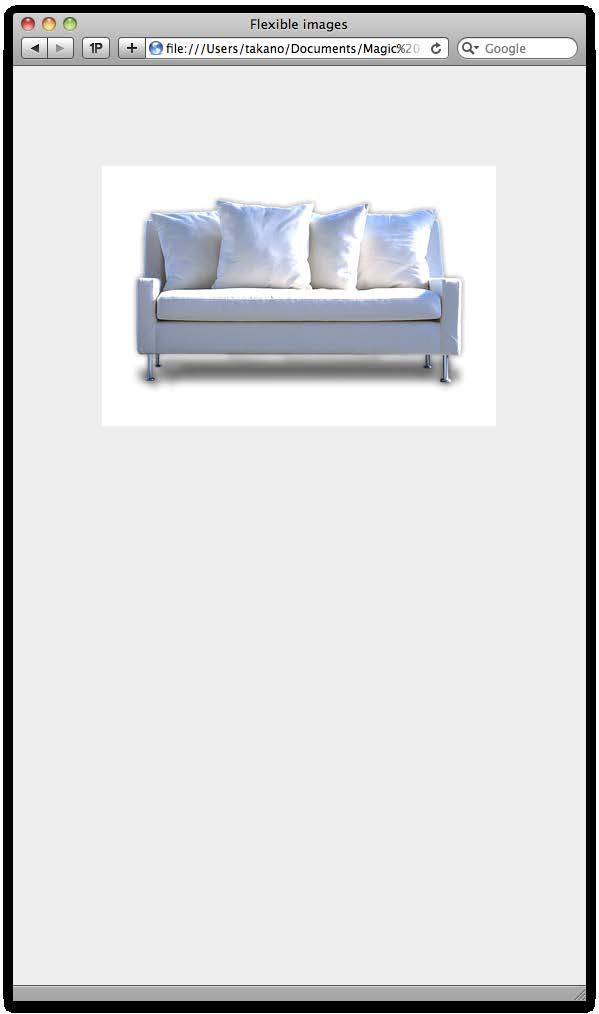
94 img { max-width: 100%; height: auto; }
95

96
97
98
99 CSS
100
101
102

103
104


105

106

107
108

109

110

111 A flexible grid Flexible images Media Queries
112 .sub-column.main-column.column2-left.column2-right.sub-column.main-column
113 .main-column.sub-column.column2-left.column2-right.main-column

114 .sub-column.main-column.column2-left.column2-right.sub-column.main-column
115 .sub-column.main-column float: right;.column2-left.column2-right.sub-column.main-column
116 .main-column.sub-column float: none;.column2-left.column2-right.main-column
117 .main-column.sub-column.column2-right.main-column.column2-left.sub-column

118 .main-column.sub-column.column2-left.column2-right.main-column
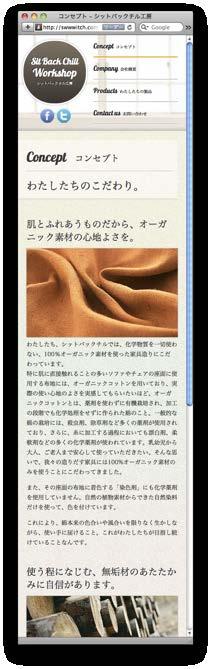
119 .main-column.sub-column display: none;.column2-right.main-column.column2-left.sub-column
120 .sub-column.main-column.main-column.main-column.column2-left.main-column.column2-right.sub-column.sub-column.column2-left.column2-right.column2-right.main-column.main-column
121 768px 320px.sub-column.main-column.main-column.main-column.column2-left.main-column.column2-right.sub-column.sub-column.column2-left.column2-right.column2-right.main-column.main-column
122 768px 320px.sub-column.main-column.main-column.main-column.column2-left.main-column.column2-right.sub-column.sub-column.column2-left.column2-right.column2-right.main-column.main-column
123 768px 320px <link href="cs/phone.css" rel="stylesheet" type="text/css" media="only screen and (min-width: 0px) and (max-width: 320px)" /> <link href="css/tablet.css" rel="stylesheet" type="text/css" media="only screen and (min-width: 321px) and (max-width: 768px)" /> <link href="css/desktop.css" rel="stylesheet" type="text/css" media="only screen and (min-width: 769px)" />
124 768px 320px <link href="cs/phone.css" rel="stylesheet" type="text/css" media="only screen and (min-width: 0px) and (max-width: 320px)" /> <link href="css/tablet.css" rel="stylesheet" type="text/css" media="only screen and (min-width: 321px) and (max-width: 768px)" /> min-width max-width <link href="css/desktop.css" rel="stylesheet" type="text/css" media="only screen and (min-width: 769px)" />
125 Quiz
126
127
128
129
130
131
132
133
134
135 Quiz
136
137

138
139


140

141
142 $blue: #3bbfce;.navigation { } color: #3bbfce;.navigation { } color: $blue;.border { } color: #3bbfce;.border { } color: $blue;
143 $blue: #3bbfce;.navigation { } color: $blue;.navigation { } color: #3bbfce;.border { } color: $blue;.border { } color: #3bbfce;
144
145


146
147
148
149
150


151

152


153

154


155


156


157
158

159
160

161

162
163
164
165
166

167

168

169
170
Web 設計入門
 情報処理技法 ( マルチメディアと表現 )I 第 12 回 CSS によるレイアウトデザイン (2) D.Mitsuhashi 1 クロスブラウジング D.Mitsuhashi 2 クロスブラウジング ブラウザや OS によって レンダリングには少なからず差異が存在する 同じソースで記述しても 表示が異なる場合がある なるべく 表示の差異を最小化し, 共通の視覚的デザインを提供すべき D.Mitsuhashi
transform: translatex(x 方向の移動距離 ) transform: translatey(y 方向の移動距離 ) transform: translate(x 方向の移動距離, Y 方向の移動距離 ) transform: translate 関数は 移動する位置ではなく 移動
 1225-8 練習 8 Translate Balls(translateX, translatey, translate) transform プロパティの translate 関数を使用して 2 つのボールを斜めに転がすトランジシ ョンを作ってみましょう Hover ボタンの上をマウスポインター ( カーソル ) で hover すると 2 つのボールが斜 めに転がります 動きの仕組み このトランジションは
 2,700,000 26,800,000 5 - - jquery Mobile - - - - jquery Mobile - - Objective-C / 30% Android - - jquery Mobile - - - - jquery Mobile - - iphone ipod UI jquery Mobile Gallery http://www.jqmgallery.com/
年刊EDP 2003
 1 2 3 HDD HDD HDD HDD ( 4 !!! ( )!! HDD ( )!! ( )!!(ry YU-SHOW!!!!!!!! HxH 5 HDD ( 0123-456-789 ( e 6 PC PC psd 7 8 YO! WebPage http://mode.jp/ PowerTone 9 A4 Canon PIXUS850i 1,440dpi 720dpi A4 10 etc
07_経営論集2010 小松先生.indd
 19 1 2009 105 123 Web Web Web Web World Wide Web WWW OS 1990 WWW Web HTML CSS JavaScript Web 1 WWW 2 Web Web 3 Web 4 HTML5 5 Web Web 3 1970 WWW HTML Web WWW WWW WWW WWW WWW 105 Web WWW 2 Web 1 1 NTT NTT
untitled
 PC Internet Explorer Windows SafariMac OS X Mozilla FireFoxWindows / Macintosh Google ChromeWindows / Macintosh IE + Google Windows 1 Internet Explorer 10.x (O)(A) Internet Explorer (O) (B) (B) (B) 2 Web
1 1 1............................ 1 2...................... 1 3..................... 2 4................... 2 2 4 1 CSS.......................... 4 2.
 1 1 1............................ 1 2...................... 1 3..................... 2 4................... 2 2 4 1 CSS.......................... 4 2.......................... 4 3......................
_勉強会_丸山さつき_v3
 CSS 2019/6/21 1 CSS CSS CSS!2 CSS Web!3 CSS HTML CSS CSS!4 CSS!5 !6 Id class id class CSS!7 !8 body 16px p 16px px, rem, em, %!9 !10 body 16px p 16px 1 CSS!11 !12 CSS CSS!13 CSS 4 CSS 1. OOCSS 2. SMACSS
Flash Player ローカル設定マネージャー
 ADOBE FLASH PLAYER http://help.adobe.com/ja_jp/legalnotices/index.html iii................................................................................................................. 1...........................................................................................................
1 1 1............................ 1 2.............. 1 3................... 1 4...................... 1 5 Web................. 2 6.....................
 web 0448039 1 1 1............................ 1 2.............. 1 3................... 1 4...................... 1 5 Web................. 2 6...................... 3 7 HTML CSS.................... 3 8....................
</div> </div> </body> </html> CSS の記述 (3DCubeAnime1.css) #stage ステージのスタイルを指定します 背景色を黒色で指定します 画像に軽く遠近感を出すために perspective: 1000px; と指定し perspective-orig
 1342-7 応用 1 Rotate 3D Cube 3D Cube が回転するアニメーション サンプル CSS1 CSS3 で 3D の Cube を描いて回転させてみましょう 3DCubeAnime1 の説明 HTML の記述 (3DCubeAnime1.html) id 属性 stage の div 要素を作り その中に div 要素でボックスを記述します id 属性 cube の div 要素を記述し
第6回 CSS入門(つづき)
 Slide URL https://vu5.sfc.keio.ac.jp/slide/ Web 情報システム構成法第 6 回 CSS 入門 ( 続き ) 萩野達也 ([email protected]) 1 CSS の役割 HTML に表現を与える 背景 色, 画像, 画像の繰り返し 文字 色, 種類, 太さ, 傾き, 大きさ 文書 整列 ( 左揃え, 中央揃え, 右揃え, 均等割り付け )
<!DOCTYPE html> <html> <head> <title>titleanime01</title> <meta charset="utf-8"> <link rel="stylesheet" type="text/css" href="titleanime01.css"> </hea
 1335 見出し ( タイトル ) のアニメーション 見出しのアニメーションを作ってみましょう ( 注 )Safari (webkit 系ブラウザ ) と Chrome(webkit にも対応 ) は テキストの輪郭や色を -webkit-text-stroke-width -webkit-text-stroke-color -webkit-text-fill-color のプロパティで描くことができますが
サンプル CSS web ページを開くと同時にピエロの玉乗りが動き出すアニメーションを作ってみましょう AnimeAuto の説明 HTML の記述 (AnimeAuto.html) ピエロの画像に pierrot という id を 玉の画像に ball という id を付けておきます <!DOCT
 1320 Animation のトリガー ( 開始させるきっかけ ) の方法 animation を開始させるきっかけは 次の3つの方法があります 1web ページが表示されるのと同時に開始させる方法 2マウスでクリック (click) して開始させる方法 3マウスカーソルを乗せている (hover) 間だけ動かす方法アニメーションを動かすためにはアニメーション名 (animation-name プロパティの値
背景の線形グラデーションをアニメーションのように見せる方法は 前章の #div4 ボックスと同じ方法です ( 注 )Safari (webkit 系ブラウザ ) と Chrome(Webkit にも対応 ) は テキストの輪郭や色を -webkit-text-stroke-width -webkit
 1329-2 Linear Gradation のアニメーション (2) 背景 (background) を線形グラデーション (Linear Gradation) のアニメーションにして みましょう W3C 仕様では background-image プロパティは transition プロパティでのトランジションや animation プロパティでのアニメーションができないようになっています linear-gradient(
1 1 1........................... 1 2.............................. 1 2 2 1........................... 2 2...................... 3 3...................
 0448051 1 1 1........................... 1 2.............................. 1 2 2 1........................... 2 2...................... 3 3.................... 4 4........................ 6 5...........................
( 注 )Safari (webkit 系ブラウザ ) と Chrome(webkit にも対応 ) は テキストの輪郭や色を -webkit-text-stroke-width -webkit-text-stroke-color -webkit-text-fill-color のプロパティで描くこ
 1330-2 Radial Gradation のアニメーション (2) 背景 (background) を円形グラデーション (Radial Gradation) のアニメーションにして みましょう radial-gradient と repeating-radial-gradient の仕様は 別本 Transition を使いこな す編 の 1238-1 円形グラデーション Radial Gradation
画像 images/ SpaceShuttle.png を指定します <!DOCTYPE html> <html> <head> <title>circleanime1</title> <meta charset="utf-8"> <link rel="stylesheet" type="text/
 1324 画像を動かす ( 円 楕円 渦巻き運動 ) 画像を円運動 楕円運動 渦巻き運動をさせる方法です 3つの方法があります 1transform-origin プロパティで半径を作る 2 親要素ボックスの transform-origin を移動して回転させ 画像を子要素に指定する 3 大きさのない親要素ボックスを回転させ 画像を子要素に指定する 3の方法は 円運動の回転の中心点が分かり易いので
経営論集2011_07_小松先生.indd
 20 1 2010 103 125 HTML+CSS HTML CSS CMS Web CMS CMS CMS CMS DreamWeaver Web Web CMS Web Web CSS Web Eclipse HTML CSS Web Web HTML CSS Web HTML CSS Web HTML CSS Web 1 Web Web HTML Web 103 HTML+CSS Web HTML
 SVG 6 ( 3) I(SVG) 2017/5/30 HTML (1) 1 2 4 5 6
 サンプル CSS OutlineAnimation.html の説明 HTML の記述 (OutlineAnimation.html) id 属性 stage の div 要素を作り その中に div 要素でボックスを記述します id 属性 div1 の div 要素を記述し 中にテキストで Out
 1339 アウトラインのアニメーション outline は入力フィールドの輪郭を赤くして目立たせるなど ユーザーインターフェースと して使用されることが多い機能です また outline でボックスの輪郭をアニメーションさ せることもできますが あまり使われることはないかもしれません アニメーションで変化させることができる outline 関係のプロパティ outline-color animation
1 1 1............................ 1 2 jquery........................ 2 3................ 3 4................... 3 2 4 1..............................
 1 1 1............................ 1 2 jquery........................ 2 3................ 3 4................... 3 2 4 1.............................. 4 2.............................. 6 3...........................
m_sotsuron
 iphone Web 0848066 1. 1 1 1 2 iphone 2 3 2 4 3 2. 3 1 3 2 iphone Web 6 3 HTML 10 4 CSS 12 5 iphone 14 6 15 7 16 8 ipad 18 3. 22 iphone Web Web 2 iphone Web iphone iphone Web iphone Web PC 1 2000 iphone
トラブルシューティング-2.key
 Wix - - α Windows Mac ( :Wix) ( :Wix) 1 Wix Internet Explorer 9 Firefox Chrome Safari HTML HTML5 HTML5 HTML 1 1. 2. 3. 4. Iframe
上記のカスタマイズにおいては default_frame.twig のレイアウトに関する記述は変更していま せん CSS だけで実現しています style.css について EC-CUBE デフォルトの記述は変更していません 記述の最後にカスタマイズの css を追加し デフォルト部分を上書きする形
 カスタマイズ内容と操作方法 1 カラムのレイアウト調整 CSS 左がデフォルト EC-CUBE 右がデザインテンプレート デフォルトでは 背景がグレー で余白のあるブロックは 左 右に飛び出した感じになって います デ ザ イ ン テ ン プ レ ー ト で は すべてのブロックの幅が等し く表示されるようになってい ます これにより body 背景を設定 した時 ばらつきがない美し い並びが実現します
Android Windows 8 AP 9 AP ios & Android 10 ST 11 ST ios 12 ST Android 13 ST Win & Mac 14 ST ios 15 ST Android
 WiCounter Version 2.0 27 .. 2. 3. 2 4. 5. 6. 7 Android Windows 8 AP 9 AP ios & Android 10 ST 11 ST ios 12 ST Android 13 ST Win & Mac 14 ST ios 15 ST Android 16 17 18 19. 20 21 22 23 24 info ST 25 26 AP
Microsoft Word - 11_thesis_08k1131_hamada.docx
 23 08k1131 24 i JSP HTML CSS JavaScript Flash ios ii 1.... 1 2.... 1 2.1...1 2.2...2 2.3 Flash...2 2.4...2 2.5...3 2.6...3 2.7...4 3.... 4 3.1...4 3.2...6 3.3...8 3.4...9 3.5... 11 3.6... 12 3.7... 13
Homepage HTML+CSS Flash JavaScript Homepage Homepage Homepage Homepage Web HTML Hyper Text Markup Language XHTML XHTML HTML5 CSS Cascading Style Sheet
 2012 Homepage HTML+CSS Flash JavaScript Homepage Homepage Homepage Homepage Web HTML Hyper Text Markup Language XHTML XHTML HTML5 CSS Cascading Style Sheets CSS2 CSS3 Web Web2.0 Web3.0 Web IT Web Homepage
PowerPoint Presentation
 HTML5 Level.1 Markup Professional HTML5 Level.2 Application Development Professional http://www.html5exam.jp/ @html5cert https://www.facebook.com/html5exam
MorphAndTextAnime の説明 HTML の記述 (MorphAndTextAnime.html) id 属性 stage の div 要素を作り その中に div 要素でボックスを記述します id 属性 div1 の div 要素を記述し 中につぎの記述をします id 属性 div2
 1343 アニメーションを連続させる 複数のアニメーションを連続して適用するためには つぎの 2 つの方法があります 1. 複数の連続したアニメーション全体を繰り返さずに 1 回だけ動かしたい場合は 待ち 時間を利用して複数のアニメーションを指定します アニメーション A 0% 100% アニメーション B( 待ち ) アニメーション C( 待ち ) アニメーションB 0% 100% アニメーションC
MovingTextsAnime1 の説明 HTML の記述 (MovingTextsAnime1.html) id 属性 stage の div 要素 ( アニメーションが動くステージ ) を作り その中にボックスやテキストを記述します id 属性 div1 のdiv 要素から id 属性 div
 1334 テキストのアニメーション animation プロパティを使ってテキストに係わるプロパティのアニメーションを作ってみ ましょう ( 注 )Safari(webkit 系ブラウザ ) と Chrome(webkit にも対応 ) は テキストの輪郭や色を -webkit-text-stroke-width -webkit-text-stroke-color -webkit-text-fill-color
1 1 1............................ 1 2............................ 1 3 HTML5 CSS3................... 2 4........................ 2 2 3 1...............
 1 1 1............................ 1 2............................ 1 3 HTML5 CSS3................... 2 4........................ 2 2 3 1.............................. 3 2........................... 3 3......................
padding( パディング ) padding プロパティでボックスの内側の余白を指定します この部分の内側には背景 ( 背景色や背景画像 ) を表示できます border( ボーダー ) border プロパティでボックスの境界線を指定します ボーダーには色 太さ 線の種類を指定できます 画像で
 1111 基本のボックス (margin, width, height, border, background) CSS3 アニメーション ( およびトランジション ) の基本はボックスです このボックスに色を付けたり ボックスにテキスト ( 文字 ) や画像を入れて ボックスを移動 回転 2D 変形 3D 変形してアニメーションを作ります では先ずボックスを作ってみましょう 基本的なボックスは下の四角形のようなものです
石井.PDF
 1 2 5 11 15 20 2 copyright copyright 17 18 3 18 19 2 10 4 5 50 50 WIPO 17 15 6 1995 CD PC PP 7 CD 59 CD CD 8 9 10 11 12 20 13 14 WWWWorld Wide Web 15 WWW Netscape Navigator Internet Explorer Web 16 17
 1 1 1.................... 1 2...................... 2 3................... 3 2 5 1.............................. 5 2........................ 6 3.................... 9 3 11 1...........................
 31 Jul.2012 API Application Program Interface Markup SEMANTICS OFFLINE & STORAGE DEVICE ACCESS CONNECTIVITY MULTIMEDIA 3D, GRAPHICS EFFECTS PERFORMANCE INTEGRATION CSS3 HTML5 CSS3 JavaScript WHATWG
「産業上利用することができる発明」の審査の運用指針(案)
 1 1.... 2 1.1... 2 2.... 4 2.1... 4 3.... 6 4.... 6 1 1 29 1 29 1 1 1. 2 1 1.1 (1) (2) (3) 1 (4) 2 4 1 2 2 3 4 31 12 5 7 2.2 (5) ( a ) ( b ) 1 3 2 ( c ) (6) 2. 2.1 2.1 (1) 4 ( i ) ( ii ) ( iii ) ( iv)
untitled
 25 10 12 11 24 (1) 14 (2) 26 10 44 (3) (4) (5) 27 10 68 (6) (7) (8) 25 10 ( ) (1) (2) (3) ) city.yokohama.lg.jp city.yokohama.jp WEB WEB WEB WEB WEB WEB 1 25 10 WEB WEB (1) (2) (3) (4) 25 10 (1) WEB (2)
 1 JIS X 8341-3:2016 WCAG2.0 http://waic.jp/docs/wcag2/understanding.html WCAG2.0 http://waic.jp/docs/wcag2/techs.html 2 ... 1... 3... 6 1.1... 6 1.2... 7... 8 1.1.1... 8 1.2.1... 13 1.2.2... 14 1.2.3...

スマートフォンサイトのためのHTML5+CSS3 お試し版
 Chapter スマートフォンやタブレットに対応したサイト構築の考え方 スマートフォン & タブレットに対応した Web サイト制作の歴史 2 レスポンシブ Web デザイン 3 density に基づいたビューポート 4 デザインを切り替えるための横幅の決定 03 Chapter スマートフォンやタブレットに対応したサイト構築の考え方 BASIC スマートフォン & タブレットに対応した Web
~/WWW-local/compIID (WWW IID ) $ mkdir WWW-local $ cd WWW-local $ mkdir compiid 3. Emacs index.html n (a) $ cd ~/WWW/compIID
 10 10 10.1 1. 2. 3. HTML(HyperText Markup Language) Web [ ][ ] HTML Web HTML HTML Web HTML ~b08a001/www/ ( ) ~b08a001/www-local/ ( ) html ( ) 10.2 WWW WWW-local b08a001 ~b08a001/www/ ~b08a001/www-local/
Microsoft PowerPoint - 情報システム20131127.pptx
 2013 11 27 NTT ISP IP 32 8. FTTH OLT ONU( ) ADSL DSLAM ADSL (ISDN) WiMAX ISP i sp ISP LAN ISP IP PPPoE FTTH ADSL BAS ID IP PPP RAS ID IP DHCP DHCP IP PPPoE ID ID ISP @ IP IPCP ID PC PC WAN LAN PC PPPoE
JIS Web Web JIS JIS 5.1.a 5.1.b 5.2.a 5.2.b 5.2.c 5.2.d 5.2.e 5.2.f 5.2.g 5.3.a 5.3.b 5.3.c 5.3.d 5.3.e 5.3.f 5.3.g 5.3.h 5.3.i 5.4.a 5.4.b 5.4.c 5.4.
 http://www1.iwate-ed.jp/ JIS Web Web JIS JIS 5.1.a 5.1.b 5.2.a 5.2.b 5.2.c 5.2.d 5.2.e 5.2.f 5.2.g 5.3.a 5.3.b 5.3.c 5.3.d 5.3.e 5.3.f 5.3.g 5.3.h 5.3.i 5.4.a 5.4.b 5.4.c 5.4.d 5.4.e 5.5.a 5.5.b 5.5.c

FileList Convert a pdf file!
 Tamadaigakufuzokuhijirigaokac yugakukoutougakkoupasocom butamadaigakufuzokuhijirigaok acyugakukoutougakkoupasoco mbutamadaigakufuzokuhijiriga 2009 09 20 21 okacyugakukoutougakkoupaso combutamadaigakufuzokuhijiri
CSSNiteLP51-s7-kubo.key
 CSS Nite LP51 Reboot Dreamweaver Dreamweaver 10th .foo width: 980px margin: auto p margin: 1em 0 a color: #000 text-decoration: none .foo { width: 980px; margin: auto; p { margin: 1em 0; a { color:

Taro13-第6章(まとめ).PDF
 % % % % % % % % 31 NO 1 52,422 10,431 19.9 10,431 19.9 1,380 2.6 1,039 2.0 33,859 64.6 5,713 10.9 2 8,292 1,591 19.2 1,591 19.2 1,827 22.0 1,782 21.5 1,431 17.3 1,661 20.0 3 1,948 1,541 79.1 1,541 79.1