
シミュレーションの簡単な例 GUI 無しのシミュレーションを作る GUI を作る パラメタを設定するデモンストレーションをする 2 オブジェクト指向プログラミング特論
|
|
|
- あやか しげまつ
- 7 years ago
- Views:
Transcription
1 例 : 簡単な酔歩シミュレーション 1 オブジェクト指向プログラミング特論
2 シミュレーションの簡単な例 GUI 無しのシミュレーションを作る GUI を作る パラメタを設定するデモンストレーションをする 2 オブジェクト指向プログラミング特論
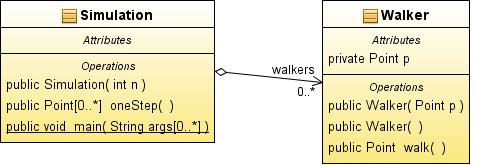
3 簡単な二次元酔歩 Walker は二次元面内で 4 方向に等確率で移動 メソッド move で移動し 新しい位置を返す Simulation クラス 多数の Walker を同時に移動 メソッド onestep は一時間ステップ進め Walker の新しい位置のリストを返す 3 オブジェクト指向プログラミング特論
4 4 オブジェクト指向プログラミング特論
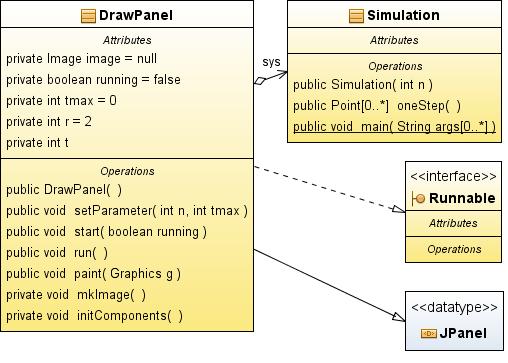
5 動作を表示するパネル Runnable インターフェイスを付ける スレッドとして動作スレッドからの駆動はrunメソッド 描画イメージを作る :mkimage イメージ初期化 Simulation.oneStep を呼び 位置を取得位置を表示 5 オブジェクト指向プログラミング特論
6 6 オブジェクト指向プログラミング特論
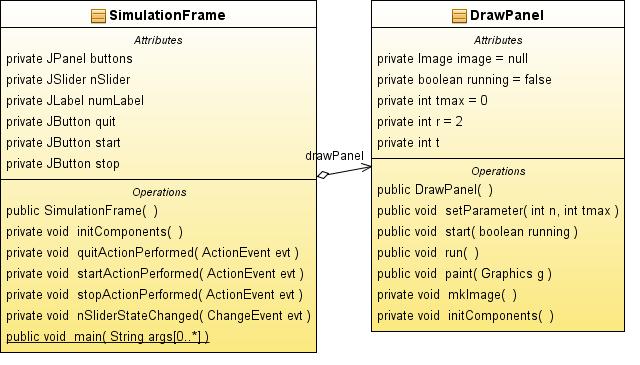
7 全体構成 SimulationFrame ボタン ( 開始 停止 終了 ) Walker 数設定 DrawPanelをスレッドで起動 7 オブジェクト指向プログラミング特論
8 8 オブジェクト指向プログラミング特論
9 Walker.java /** * Walker のクラス tadaki package model; import java.awt.point; public class Walker { private Point p;//walker の位置 public Walker(Point p) { this.p = p; public Walker() { p = new Point(0, 0); /** * 一時間ステップの移動 新しい位置 public Point walk() { /** 4 方向に等確率で移動する * int r = (int) (4 * Math.random()); int x = 2 * (r % 2) - 1; int y = 2 * (r / 2) - 1; x += p.x; y += p.y; p.move(x, y); return new Point (p); 1/1 ページ
10 Simulation.java /** * 二次元酔歩モデルのシミュレーション tadaki package model; import java.awt.point; import java.util.arraylist; import java.util.collections; import java.util.list; public class Simulation { private List<Walker> walkers=null;//walker のリスト public Simulation(int n) { walkers = Collections.synchronizedList(new ArrayList<Walker>()); /** Walker を初期化 for(int i=0;i<n;i++){ walkers.add(new Walker()); /** * 一時間ステップの動作 更新した Walker の位置の一覧 public List<Point> onestep(){ List<Point> plist = Collections.synchronizedList(new ArrayList<Point>()); for(walker w:walkers){ Point p = w.walk(); plist.add(p); return plist; /** args the command line arguments public static void main(string[] args) { Simulation sys=new Simulation(100); for(int i=0;i<100;i++){ sys.onestep(); 1/2 ページ
11 Simulation.java List<Point> plist = sys.onestep(); for(point p:plist){ System.out.print(p.x); System.out.print(" " ); System.out.println(p.y); 2/2 ページ
12 DrawPanel.java * /* * DrawPanel.java * 酔歩シミュレーションの画面表示 * Created on 2010/12/17, 9:19:40 tadaki package gui; import java.awt.color; import java.awt.dimension; import java.awt.graphics; import java.awt.image; import java.awt.point; import java.util.list; public class DrawPanel extends javax.swing.jpanel implements Runnable { private Image image = null; private volatile boolean running = false; private model.simulation sys = null; private int tmax = 0; private int r = 2; private int t; /** Creates new form DrawPanel public DrawPanel() { initcomponents(); /** * 酔歩シミュレーションの初期化 n Walker 数 tmax 時間上限 public void setparameter(int n, int tmax) { this.tmax = tmax; sys = new model.simulation(n); running = false; t = 0; public void start(boolean running) { this.running = running; 1/3 ページ
13 DrawPanel.java * public void run() { while (running) { mkimage(); repaint(); if (t > tmax) { running = false; try { Thread.sleep(100); catch (InterruptedException e) public void paint(graphics g) { if (image == null) { return; g.drawimage(image, 0, 0, this ); /** 描画イメージ作成 * private void mkimage() { if (sys == null) { return; Dimension dimension = getsize(); image = createimage(dimension.width, dimension.height); Graphics g = image.getgraphics(); g.setcolor(getbackground()); g.fillrect(0, 0, dimension.width, dimension.height); g.setclip(0, 0, dimension.width, dimension.height); g.translate(dimension.width / 2, dimension.height / 2); List<Point> plist = sys.onestep(); g.setcolor(color.red); for (Point p : plist) { g.filloval(p.x - r, p.y - r, 2 * r, 2 * r); t++; 2/3 ページ
14 DrawPanel.java * /** This method is called from within the constructor to * initialize the form. * WARNING: Do NOT modify this code. The content of this method is * always regenerated by the Form // <editor-fold defaultstate="collapsed" desc="generated Code">//GEN-BEGIN:initComponents private void initcomponents() { // 省略 // </editor-fold>//gen-end:initcomponents // Variables declaration - do not modify//gen-begin:variables // End of variables declaration//gen-end:variables 3/3 ページ
15 SimulationFrame.java * /* * To change this template, choose Tools Templates * and open the template in the editor. /* * SimulationFrame.java * * Created on 2010/12/17, 9:16:41 package gui; /** * tadaki public class SimulationFrame extends javax.swing.jframe { /** Creates new form SimulationFrame public SimulationFrame() { initcomponents(); /** This method is called from within the constructor to * initialize the form. * WARNING: Do NOT modify this code. The content of this method is * always regenerated by the Form // <editor-fold defaultstate="collapsed" desc="generated Code">//GEN-BEGIN:initComponents private void initcomponents() { // 省略 // </editor-fold>//gen-end:initcomponents private void quitactionperformed(java.awt.event.actionevent evt) {//GEN-FIRST:event_quitActionPerformed System.exit(0); //GEN-LAST:event_quitActionPerformed private void startactionperformed(java.awt.event.actionevent evt) {//GEN-FIRST:event_startActionPerformed int n = nslider.getvalue(); 1/2 ページ
16 SimulationFrame.java * int t= 2*drawPanel.getSize().width; drawpanel.setparameter(n,t); drawpanel.start(true ); new Thread(drawPanel).start(); //GEN-LAST:event_startActionPerformed private void stopactionperformed(java.awt.event.actionevent evt) {//GEN-FIRST:event_stopActionPerformed drawpanel.start(false ); //GEN-LAST:event_stopActionPerformed private void nsliderstatechanged(javax.swing.event.changeevent evt) {//GEN-FIRST:event_nSliderStateChanged int n = nslider.getvalue(); numlabel.settext("# "+String.valueOf(n)); //GEN-LAST:event_nSliderStateChanged /** args the command line arguments public static void main(string args[]) { java.awt.eventqueue.invokelater(new Runnable() { public void run() { new SimulationFrame().setVisible(true ); ); // Variables declaration - do not modify//gen-begin:variables private javax.swing.jpanel buttons; private gui.drawpanel drawpanel; private javax.swing.jslider nslider; private javax.swing.jlabel numlabel; private javax.swing.jbutton quit; private javax.swing.jbutton start; private javax.swing.jbutton stop; // End of variables declaration//gen-end:variables 2/2 ページ
グラフを表すデータ構造 Javaでの実装
 グラフを表すデータ構造 JAVA での実装 なぜ JAVA を使うか グラフの実装 頂点 弧及びその関連を記述する 頂点の数 弧の数を柔軟に変える必要あり グラフ探索など リンクをたどる必要あり オブジェクト指向言語が向いている オブジェクト数の柔軟な変更 再帰的関数 メソッド リストなどの豊富なライブラリ java.util.vector など 使い易い開発環境 プロジェクト管理 クラス管理 GUI
Graphical User Interface 描画する
 Graphical User Interface 描画する オブジェクト指向プログラミング特論 2016 年度 只木進一 : 工学系研究科 2 描画の基本 javax.swing.jpanel に描画する paint() または paintcomponent() メソッドを上書きすることによって描画する この中で描画対象を描く 基本的図形要素は準備されている しかし 画面の重なりによる再描画の場合
文字列操作と正規表現
 文字列操作と正規表現 オブジェクト指向プログラミング特論 2018 年度只木進一 : 工学系研究科 2 文字列と文字列クラス 0 個以上の長さの文字の列 Java では String クラス 操作 文字列を作る 連結する 文字列中に文字列を探す 文字列中の文字列を置き換える 部分文字列を得る 3 String クラス 文字列を保持するクラス 文字列は定数であることに注意 比較に注意 == : オブジェクトとしての同等性
目的 泡立ち法を例に Comparableインターフェイスの実装 抽象クラスの利用 型パラメタの利用 比較 入替 の回数を計測
 泡立ち法とその実装 計算機アルゴリズム特論 :2017 年度只木進一 目的 泡立ち法を例に Comparableインターフェイスの実装 抽象クラスの利用 型パラメタの利用 比較 入替 の回数を計測 Comparable インターフェイ ス クラスインスタンスが比較可能であることを示す Int compareto() メソッドを実装 Integer Double String などには実装済み public
r3.dvi
 00 3 2000.6.10 0 Java ( 7 1 7 1 GSSM 1? 1 1.1 4 4a 4b / / 0 255 HTML X 0 255 16 (0,32,255 #0020FF Java xclock -bg #0020FF xclock ^C (Control C xclock 4c 1 import java.applet.applet; import java.awt.*;
Java演習(9) -- クラスとメソッド --
 Java (9) Java (9) Java (9) 3 (x, y) x 1 30 10 (0, 50) 1 2 10 10 (width - 10, 80) -2 3 50 10 (width / 2, 110) 2 width 3 (RectMove4-1.java) import javax.swing.japplet; import javax.swing.timer; import java.awt.graphics;
Java演習(4) -- 変数と型 --
 50 20 20 5 (20, 20) O 50 100 150 200 250 300 350 x (reserved 50 100 y 50 20 20 5 (20, 20) (1)(Blocks1.java) import javax.swing.japplet; import java.awt.graphics; (reserved public class Blocks1 extends
目 次 Java GUI 3 1 概要 クラス構成 ソースコード例 課題...7 i
 Java GUI 3 Java GUI 3 - サンプルプログラム (1) - 2011-09-25 Version 1.00 K. Yanai 目 次 Java GUI 3 1 概要...1 2 クラス構成...2 3 ソースコード例...3 4 課題...7 i 1 概要まずは簡単なサンプルプログラムをみながら Java GUI の基本的なことを学びましょう 本サンプルは 図に示すようなひとつのメイン画面を使用します
アプレットの作成
 - 1 - import java.applet.applet; import java.awt.graphics; public class HelloWorld extends Applet { public void init() { resize(150,60) ; public void paint ( Graphics g ) { g.drawstring("hello, world!",
今回の内容 グラフとオブジェクト指向プログラミング Java を使う理由 Java の基本 Javaのライブラリ 開発 実行 クラスの再利用 クラス継承 抽象クラス 開発の要点
 JAVA 入門 今回の内容 グラフとオブジェクト指向プログラミング Java を使う理由 Java の基本 Javaのライブラリ 開発 実行 クラスの再利用 クラス継承 抽象クラス 開発の要点 グラフを記述するには 頂点 (Vertex) と弧 (Arc) その間の関係 素直にデータ構造として表現したい グラフは 頂点と弧の集合 弧から始点と終点を得る 頂点から その頂点を始点とする弧の集合を得る
やさしいJavaプログラミング -Great Ideas for Java Programming サンプルPDF
 pref : 2004/6/5 (11:8) pref : 2004/6/5 (11:8) pref : 2004/6/5 (11:8) 3 5 14 18 21 23 23 24 28 29 29 31 32 34 35 35 36 38 40 44 44 45 46 49 49 50 pref : 2004/6/5 (11:8) 50 51 52 54 55 56 57 58 59 60 61
問題1 以下に示すプログラムは、次の処理をするプログラムである
 問題 1 次に示すプログラムは 配列 a の値を乱数で設定し 配列 a の値が 333 より大きく 667 以下の値 の合計値を求めるプログラムである 1 と 2 に適切なコードを記述してプログラムを完 成させよ class TotalNumber { public static void main(string[] args) { int[] a = new int[1000]; // 1 解答条件
Microsoft PowerPoint prog1_doc2x.pptx
 アプレット public class extends Applet { public void paint(graphics g) { // アプレット描画 g.drawstring( Hello World, 10, 20 ); page 1 アプレット : 色 public class extends Applet { Color col; // カラークラス int red, grn, blu;
新・明解Java入門
 537,... 224,... 224,... 32, 35,... 188, 216, 312 -... 38 -... 38 --... 102 --... 103 -=... 111 -classpath... 379 '... 106, 474!... 57, 97!=... 56 "... 14, 476 %... 38 %=... 111 &... 240, 247 &&... 66,
< F2D825282CC947B909482CC A815B83682E6A>
 3 の倍数のトランプカード 1. はじめに [Java アプレット ] [Java アプリケーション ] ここにトランプが 1 組あります ジョーカー 2 枚を除いて 52 枚を使います 3 の倍数は スペード クローバ ダイヤ ハートに それぞれ 3 と 6 と 9 と 12 の 4 枚ずつあるので 4 4=16 枚あります この 52 枚のトランプから 1 枚引いたとき そのカードが 3 の倍数である確率を考えます
< F2D F B834E2E6A7464>
 ランダムウォーク [Java アプレット ] [Java アプレリケーョン ] 1. はじめに 酔っぱらいは前後左右見境なくふらつきます 酔っぱらいは目的地にたどり着こうと歩き回っているうちに何度も同じところに戻って来てしまったりするものです 今 酔っぱらいが数直線上の原点にいるとします 原点を出発して30 回ふらつくとき 30 回目に酔っぱらいがいる位置は 出発点である原点からどれくらい離れてしまっているのでしょうか
19 3!! (+) (>) (++) (+=) for while 3.1!! (20, 20) (1)(Blocks1.java) import javax.swing.japplet; import java.awt.graphics;
 19 3!!...... (+) (>) (++) (+=) for while 3.1!! 3.1.1 50 20 20 5 (20, 20) 3.1.1 (1)(Blocks1.java) public class Blocks1 extends JApplet { public void paint(graphics g){ 5 g.drawrect( 20, 20, 50, 20); g.drawrect(
< F2D82518CC282CC D2E6A7464>
 2 個のさいころ 1. はじめに [Java アプレット ] [Java アプリケーション ] 2 個のさいころを同時に投げたときの目の出方を考えてみましょう この 2 個のさいころをそれぞれ さいころ Ⅰ さいころ Ⅱ とすると その目の出方は順に 1 1 2 1 3 1 4 1 5 1 6 1 1 2 2 2 3 2 4 2 5 2 6 2 1 3 2 3 3 3 4 3 5 3 6 3 1 4
グラフの探索 JAVA での実装
 グラフの探索 JAVA での実装 二つの探索手法 深さ優先探索 :DFS (Depth-First Search) 幅優先探索 :BFS (Breadth-First Search) 共通部分 元のグラフを指定して 極大木を得る 探索アルゴリズムの利用の観点から 利用する側からみると 取り替えられる部品 どちらの方法が良いかはグラフに依存 操作性が同じでなければ 共通のクラスの派生で作ると便利 共通化を考える
. IDE JIVE[1][] Eclipse Java ( 1) Java Platform Debugger Architecture [5] 3. Eclipse GUI JIVE 3.1 Eclipse ( ) 1 JIVE Java [3] IDE c 016 Information Pr
![. IDE JIVE[1][] Eclipse Java ( 1) Java Platform Debugger Architecture [5] 3. Eclipse GUI JIVE 3.1 Eclipse ( ) 1 JIVE Java [3] IDE c 016 Information Pr](/thumbs/88/115750650.jpg ". IDE JIVE[1][] Eclipse Java ( 1) Java Platform Debugger Architecture [5] 3. Eclipse GUI JIVE 3.1 Eclipse ( ) 1 JIVE Java [3] IDE c 016 Information Pr") Eclipse 1,a) 1,b) 1,c) ( IDE) IDE Graphical User Interface( GUI) GUI GUI IDE View Eclipse Development of Eclipse Plug-in to present an Object Diagram to Debug Environment Kubota Yoshihiko 1,a) Yamazaki
Eclipse 1,a) 1,b) 1,c) ( IDE) IDE Graphical User Interface( GUI) GUI GUI IDE View Eclipse Development of Eclipse Plug-in to present an Object Diagram to Debug Environment Kubota Yoshihiko 1,a) Yamazaki
II Java :30 12:00 I. I IV II. III. IV. ( a d) V. : this==null, T == N A ActionListener C class D actionperformed G getsource I implements K
 II Java 09 2 13 10:30 12:00 I. I IV II. III. IV. ( a d) V. : this==null, T == N A ActionListener C class D actionperformed G getsource I implements K KeyListener J JApplet L addmouselistener M MouseListener
Microsoft PowerPoint prog1_doc2.pptx
 2011 年 12 月 6 日 ( 火 ) プログラミング Ⅰ Java Applet プログラミング 文教大学情報学部経営情報学科堀田敬介 アプレット Applet public class クラス名 extends Applet { public void paint(graphics g) { // アプレット描画 g.drawstring( Hello World, 10, 20); 10
 {:from => Java, :to => Ruby } Java Ruby KAKUTANI Shintaro; Eiwa System Management, Inc.; a strong Ruby proponent http://kakutani.com http://www.amazon.co.jp/o/asin/4873113202/kakutani-22 http://www.amazon.co.jp/o/asin/477413256x/kakutani-22
I HTML HashMap (i) (ii) :.java import java.net.*; import java.io.*; import java.util.hashmap; public class SimpleStopWatch { public static voi
 II Java 10 2 12 10:30 12:00 I. I III II. III. IV. ( a d) V. : this==null, T == N A ActionListener C class D actionperformed G getsource I implements K KeyListener J JApplet L addmouselistener M MouseListener
226
 226 227 Main ClientThread Request Channel WorkerThread Channel startworkers takerequest requestqueue threadpool WorkerThread channel run Request tostring execute name number ClientThread channel random
Applet java.lang.object java.awt.component java.awt.container java.awt.panel java.applet.applet
 13 Java 13.9 Applet 13.10 AppletContext 13.11 Applet java.lang.object java.awt.component java.awt.container java.awt.panel java.applet.applet Applet (1/2) Component GUI etc Container Applet (2/2) Panel
class IntCell { private int value ; int getvalue() {return value; private IntCell next; IntCell next() {return next; IntCell(int value) {this.value =
 Part2-1-3 Java (*) (*).class Java public static final 1 class IntCell { private int value ; int getvalue() {return value; private IntCell next; IntCell next() {return next; IntCell(int value) {this.value
2 static final int DO NOTHING ON CLOSE static final int HIDE ON CLOSE static final int DISPOSE ON CLOSE static final int EXIT ON CLOSE void setvisible
 12 2013 7 2 12.1 GUI........................... 12 1 12.2............................... 12 4 12.3..................................... 12 7 12.4....................................... 12 9 12.5 : FreeCellPanel.java............................
Java (9) 1 Lesson Java System.out.println() 1 Java API 1 Java Java 1
 Java (9) 1 Lesson 7 2008-05-20 Java System.out.println() 1 Java API 1 Java Java 1 GUI 2 Java 3 1.1 5 3 1.0 10.0, 1.0, 0.5 5.0, 3.0, 0.3 4.0, 1.0, 0.6 1 2 4 3, ( 2 3 2 1.2 Java (stream) 4 1 a 5 (End of
10/ / /30 3. ( ) 11/ 6 4. UNIX + C socket 11/13 5. ( ) C 11/20 6. http, CGI Perl 11/27 7. ( ) Perl 12/ 4 8. Windows Winsock 12/11 9. JAV
 [email protected] [email protected] http://www.misojiro.t.u-tokyo.ac.jp/ tutimura/sem3/ 2002 12 11 p.1/33 10/16 1. 10/23 2. 10/30 3. ( ) 11/ 6 4. UNIX + C socket 11/13 5. ( ) C 11/20
JavaプログラミングⅠ
 Java プログラミング Ⅱ 11 回目スレッド課題 確認 問題次の各文は正しいか誤っているか答えなさい (1) スレッドは 1 つの実行箇所をもつ一連の処理の流れである (2) マルチスレッドで各スレッドの処理は並行して実行される (3) Java はマルチスレッド処理を記述できない (4) 新たにスレッドを生成する場合 Thread クラスを拡張し かつ Runnable インタフェースを実装する必要がある
解きながら学ぶJava入門編
 44 // class Negative { System.out.print(""); int n = stdin.nextint(); if (n < 0) System.out.println(""); -10 Ÿ 35 Ÿ 0 n if statement if ( ) if i f ( ) if n < 0 < true false true false boolean literalboolean
ALG2012-C.ppt
 2012717 ([email protected]) http://www.info.kochi-tech.ac.jp/k1sakai/lecture/alg/2012/index.html 1 1. 2. 2 .. 3 public class WeightedNode { private E value; // private Map
< F2D BCA82CC978E89BA82CC8EC08CB12E6A7464>
 パチンコ玉の落下の実験 [Java アプレット ] [Java アプリケーション ] 1. はじめに 1 個のパチンコ玉が釘に当たって左右に分かれながら落下するとき パチンコ玉はどこに落下するのでしょうか ただし パチンコ玉が釘に当たって左右に分かれるとき その分かれ方は左右半々であるとします パチンコ玉が落下し易い場所はあるのでしょうか それとも どこの場所も同じなのでしょうか シミュレーションソフト
class IntCell { private int value ; int getvalue() {return value; private IntCell next; IntCell next() {return next; IntCell(int value) {this.value =
 Part2-1-3 Java (*) (*).class Java public static final 1 class IntCell { private int value ; int getvalue() {return value; private IntCell next; IntCell next() {return next; IntCell(int value) {this.value
Java講座
 ~ 第 1 回 ~ 情報科学部コンピュータ科学科 2 年竹中優 プログラムを書く上で Hello world 基礎事項 演算子 構文 2 コメントアウト (//, /* */, /** */) をしよう! インデントをしよう! 変数などにはわかりやすい名前をつけよう! 要するに 他人が見て理解しやすいコードを書こうということです 3 1. Eclipse を起動 2. ファイル 新規 javaプロジェクト
:30 12:00 I. I VII II. III. IV. ( a d) V. VI : this==null, T == N A ActionListener A addactionlistener C class D actionperforme
 2014 8 01 10:30 12:00 I. I VII II. III. IV. ( a d) V. VI. 80 100 60 : this==null, T == N A ActionListener A addactionlistener C class D actionperformed E ActionEvent G getsource I implements J JApplet
5 p Point int Java p Point Point p; p = new Point(); Point instance, p Point int 2 Point Point p = new Point(); p.x = 1; p.y = 2;
 5 p.1 5 JPanel (toy example) 5.1 2 extends : Object java.lang.object extends... extends Object Point.java 1 public class Point { // public int x; public int y; Point x y 5.1.1, 5 p.2 5 5.2 Point int Java
Local variable x y i paint public class Sample extends Applet { public void paint( Graphics gc ) { int x, y;... int i=10 ; while ( i < 100 ) {... i +=
 Safari AppletViewer Web HTML Netscape Web Web 13-1 Applet Web Applet init Web paint Web start Web HTML stop destroy update init Web paint start Web update Event Driven paint Signature Overwriting Overriding
text_10.dvi
 C 10 13 6 18 10 Java(5) {, 1 10.1 10 : : : : : : : : : : : : : : : : : : : : : : : : : : : : : : : : : : : : : : : : : 1 10.2 : : : : : : : : : : : : : : : : : : : : : : : : : : : : : : : : : : : : : :