
<4D F736F F D B B83578B6594BB2D834A836F815B82D082C88C60202E646F63>
|
|
|
- ゆき いしなみ
- 7 years ago
- Views:
Transcription





1
2 デザイン言語 Processing 入門 サンプルページ この本の定価 判型などは, 以下の URL からご覧いただけます. このサンプルページの内容は, 初版 1 刷発行当時のものです.
3
4 Processing Ben Fry Casey Reas Windows Mac Linux Lesson 1 Processing Lesson 2 Lesson 6 Lesson 2 Lesson 6 Lesson 6 Lesson 7 Lesson 7 Lesson 8 Lesson 9 Lesson 10 Lesson i
5 Lesson 13 Lesson Lesson 14 3D Processing ii
6 Lesson Lesson setup draw Lesson Processing 23 for 23 for Lesson if iii
7 Lesson Lesson Lesson Lesson Lesson iv
8 Lesson Lesson Lesson setup() draw() 103 Lesson v
9 111 setup() draw() 112 Lesson 14 3D vi
10 Lesson 1 Processing Mac Windows Windows zip Program Files Processing.exe Mac OS X disk image Application Processing Mac Windows Fig Fig Mac Windows Ver.1.5 Lesson 1 1
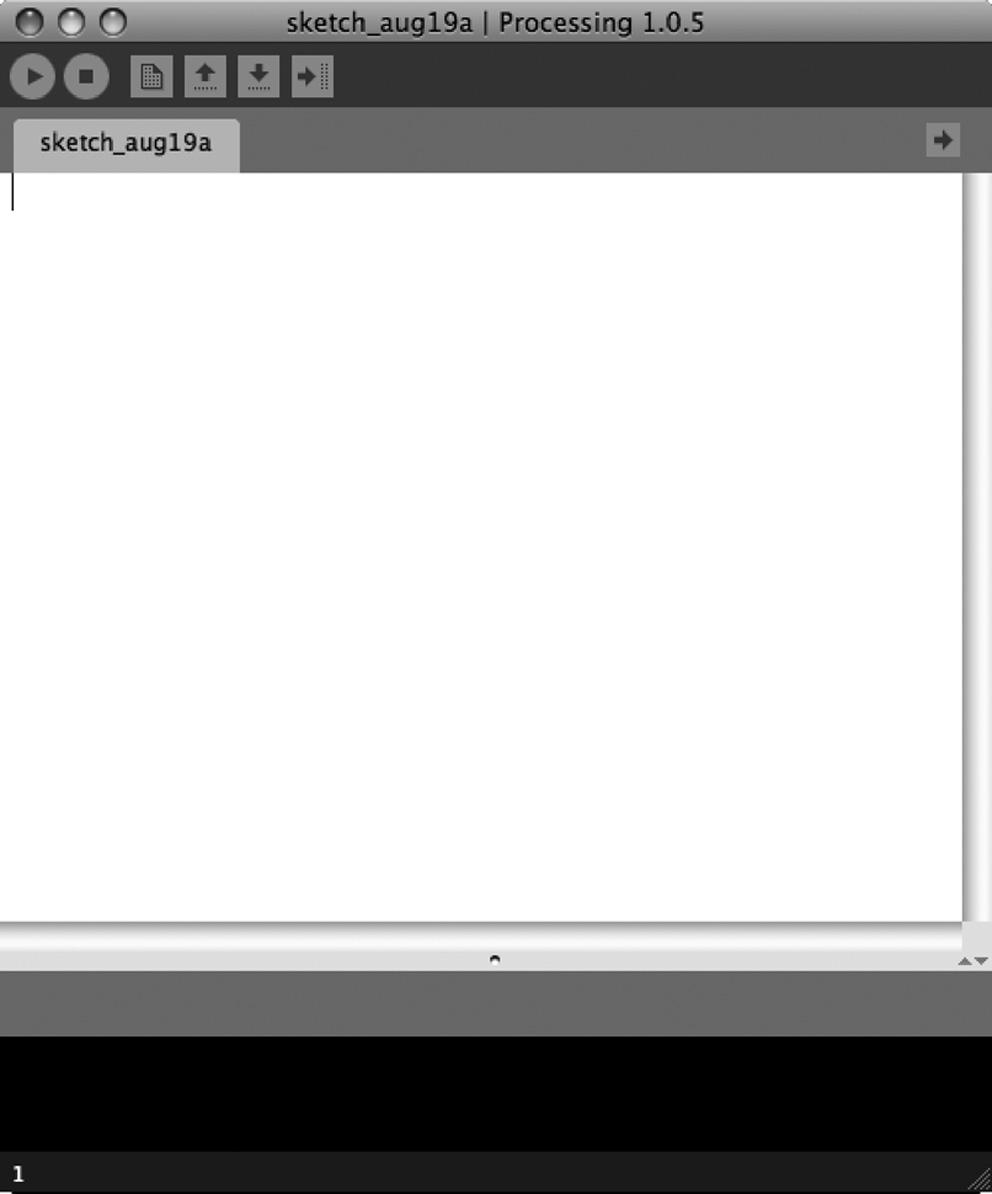
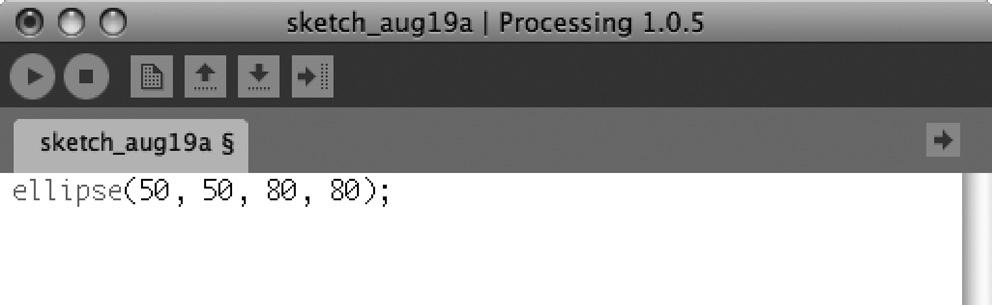
11 Fig. 1.1 Processing Fig. 1.2 Fig. 1.2 ellipse(50, 50, 80, 80); 2 Lesson 1
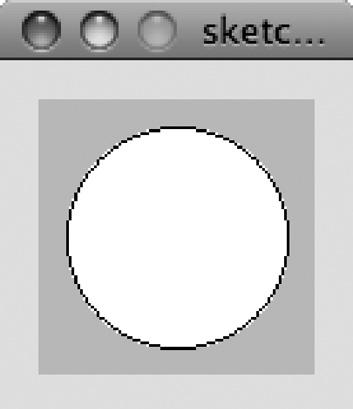
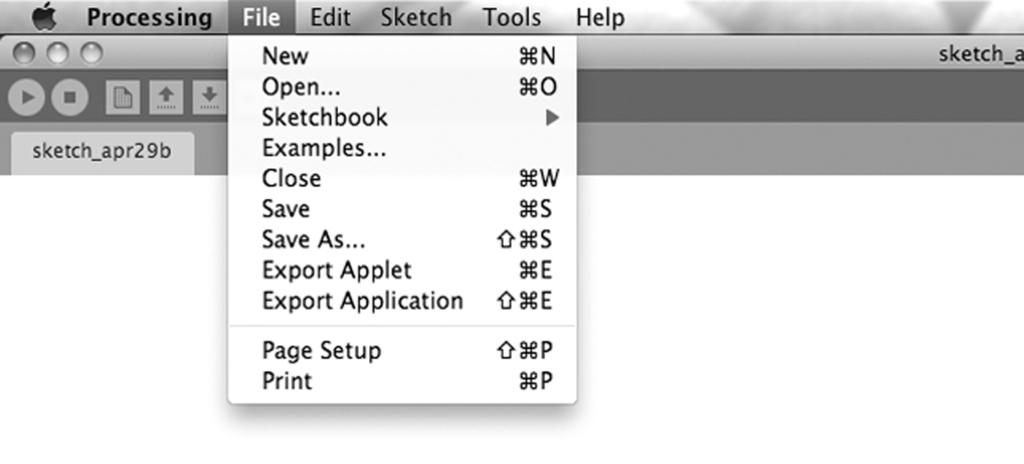
12 50 (pixels) ; Fig. 1.3 Fig. 1.3 (File) Fig. 1.4 Save Save As Processing (sketch) (sketchbook) Fig. 1.4 Lesson 1 3
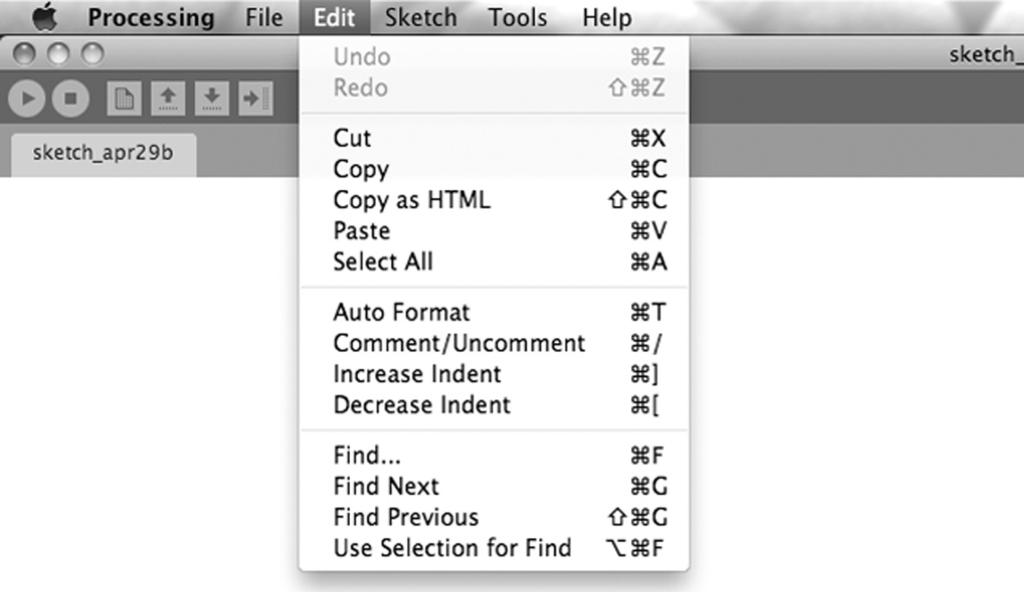
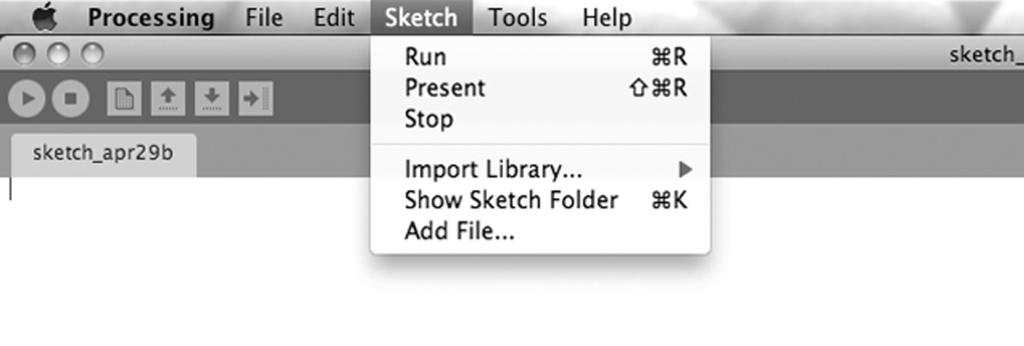
13 Open New Export (Applet) Web (Edit) Fig. 1.5 Cut Paste Comment/Uncomment (comment) (uncomment) Auto Format Fig. 1.5 (Sketch) Fig. 1.6 Run Stop Fig Lesson 1
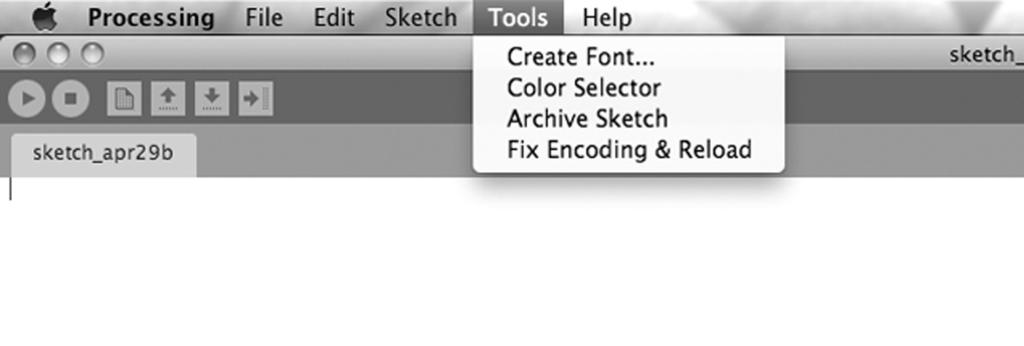
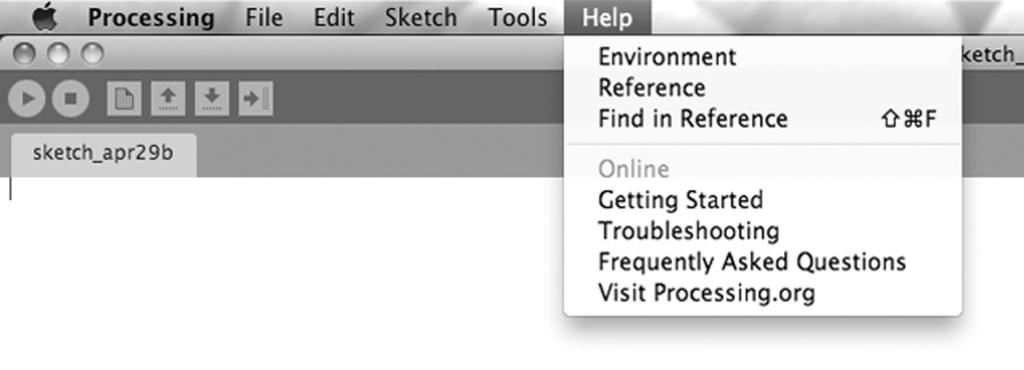
14 (Tools) Fig. 1.7 Color Selector Fig. 1.7 (Help) Fig. 1.8 Reference Environment Vsit Processing.org Fig. 1.8 Lesson 1 5
15 Lesson 2 File New point() x y Processing Fig. 2.1 Fig size() point() x y (60, 60) File Save As fig2 2 Fig Fig. 2.2 size(120, 120); point(60, 60); (20, 100) (100, 20) Fig. 2.3 line() (x1, y1) (x2, 6 Lesson 2


16 y2) fig2 3 Fig. 2.3 size(120, 120); line(20, 100, 100, 20); Fig. 2.4 triangle() Fig. 2.4 size(120, 120); triangle(20, 20, 90, 50, 60, 100); Fig. 2.5 quad() Lesson 2 7
17
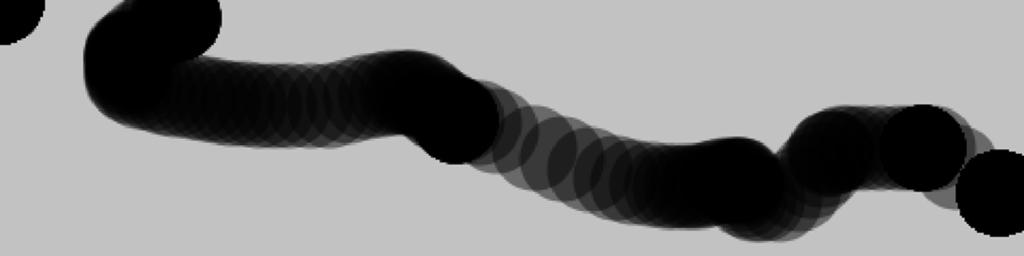
18 Lesson 4 mousex, mousey Processing setup() fill(0, 100) draw() 1 60 ellipse(mousex, mousey, 40, 40); mousex, mousey (x, y) Fig. 4.1 Fig. 4.1 void setup() { size(480, 120); smooth(); Lesson 4 29
19 fill(0, 100); nostroke(); } void draw() { ellipse(mousex, mousey, 40, 40); } Fig. 4.2 Fig. 4.1 draw() background(204); background(204); Fig. 4.2 void setup() { size(480, 120); smooth(); fill(0, 100); nostroke(); } void draw() { background(204); ellipse(mousex, mousey, 40, 40); } Fig. 4.3 pmousex, pmousey Processing mousex, mousey pmousex, pmousey dist() d 30 Lesson 4
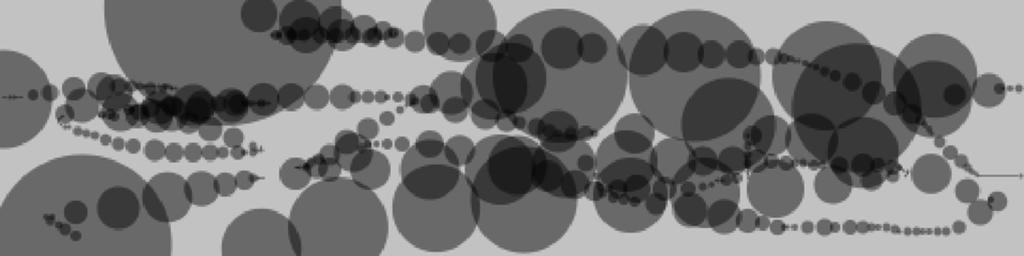
20 d Fig. 4.3 void setup() { size(480, 120); smooth(); fill(0, 100); nostroke(); } void draw() { float d = dist(mousex, mousey, pmousex, pmousey); ellipse(mousex, mousey, d, d); } if if if if (test) { statements; } test (true) (false) statements Fig. 4.4 draw() background(128); fill(0); if mousepressed Processing mousepressed Lesson 4 31
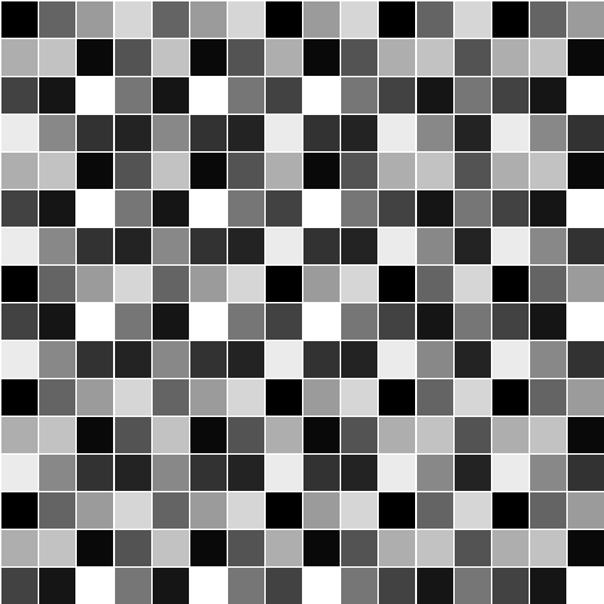
21 Lesson 10 Fig Fig Fig Fig Lesson 10
22 Fig Fig Fig int square 2 Fig int[][] square = {{0, 11, 5, 14}, {7, 12, 2, 9}, {10, 1, 15, 4}, {13, 6, 8, 3}}; Lesson 10 79
23 Excel Excel Processing C FAX / / / PrintedinJapan ISBN
<4D F736F F D B B BB2D834A836F815B82D082C88C602E646F63>
 入門モーター工学 サンプルページ この本の定価 判型などは, 以下の URL からご覧いただけます. http://www.morikita.co.jp/books/mid/074351 このサンプルページの内容は, 初版 1 刷発行当時のものです. 10 kw 21 20 50 2 20 IGBT IGBT IGBT 21 (1) 1 2 (2) (3) ii 20 2013 2 iii iv...
i
 14 i ii iii iv v vi 14 13 86 13 12 28 14 16 14 15 31 (1) 13 12 28 20 (2) (3) 2 (4) (5) 14 14 50 48 3 11 11 22 14 15 10 14 20 21 20 (1) 14 (2) 14 4 (3) (4) (5) 12 12 (6) 14 15 5 6 7 8 9 10 7


 line(x1, y1, x2, y2); (x1, y1) rect(x, y, width, height); (x, y) (x1, y1) (x2, y2) height width (x2, y2) ellipse(x, y, width, height); rectmode(corners); rect(x1, y1, x2, y2); (x,y) width height strokeweight(4);
Processingをはじめよう
 Processing をはじめよう 第 5 章 反応 目次 繰り返されるdrawと一度だけのsetup 追いかける クリック カーソルの位置 キーボードからの入力 マッピング Robot 3: Response 繰り返される draw と一度だけの setup Example 5-1 draw() 関数 println("i'm drawing"); println(framecount); draw()
課題
 2018 6 22 2. float[] y = new float[5]; void setup() { size(400, 200); for (int i=0;i< (a) ;i++) { y[i] = random(0.3*width, width); void draw() { y[ (b) ] = mousex; int minpos = findminpos( (c) ); for (int
課題
 colormode(hsb,359,99,99); background(0,0,99); s = 99; x = mousex; y = mousey; nostroke(); while(s >= 0 && (0
Processing入門マニュアル17
 20. 連続したベジェ曲線を描く beginshape(); beziervertex(x座標, y座標); endshape(); ベジェ曲線を連続して描くためにはbezierVertex命令をbeginShapeとendShape命令の間に記述します ( C1x, C1y ) ( V1x, V1y ) ( V2x, V2y ) ( C2x, C2y ) ( C3x, C3y ) ( C6x, C6y
Taro-テキスト.jtd
 付録 7 実習テキスト Processingスケッチプログラミング Processingスケッチプログラミング Processingスケッチプログラミング 1. 的 作成 : 米田文彦 Processing プロセッシング を使い プログラムによるビジュアル表現を学ぶ また Arduino と連携させ デジタルとフィジカルの融合がどのように行われているのかを知る 2. 使 機器 パソコン Processing

 262014 3 1 1 6 3 2 198810 2/ 198810 2 1 3 4 http://www.pref.hiroshima.lg.jp/site/monjokan/ 1... 1... 1... 2... 2... 4... 5... 9... 9... 10... 10... 10... 10... 13 2... 13 3... 15... 15... 15... 16 4...
provider_020524_2.PDF
 1 1 1 2 2 3 (1) 3 (2) 4 (3) 6 7 7 (1) 8 (2) 21 26 27 27 27 28 31 32 32 36 1 1 2 2 (1) 3 3 4 45 (2) 6 7 5 (3) 6 7 8 (1) ii iii iv 8 * 9 10 11 9 12 10 13 14 15 11 16 17 12 13 18 19 20 (2) 14 21 22 23 24
178 5 I 1 ( ) ( ) 10 3 13 3 1 8891 8 3023 6317 ( 10 1914 7152 ) 16 5 1 ( ) 6 13 3 13 3 8575 3896 8 1715 779 6 (1) 2 7 4 ( 2 ) 13 11 26 12 21 14 11 21
 I 178 II 180 III ( ) 181 IV 183 V 185 VI 186 178 5 I 1 ( ) ( ) 10 3 13 3 1 8891 8 3023 6317 ( 10 1914 7152 ) 16 5 1 ( ) 6 13 3 13 3 8575 3896 8 1715 779 6 (1) 2 7 4 ( 2 ) 13 11 26 12 21 14 11 21 4 10 (

44 4 I (1) ( ) (10 15 ) ( 17 ) ( 3 1 ) (2)
 (1) I 44 II 45 III 47 IV 52 44 4 I (1) ( ) 1945 8 9 (10 15 ) ( 17 ) ( 3 1 ) (2) 45 II 1 (3) 511 ( 451 1 ) ( ) 365 1 2 512 1 2 365 1 2 363 2 ( ) 3 ( ) ( 451 2 ( 314 1 ) ( 339 1 4 ) 337 2 3 ) 363 (4) 46

 i ii i iii iv 1 3 3 10 14 17 17 18 22 23 28 29 31 36 37 39 40 43 48 59 70 75 75 77 90 95 102 107 109 110 118 125 128 130 132 134 48 43 43 51 52 61 61 64 62 124 70 58 3 10 17 29 78 82 85 102 95 109 iii
<4D F736F F D B B83578B6594BB2D834A836F815B82D082C88C60202E646F63>
 新 Excel コンピュータシミュレーション サンプルページ この本の定価 判型などは, 以下の URL からご覧いただけます. http://www.morikita.co.jp/books/mid/084871 このサンプルページの内容は, 初版 1 刷発行当時のものです. Microsoft Excel Excel Visual Basic Visual Basic 2007 Excel Excel
Microsoft PowerPoint P演習 第10回 関数.ppt [互換モード]
![Microsoft PowerPoint P演習 第10回 関数.ppt [互換モード]](/thumbs/93/111268660.jpg "Microsoft PowerPoint P演習 第10回 関数.ppt [互換モード]") プログラミング演習 (10) 関数 中村, 橋本, 小松, 渡辺 1 目標 Processing で関数に挑戦! 機能をどんどん作ってみよう! 円とか四角形だけじゃなくて, 色々な図形描画を関数にしてしまおう! 判定も関数で! 関数 背景を塗りつぶす : background( 色 ); 円を描く : ellipse(x 座標, y 座標, 縦直径, 横直径 ); 線を描く : line( x1,
プログラミング演習 (10) 関数 中村, 橋本, 小松, 渡辺 1 目標 Processing で関数に挑戦! 機能をどんどん作ってみよう! 円とか四角形だけじゃなくて, 色々な図形描画を関数にしてしまおう! 判定も関数で! 関数 背景を塗りつぶす : background( 色 ); 円を描く : ellipse(x 座標, y 座標, 縦直径, 横直径 ); 線を描く : line( x1,
地盤環境振動の対策技術-00-前付.indd
 地盤環境振動の対策技術 サンプルページ この本の定価 判型などは, 以下の URL からご覧いただけます. http://www.morikita.co.jp/books/mid/048561 このサンプルページの内容は, 初版 1 刷発行当時のものです. i 23 25 28 8 ii 1 8 2 9 3 10 4 11 5 12 6 13 7 iii 1 1 1.1 1.1.11 1.1.22
スライド 1
 グラフィックスの世界第 3 回 サイバーメディアセンター サイバーコミュニティ研究部門安福健祐 Processing によるアニメーション setup と draw void setup() size(400, 400); void draw() ellipse( mousex,mousey,100,100); void とか setup とか draw とかはじめて見る が出てきてややこしい ellipseは円描く関数でした

課題
 size(300,120); void drawrect(float x,float y,float w,float h,color c){ rectmode(corner); stroke( (a) ); fill( (b) ); rect( (c), (d), (e), (f) ); float x = map(hour(), (g), (h), (i), (j) ); drawrect(0,0,x,height/3,color(
untitled
 i ii iii iv v 43 43 vi 43 vii T+1 T+2 1 viii 1 2 3 4 5 6 7 8 9 10 11 12 13 14 15 16 17 18 19 20 21 22 23 24 25 26 27 28 29 30 31 32 33 34 35 36 37 38 39 40 41 42 43 44 45 46 47 48 49 50 a) ( ) b) ( ) 51

AccessflÌfl—−ÇŠš1
 ACCESS ACCESS i ii ACCESS iii iv ACCESS v vi ACCESS CONTENTS ACCESS CONTENTS ACCESS 1 ACCESS 1 2 ACCESS 3 1 4 ACCESS 5 1 6 ACCESS 7 1 8 9 ACCESS 10 1 ACCESS 11 1 12 ACCESS 13 1 14 ACCESS 15 1 v 16 ACCESS
Arduino Processing and ) Fig1. Arduino Homepage : h;p://www.arduino.cc/
 Arduino Horiuchi* Oguri* Ueda* Tani* Eto* Arduino Processing and ) Fig1. Arduino Homepage : h;p://www.arduino.cc/ : Arduino Java Fig2. Arduino SoGware Download : h;p://arduino.cc/en/main/sogware Hardware
医系の統計入門第 2 版 サンプルページ この本の定価 判型などは, 以下の URL からご覧いただけます. このサンプルページの内容は, 第 2 版 1 刷発行時のものです.
 医系の統計入門第 2 版 サンプルページ この本の定価 判型などは, 以下の URL からご覧いただけます. http://www.morikita.co.jp/books/mid/009192 このサンプルページの内容は, 第 2 版 1 刷発行時のものです. i 2 t 1. 2. 3 2 3. 6 4. 7 5. n 2 ν 6. 2 7. 2003 ii 2 2013 10 iii 1987
2
 1 2 3 4 5 6 7 8 9 10 I II III 11 IV 12 V 13 VI VII 14 VIII. 15 16 17 18 19 20 21 22 23 24 25 26 27 28 29 30 31 32 _ 33 _ 34 35 36 37 38 39 40 41 42 43 44 45 46 47 48 49 50 VII 51 52 53 54 55 56 57 58 59

活用ガイド (ソフトウェア編)
 (Windows 95 ) ii iii iv NEC Corporation 1999 v P A R T 1 vi P A R T 2 vii P A R T 3 P A R T 4 viii P A R T 5 ix x P A R T 1 2 3 1 1 2 4 1 2 3 4 5 1 1 2 3 4 6 5 6 7 7 1 1 2 8 1 9 1 1 2 3 4 5 6 1 2 3 4
 1 2 3 4 5 6 7 8 9 10 11 12 13 14 15 16 17 18 19 20 21 22 23 24 25 26 27 28 29 30 31 32 33 () - 1 - - 2 - - 3 - - 4 - - 5 - 34 35 36 37 38 39 40 41 42 43 44 45 46 47 48 49 50 51 52 53 54 55 56 57
Processingをはじめよう
 Processing をはじめよう 第 7 章 動きその 2 目次 フレームレート スピードと方向 移動 回転 拡大 縮小 2 点間の移動 乱数 タイマー 円運動 今回はここまで 2 2 点間の移動 Example 7-6 (EX_08_06) 始点 (startx, starty) から終点 (stopx, stopy) まで移動する 座標更新の計算方法は後述 始点と終点を変更しても動作する 変更して確認
TeraTerm Pro V.2.32の利用法
 Tera Term Pro ver.2.23 Windows Ver.2.1 2 Tterm23Zip Ttermp23 cedar ttermpro Ttermpro 3 Setup Terminal 3 Setup Window 4 Setup Font 5 Setup keyboard 6 Setup Serial port 7 Setup General 8 9 Tera Term Pro
情報システム設計論II ユーザインタフェース(1)
 プログラミング演習 (5) 条件分岐 (2) 中村, 高橋 小林, 橋本 1 目標 Processing で当たり判定に挑戦! 条件分岐を理解する 何らかの条件を満たした時に色を変える! マウスカーソルと動いている円がぶつかったら終了 シューティングゲームやもぐらたたきに挑戦! 課題 : Processing でゲームを作ろう! 占いを作ってみよう フローチャートと条件分岐 プログラムの流れ 年齢確認
<4D F736F F D B B83578B6594BB2D834A836F815B82D082C88C60202E646F63>
 MATLAB/Simulink による現代制御入門 サンプルページ この本の定価 判型などは, 以下の URL からご覧いただけます. http://www.morikita.co.jp/books/mid/9241 このサンプルページの内容は, 初版 1 刷発行当時のものです. i MATLAB/Simulink MATLAB/Simulink 1. 1 2. 3. MATLAB/Simulink

入門ガイド
 ii iii iv NEC Corporation 1998 v P A R 1 P A R 2 P A R 3 T T T vi P A R T 4 P A R T 5 P A R T 6 P A R T 7 vii 1P A R T 1 2 2 1 3 1 4 1 1 5 2 3 6 4 1 7 1 2 3 8 1 1 2 3 9 1 2 10 1 1 2 11 3 12 1 2 1 3 4 13
活用ガイド (ソフトウェア編)
 (Windows 98 ) ii iii iv v NEC Corporation 1999 vi P A R T 1 P A R T 2 vii P A R T 3 viii P A R T 4 ix P A R T 5 x P A R T 1 2 3 1 1 2 4 1 2 3 4 5 1 1 2 3 4 5 6 6 7 7 1 1 2 8 1 9 1 1 2 3 4 5 6 1 2 3 10
<4D6963726F736F667420506F776572506F696E74202D208376838C835B83938365815B835683878393312E707074205B8CDD8AB78382815B83685D>
 i i vi ii iii iv v vi vii viii ix 2 3 4 5 6 7 10 11 12 13 14 15 16 17 18 19 20 21 22 23 24 25 26 27 28 29 30 31 32 33 34 36 37 38 39 40 41 42 43 44 45 46 47 48 49 50 51 52 53 54 55 56 57 58 59 60
SC-85X2取説
 I II III IV V VI .................. VII VIII IX X 1-1 1-2 1-3 1-4 ( ) 1-5 1-6 2-1 2-2 3-1 3-2 3-3 8 3-4 3-5 3-6 3-7 ) ) - - 3-8 3-9 4-1 4-2 4-3 4-4 4-5 4-6 5-1 5-2 5-3 5-4 5-5 5-6 5-7 5-8 5-9 5-10 5-11

情報システム設計論II ユーザインタフェース(1)
 プログラミング演習 (9) 多重配列 中村, 青山 小林, 橋本 1 目標 Processing で多重配列に挑戦! 2 次元のマス目に配置されたオブジェクトをどう扱っていくか? 課題 : オセロゲームを作ってみる ライツアウトを作ってみよう 2 次元配列の定義 int[][] square = new int [10][5]; 整数型で要素数が10x5 個の square という配列を作成 square
課題
 float xball;// 円の中心の X 座標 float yball; // 円の中心の Y 座標 float rball; // 円の半径 color cball; // 円の色 // 円を移動させる void updateball(){ yball -= 1; if(yball+rball< 0){ yball = height+rball; // 円を描く void drawball(){
情報システム設計論II ユーザインタフェース(1)
 プログラミング演習 (3) 変数 : 計算とアニメーション 中村, 高橋 小林, 橋本 1 目標 Processing で計算してみよう Processing でアニメーションしよう 計算の方法を理解する 変数を理解する 課題 : Processing でアニメーションしよう! 計算してみよう 地球の半径は 6378.137km. では, 地球 1 周の距離はどれくらいになるでしょうか? println(
![福祉行財政と福祉計画[第3版]](/thumbs/49/25265320.jpg "福祉行財政と福祉計画[第3版]")
CG
 Grahics with Processig 2016-05 複雑な図形の描画 htt://vilab.org 塩澤秀和 1 2006-2016 H. SHIOZAWA htt://vilab.org 5.1 頂点列による図形描画 複雑な図形描画 begishae( 図形 ) 頂点列モードの開始 図形が空欄なら頂点を線で結ぶ ( 折れ線か多角形になる ) その他, 下記図形を指定できる POINTS,
<4D F736F F D B B83578B6594BB2D834A836F815B82D082C88C60202E646F63>
 電気電子数学入門 サンプルページ この本の定価 判型などは, 以下の URL からご覧いただけます. http://www.morikita.co.jp/books/mid/073471 このサンプルページの内容は, 初版 1 刷発行当時のものです. i 14 (tool) [ ] IT ( ) PC (EXCEL) HP() 1 1 4 15 3 010 9 ii 1... 1 1.1 1 1.


- 2 -
 - 2 - - 3 - (1) (2) (3) (1) - 4 - ~ - 5 - (2) - 6 - (1) (1) - 7 - - 8 - (i) (ii) (iii) (ii) (iii) (ii) 10 - 9 - (3) - 10 - (3) - 11 - - 12 - (1) - 13 - - 14 - (2) - 15 - - 16 - (3) - 17 - - 18 - (4) -
2 1980 8 4 4 4 4 4 3 4 2 4 4 2 4 6 0 0 6 4 2 4 1 2 2 1 4 4 4 2 3 3 3 4 3 4 4 4 4 2 5 5 2 4 4 4 0 3 3 0 9 10 10 9 1 1
 1 1979 6 24 3 4 4 4 4 3 4 4 2 3 4 4 6 0 0 6 2 4 4 4 3 0 0 3 3 3 4 3 2 4 3? 4 3 4 3 4 4 4 4 3 3 4 4 4 4 2 1 1 2 15 4 4 15 0 1 2 1980 8 4 4 4 4 4 3 4 2 4 4 2 4 6 0 0 6 4 2 4 1 2 2 1 4 4 4 2 3 3 3 4 3 4 4
1 (1) (2)
 1 2 (1) (2) (3) 3-78 - 1 (1) (2) - 79 - i) ii) iii) (3) (4) (5) (6) - 80 - (7) (8) (9) (10) 2 (1) (2) (3) (4) i) - 81 - ii) (a) (b) 3 (1) (2) - 82 - - 83 - - 84 - - 85 - - 86 - (1) (2) (3) (4) (5) (6)
フリーソフトでつくる音声認識システム ( 第 2 版 ) サンプルページ この本の定価 判型などは, 以下の URL からご覧いただけます. このサンプルページの内容は, 第 2 版 1 刷発行時のものです.
 フリーソフトでつくる音声認識システム ( 第 2 版 ) サンプルページ この本の定価 判型などは, 以下の URL からご覧いただけます. http://www.morikita.co.jp/books/mid/084712 このサンプルページの内容は, 第 2 版 1 刷発行時のものです. i 2007 10 1 Scilab 2 2017 2 1 2 1 ii 2 web 2007 9 iii
微分積分 サンプルページ この本の定価 判型などは, 以下の URL からご覧いただけます. このサンプルページの内容は, 初版 1 刷発行時のものです.
 微分積分 サンプルページ この本の定価 判型などは, 以下の URL からご覧いただけます. ttp://www.morikita.co.jp/books/mid/00571 このサンプルページの内容は, 初版 1 刷発行時のものです. i ii 014 10 iii [note] 1 3 iv 4 5 3 6 4 x 0 sin x x 1 5 6 z = f(x, y) 1 y = f(x)
 (new) (Opens) Processing (Saves) (Exports) Java Java HTML Getting Started with Processing Casey Reas and Ben Fry. Processing: A Programming Handbook for Visual Designers and Artists Casey Reas and Ben
メガターム取扱説明書改.PDF
 MegaTerm for Windows B20051-01 MegaTerm for Windows 4 5 1. ESA23 25 35 ESB EDB Y PM / DOS/V PC Windows 95,98,2000 RS-232C ESA23,25 ESB,ESA35 EDB OFF PC RS-232C ON DOS/V OS Windows95+IE5 Windows98 Second

これわかWord2010_第1部_100710.indd
 i 1 1 2 3 6 6 7 8 10 10 11 12 12 12 13 2 15 15 16 17 17 18 19 20 20 21 ii CONTENTS 25 26 26 28 28 29 30 30 31 32 35 35 35 36 37 40 42 44 44 45 46 49 50 50 51 iii 52 52 52 53 55 56 56 57 58 58 60 60 iv
パワポカバー入稿用.indd
 i 1 1 2 2 3 3 4 4 4 5 7 8 8 9 9 10 11 13 14 15 16 17 19 ii CONTENTS 2 21 21 22 25 26 32 37 38 39 39 41 41 43 43 43 44 45 46 47 47 49 52 54 56 56 iii 57 59 62 64 64 66 67 68 71 72 72 73 74 74 77 79 81 84
これでわかるAccess2010
 i 1 1 1 2 2 2 3 4 4 5 6 7 7 9 10 11 12 13 14 15 17 ii CONTENTS 2 19 19 20 23 24 25 25 26 29 29 31 31 33 35 36 36 39 39 41 44 45 46 48 iii 50 50 52 54 55 57 57 59 61 63 64 66 66 67 70 70 73 74 74 77 77
main.dvi
 Java でつくる RoboCup サッカー選手プログラム サンプルページ この本の定価 判型などは, 以下の URL からご覧いただけます. http://www.morikita.co.jp/books/mid/084531 このサンプルページの内容は, 初版 1 刷発行当時のものです. http://www.morikita.co.jp/soft/robocup/ ( 03 3817 5670
活用ガイド (ハードウェア編)
 (Windows 98) 808-877675-122-A ii iii iv NEC Corporation 1999 v vi PART 1 vii viii PART 2 PART 3 ix x xi xii P A R T 1 2 1 3 4 1 5 6 1 7 8 1 9 10 11 1 12 1 1 2 3 13 1 2 3 14 4 5 1 15 1 1 16 1 17 18 1 19
Microsoft Word - Meta70_Preferences.doc
 Image Windows Preferences Edit, Preferences MetaMorph, MetaVue Image Windows Preferences Edit, Preferences Image Windows Preferences 1. Windows Image Placement: Acquire Overlay at Top Left Corner: 1 Acquire
平成18年版 男女共同参画白書
 i ii iii iv v vi vii viii ix 3 4 5 6 7 8 9 Column 10 11 12 13 14 15 Column 16 17 18 19 20 21 22 23 24 25 26 Column 27 28 29 30 Column 31 32 33 34 35 36 Column 37 Column 38 39 40 Column 41 42 43 44 45
ProVAL Recent Projects, ProVAL Online 3 Recent Projects ProVAL Online Show Online Content on the Start Page Page 13
 ProVAL Unit System Enable Recording Log Preferred Language Default File Type Default Project Path ProVAL : Unit SystemUse SI Units SI SI USCS Enable Recording Log Language Default File Type Default Project
ÿþ
 I O 01 II O III IV 02 II O 03 II O III IV III IV 04 II O III IV III IV 05 II O III IV 06 III O 07 III O 08 III 09 O III O 10 IV O 11 IV O 12 V O 13 V O 14 V O 15 O ( - ) ( - ) 16 本 校 志 望 の 理 由 入 学 後 の
限必要な HTML ファイルも作成さ れます Processing を用いて作られるプログラムは スケッチ (sketch) と呼ばれています 保存をすると ドキュメントフォルダの中の Processing というフォルダ内に新しくフォルダを作り その中にスケッチを構成するプログラムやデータを保存し
 情報メディア基盤ユニット用資料 (2012 年 4 月 13 日分 ) Processing 言語による情報メディア入門 プログラムを使って絵を描く (2012 年 5 月 18 日修正版 ) 神奈川工科大学情報メディア学科佐藤尚 Processing とは? Processing とは アメリカのマサチューセッツ工科大学の Ben Fry さんと Casey Reas さんによって作られた視覚デザインのためのプログラミング言語と開発環境のことです
「産業上利用することができる発明」の審査の運用指針(案)
 1 1.... 2 1.1... 2 2.... 4 2.1... 4 3.... 6 4.... 6 1 1 29 1 29 1 1 1. 2 1 1.1 (1) (2) (3) 1 (4) 2 4 1 2 2 3 4 31 12 5 7 2.2 (5) ( a ) ( b ) 1 3 2 ( c ) (6) 2. 2.1 2.1 (1) 4 ( i ) ( ii ) ( iii ) ( iv)
1 I EViews View Proc Freeze
 EViews 2017 9 6 1 I EViews 4 1 5 2 10 3 13 4 16 4.1 View.......................................... 17 4.2 Proc.......................................... 22 4.3 Freeze & Name....................................
Excel ではじめる数値解析 サンプルページ この本の定価 判型などは, 以下の URL からご覧いただけます. このサンプルページの内容は, 初版 1 刷発行時のものです.
 Excel ではじめる数値解析 サンプルページ この本の定価 判型などは, 以下の URL からご覧いただけます. http://www.morikita.co.jp/books/mid/009631 このサンプルページの内容は, 初版 1 刷発行時のものです. Excel URL http://www.morikita.co.jp/books/mid/009631 i Microsoft Windows

スライド 1
 Graphics with Processing 2007-11 シェーディングとテクスチャマッピング http://vilab.org 塩澤秀和 1 11.1 シェーディング シェーディング シェーディングとは Shading= 陰影づけ 光の反射 材質のモデル ( 前回 ) ポリゴンの陰影計算モデル = シェーディングモデル シェーディングモデル フラットシェーディング ポリゴンを単一色で描画