1 3 2 OpenGL 4 3 OpenGL 5 4 OpenGL 6 OpenGl : : : : : : : : : : : : : : : : : : : : : : : : : : : : : : : 6 : : : : : : : : : : : : : : : : : : : : :
|
|
|
- たみじろう とくやす
- 9 years ago
- Views:
Transcription
1 1999 OpenGL S96M501 S96M596 S96M649
2 1 3 2 OpenGL 4 3 OpenGL 5 4 OpenGL 6 OpenGl : : : : : : : : : : : : : : : : : : : : : : : : : : : : : : : 6 : : : : : : : : : : : : : : : : : : : : : OpenGL : : : : : : : : : : : : : : : : : : : : : : : : : : : : 10 Windows98 : : : : : : : : : : : : : : : : : : : : : : : : : : : 11 : : : : : : : : : : : : : : : : : : : : : : : : : : : : : : : : : : : : : : : : : : : : : : : : : : : : : : : : : : : : : : : : : : : : 13 : : : : : : : : : : : : : : : : : : : : : : : : : : : : : : : : : : : 13 : : : : : : : : : : : : : : : : : : : : : : : : : : : : : : : : : : : : : 13 : : : : : : : : : : : : : : : : : : : : : : : : : : : : : : : : : : : 15, : : : : : : : : : : : : : : 15 : : : : : : : : : : : : : : : : : : : : : : : : : : : : : : : : : : : : : : : : : : : : : : : : : : : : : : 17 : : : : : : : : : : : : : : : : : : : : : : : : : : : : : : : : : : : : 18 : : : : : : : : : : : : : : : : : : : : : : : : : : : : : : 18 : : : : : : : : : : : : : : : : : : : : : : : : : : : : : : : : 19 : : : : : : : : : : : : : : : : : : : : : : : : : : : : : 19 : : : : : : : : : : : : : : : : : : : : : : : : : : : : 20 (,, ) : : : : : : : : 20 : : : : : : : : : : : : : : : : : : : : : : : : : : : 21 : : : : : : : : : : : : : : : : : : : : : : : 22 : : : : : : : : : : : : : : : : : : : : : : : : : : : : : : : : : OpenGL : : : : : : : : : : : : : : : : : : : : : : : : : : : 25 : : : : : : : : : : : : : : : : : : : : : : : : : : : : : : : : : : : : : : : : : 25 : : : : : : : : : : : : : : : : : : : : : : : : : : : : : : : 25 : : : : : : : : : : : : : : : : : : : : : : : : : : : : : : : : : : : : : : 26 : : : : : : : : : : : : : : : : : : : : : : : : : : : : : : : : : 26 1

3
4 1 OpenGL, Microsoft,Windows95,WindowsNT,, 3,OpenGL OpenGL 3

5 2 OpenGL OpenGL 1980 SGI( ) IRIS GL (Graphics Library) SGI, IRIS GL SGI,, OpenGL,OpenGL ARB(Architecture Review Bord),SGI,IBM,DEC,SONY,NEC,E&S, Microsoft(WindowsNT),Integraph OpenGL Windows NT version35, API,, 4

6 3 OpenGL OpenGL 1 OpenGL,,X-Window 3 PEX,X-Window UNIX X-Window, X-Window,X (MS Windows X ),OpenGL, 2 OpenGL,, OpenGL, 5

7 4 OpenGL OpenGl OpenGL OpenGL,,,,, OpenGL, OpenGL,, OpenGL 1, 2-3,,,, 4, NURBUS(NON-UniformRational B-Splin) 12 6

8 , ², ²,, ² X-Window UNIX ² Windows NT NT new technology,, ², ²,, ² ², ²,, ² ², ² OpenGL, 7

9 ² OpenGL, ² ² RGBA, ², ² RGBA ² RGBA A A 10, 0,0 ², ², ²,,,, ², ² NURBUS(Non-UniformRational B-Splin), ²,, 8

10 ²,,,,, 9

11 5 OpenGL OpenGL OpenGL,,,,,,,, OpenGL, OpenGL,, OpenGL X Window System UNIX Windows95 Window98 NT, OS OpenGL,,,,,OpenGL ² gl ² glu ² aux, #include <GL/glh> #include <GL/gluh> #include <auxh> /* windows <GL/glauxh>, 10

12 Windows98 OpenGL, Visual C++, Windows98 OpenGL, Visual C++,Visual C++ Version60,OpenGL,, Visual C++ Version60,Windows ² #include GL/glh #include windowsh ² #include GL/auxh #include GL/glauxh ² CALLBACK, 1,, [ ] [ ] ), [ ],,Opengl32lib Glu32lib Glauxlib,,, 1 11

13 6 3D, 2 OpenGL,, 1,,, 2 ( ) ( 1 ) ( ) 3,,, 1 : 2 : 3 : 4, : 5 : 6, glviewport(0,0,400,400); /* glmatrixmode(gl_projection);glloadidentity(); /* glortho(-20, 20, -20, 20-20, 20); /* glmatrixmode(gl_modelview);glloadidentity(); /* gllookat(00,00,20, 00,00,00, 00,10,00); /* 12

14 , glviewport() glviewport(0,0,400,400); void glviewport(glint x,glint y,glsizei w,glsizei h) (x,y), w, h, (00),, glmatrixmode(gl PROJECTION); glloadidentity();,glmatrixmode() "GL PROJECTION",glLoadIdentity(), void glmatrixmode(mode) "MODE", GL PROJECTION GL MODELVIEW GL TEXTURE void glloadidentity(void) 4 4,glLoadMatrix(),, " ",, ( ),, 2, 13

15 63 14

16 ,, ( ),glfrustum(), glu gluperspective(),gluperspective() void gluperspective(gldouble fv,gloduble a,gldouble n,gldouble f) "fv",xy, "a", (w/h) "n" "f", gluperspective(400,6400/4800,01,200); /* 40, 133, "n" "f", ( ) glmatrixmode(gl_modelview);/* glloadidentity();/* glulookat(00,00,50, 00,00,00, 00,10,00); /* (0,0,5), (0,0,0), Y glu glulookat(),, ( ) Z,,,,OpenGL 2,,,,OpenGL glulookat(), glulookat() 3D ( ),, glulookat() glmatrixmode() 15

17 void glulookat(gldouble Ex,GLdouble Ey,GLdouble Ez, GLdouble Cx,GLdouble Cy,GLdouble Cz, GLdouble Ux,GLdouble Uy,GLdouble Uz), (Ex,Ey,Ez), (Cx,Cy,Cz), " ", (Ux,Uy,Uz) "10", "00" glmatrixmode(gl_modelview);/* glloadidentity();/* glulookat(00,00,50, 00,00,00, 00,10,00); /* (0,0,5), (0,0,0), Y,,,, OpenGL void gltranslate f f j d g (TYPE x,type y,type z) void glrotate f f j d g (TYPE angle,type x,type y,type z) "angle" "x","y","z" glmatrixmode(gl_modelview); glloadidentity(); gltranslatef(100,00,00); glrotatef(300,00,10,00); auxwireteapot(10);, X 30, X 100,glTranslate() glrotate(), 16

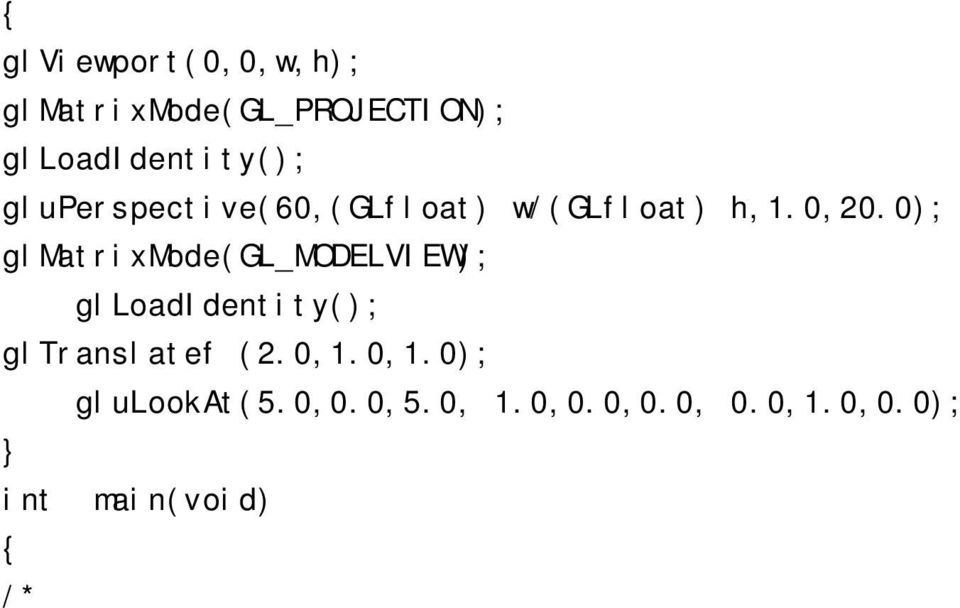
18 7 OpenGL,,,, ( ),,,,,, OpenGL,AUX #include "glosh" #include <GL/glh> #include <GL/gluh> #include <GL/glauxh> void CALLBACK Key_space(void) { exit(-1); } void CALLBACK display(void) { glclear(gl_color_buffer_bit GL_DEPTH_BUFFER_BIT); auxwireteapot(10); glrotatef((gldouble)roty,00,00,20); gltranslatef (10,00,00); glflush(); auxswapbuffers(); } void CALLBACK Reshape(GLint w,glint h) 17

19 { glviewport(0,0,w,h); glmatrixmode(gl_projection); glloadidentity(); gluperspective(60,(glfloat) w/(glfloat) h,10,200); glmatrixmode(gl_modelview); glloadidentity(); gltranslatef (20,10,10); glulookat(50,00,50, 10,00,00, 00,10,00); } int main(void) { /* auxinitdisplaymode(aux_double AUX_RGBA AUX_DEPTH); auxinitposition(0,0,600,600); auxinitwindow("window name"); /* auxreshapefunc(reshape); auxkeyfunc(aux_space,key_space); /* auxmainloop(display); return(0); },,,, 1 auxinitdisplaymode(aux_double AUX_RGBA AUX_DEPTH); 2 auxinitiposition(0,0,400,400); 3 auxinitwindow("window name"); auxdisplaymode(aux DOUBLE j AUX RGBA j AUX DEPTH); OpenGL ""j"" 18
20 , AUX INDEX, RGB 8 RGBA AUX RGBA AUX SINGLE,,,, AUX DOUBLE, OpenGL, OpenGL Z-buer, auxinitdisplaymodede(), opengl,, glenable GL DEPTHTEST, auxinitposition(int x,int y,int w,int h) (x,y), w, h auxinitiwindow(char titlestring) titlestring 19

21 ,,, (AUX auxmainloop) AUX, ² (,, ) ² ² ²,, ( ), auxreshapefunc(reshpe); auxkeyfunc(aux SPACE,Key dpace); Windows,, CALLBACK ( ) void CALLBACK Display(void) f g void CALLBACK Resheape(int w,int h) f g (,, ) void CALLBACK auxreshapefunc((function)(int w,int h)) 20
22 ,, (w,h),,,glviewport(),,,, main ; auxreshapefunc(reshape); ; void CALLBACK Reshape(int w, int h); f, g void CALLBACK auxmousefunc(int button,int mode, void(function)(aux EVENTRIC)) "button" "mode", (function) AUX EVENTRIC,, data[aux MOUSEX]data[AUX MOUSEY] "button"( ) "mode"( ) main ; auxmousefunc(); ; void ; f /* /* g 21
23 void CALLBACK auxkeyfunc(key,void (function)(void)) (KEY) KEY 71 main ; auxkeyfunc(); ; void ;,, 22
24 71: AUX A "A" AUX LEFT AUX RIGHT AUX Z "Z" AUX UP AUX a "a" AUX DOWN AUX SPACE SPACE AUX Z "z" AUX ESCAPE ESC AUX 0 "0" AUX RETURN RETURN AUX 9 "9",auxMainLoop void auxmainloop(void(displayfunction)(void)),opengl, (displayfunction) main ; auxmainloop(display);/* display ; void display(void);, auxmainloop() display,,glclear() void glclear(mask) "MASK" "j"(or) GL_COLOR_BUFFER_BIT 23
25 GL_DEPTH_BUFFER_BIT GL_STENCIL_BUFFER_BIT GL_ACCUM_BUFFER_BIT,, glflush(),aux auxswapbuer(),, void auxswapbuer(void),,,,,,,,,,, auxswapbuer(),,,auxswapbuer(),, 24
26 8 glbegin() glend(),glvertex() 9, glvertex()( ),glcolor()( ), glbegin() glend(), OpenGL auxinitdisplaymode(), OpenGL,, RGB 3 RGBA 2,RGBA, RGBA " (Red)"," (Green)"," (Blue)"," (Alpha)" "00" "10",RGB OpenGL glcolor() glcolor() glcolor3f(r,g,b); R,G,B glcolor3f(), "A" "10" OpenGL glclearcolor() glclear(), glclearcolor() void glclearcolor(glclampf r,glclampf g,glclamp a) RGBA GLclampf "00" "10", "00" glvertex() glcolor() glbegin(gl\_polygon); glcolor3f(00,10,00);glvertex3f(-10,10,00);/* 25
27 glcolor3f(00,10,00);glvertex3f(-10,-10,00);/* glcolor3f(00,00,10);glvertex3f(10,-10,00);/* glcolor3f(10,10,10);glvertex3f(10,-10,00);/* glend();,,,,,opengl,,,,opengl,,, Nv Nv N Nv N Nv N Nv N Nv N (a) (b) 6: OpenGL, ( ),, void glshademodel(mode), 26
28 glshademodel(gl_smooth) glshademodel(gl_flat);,, 27
29 9, OpenGL,, 28
30 10,OpenGL 3, 3 29
31 11 [1],OpenGL,,, 1995 [2] C++,, SOFTBANK BOOKS, 1998 [3]C/C,,, 1999 [4] C,,, 1996 [5]C, M J,, 1998 [6] C,,,
32 12 1,, 11 31
2 3 OpenGL 2 OpenGL OpenGL(Open Graphics Library) Silicon Graphics (SGI) 3D OpenGL SGI HP, SUN, IBM UNIX Linux, FreeBSD PC UNIX Windows, Mac OS API PD
 1 2015 5-1 2015 6 22 1 3DCG 3DCG 3DCG OpenGL OS Linux(Ubuntu) 1.1 TA 1.2 http://www.cyber.t.u-tokyo.ac.jp/~tani/class/mech_enshu/ 2 3 OpenGL 2 OpenGL OpenGL(Open Graphics Library) Silicon Graphics (SGI)
第3章 OpenGL の基礎
 3 OpenGL April 20, 2012 1 / 23 31 ( ) OpenGL OpenGL 2 / 23 32 OpenGL OpenGL OpenGL (Open Graphics Library) Silicon Graphics, Inc 2 3 API (Application Program Interface) [4] UNIX OS Windows Macintosh CAD
2 2 OpenGL OpenGL OpenGL(Open Graphics Library) Silicon Graphics (SGI) 3D OpenGL SGI HP, SUN,
 1 20 (1) OpenGL TA 2008 10 20 1 C OpenGL (3DCG) OS Linux (Open SUSE 10.3) 3DCG OpenGL GUI GLUT OpenGL GLUT GLUI USB EyeToy 1.1 1 3DCG 2 3DCG GUI 2 USB EyeToy) 10/20( ) 10/27( ) 3DCG OpenGL OpenGL+GUI(GLUI)
第3章 OpenGL の基礎
 3 OpenGL April 11, 2017 1 / 28 3.1 ( ) OpenGL OpenGL 2 / 28 3.2 OpenGL OpenGL OpenGL (Open Graphics Library) Silicon Graphics, Inc. 2 3 API (Application Program Interface) [4] UNIX OS Windows Macintosh
2 2 OpenGL ( ) OpenGL ( ) glclearcolor(glclampf red, GLclampf green, GLclampf
 1 24 (1) OpenGL TA 2012 10 11 1 C OpenGL (3DCG) OS Linux OS 3DCG OpenGL GUI GLUT OpenGL GLUT GLUI 3DCG 3DCG 1.1 1 3DCG 3DCG GUI 2 3DCG 10/10( ) 11/11( ) 3DCG OpenGL OpenGL+GUI(GLUI) 3DCG 3DCG 1.2 TA 2
OpenGL Programming Course OpenGL Programming Course FAQ
 OpenGL NK EXA Corporation [email protected] [email protected] OpenGL FAQ (http://www.nk-exa.co.jp/mmtech/opengledu/faq.shtml) i 1 OpenGL 1{1 1.1 OpenGL : : : : : : : : : : : : : : : : : : :
1 1. Program 1 OpenCV (OpenCV Sample001) 1 /* 2 - > - > - >VC++ 3 ( ) 4 C:\opencv\build\include 5 ( ) 6 C:\opencv\build\x86\vc10\lib 7 - > - > - > - >
 1 1. Program 1 OpenCV (OpenCV Sample001) 1 /* 2 - > - > - >VC++ 3 ( ) 4 C:\opencv\build\include 5 ( ) 6 C:\opencv\build\x86\vc10\lib 7 - > - > - > - > 8 (240 O p e n C V ) 9 opencv_core240d.lib 10 opencv_imgproc240d.lib
3D グラフィックス処理の一般過程 1. 3D グラフィックス処理の一般過程
 3. 3D ビューイング 1. 3Dグラフィックス処理の一般過程 2. 射影と射影変換 3. ビューボリュームとクリッピング 4. 陰面処理とデプスバッファ 5. ビューポート変換 6. 3Dグラフィックスを描く 7. モデルビュー変換 3D グラフィックス処理の一般過程 1. 3D グラフィックス処理の一般過程 3D グラフィックス処理の一般過程 1. モデリング変換 座標系の異なる複数のオブジェクトを仮想世界に配置し,
#include <stdio.h> 2 #include <stdlib.h> 3 #include <GL/glut.h> 4 Program 1 (OpenGL GameSample001) 5 // 6 static bool KeyUpON = false; // 7 sta
 1 1. 1 #include 2 #include 3 #include 4 Program 1 (OpenGL GameSample001) 5 // 6 static bool KeyUpON = false; // 7 static bool KeyDownON = false; // 8 static bool KeyLeftON
2 2 OpenGL ( ) 2 OpenGL ( ) glclearcolor(glclampf red, GLclampf green, GLclampf blu
 1 27 (1) OpenGL TA 2015 9 29 1 C OpenGL (3DCG) OS Linux OS 3DCG OpenGL 3DCG 3DCG 1.1 1 3DCG 3DCG 2 3DCG GUI AR 9/29( ) 10/1( ) 3DCG OpenGL 3DCG 3DCG 1.2 TA 1.3 2 2 OpenGL ( ) http://www.cyber.t.u-tokyo.ac.jp/~tani/class/mech_enshu/
謗域・ュ逕ィppt
 情報工学 212 年度後期第 5 回 [1 月 31 日 ] 静岡大学 創造科学技術大学院情報科学専攻工学部機械工学科計測情報講座 三浦憲二郎 講義日程 第 8 回 11 月 21 日 ( 水 ) CG パート試験 講義アウトライン [1 月 31 日 ] ビジュアル情報処理 1.3.4 投影変換 1.3.5 いろいろな座標系と変換 OpenGL 投影変換 曲線の描画 トロコイド ( 外トロコイドと内トロコイド
JAPLAシンポジウム資料 2009/12/5
 JAPLA シンポジウム資料 2009/12/5 J の OpenGL グラフィックス - その 5 - 正 12 面体と正 20 面体を動かす - 西川利男 正 12 面体と正 20 面体との頂点座標が別報 [1] のように計算されたので それを用いて J の OpenGL により 3 D グラフィックス図形を描き いろいろ動かしてみる 1. 正 12 面体と正 20 面体の J プログラム (J402
manual.dvi
 ' & VR CompleXcope $ % 1 2 509{5292 322{6 1) kage@tokitheorynifsacjp 2) sato@tokitheorynifsacjp CompleXcope Programming Guide, Ver 1, by A Kageyama and T Sato, August 1998 1 CompleXcope 5 11 : : : : :
OpenGL & GLUTの基本関数の説明
 コンピュータグラフィックス S 演習資料 OpenGL & GLUT の基本関数の説明 1. OpenGL & GLUT 2. GLUT 2.1. GLUT void glutinit( int argc, char ** argv ); glut void glutinitdysplaymode( unsigned int mode ); mode void glutinitwindowsize(
/*p7-1-1*/
 1 2 3 4 5 6 7 8 9 10 11 12 13 14 15 16 17 18 19 20 21 22 23 24 25 26 27 28 29 30 31 32 33 34 35 36 37 38 39 40 41 42 43 44 45 46 47 48 49 50 51 52 53 54 55 56 /* e8.c Copyright (c) 2003 by T. HAYASHI and
j x j j j + 1 l j l j = x j+1 x j, n x n x 1 = n 1 l j j=1 H j j + 1 l j l j E
 8 9 7 6 4 2 3 5 1 j x j j j + 1 l j l j = x j+1 x j, n x n x 1 = n 1 l j j=1 H j j + 1 l j l j E a n 1 H = ae l j, j=1 l j = x j+1 x j, x n x 1 = n 1 j=1 l j, l j = ±l l > 0) n 1 H = ϵ l j, j=1 ϵ e x x
/* drawing function */ function_graph();// drawing graph glflush(); int main(int argc, char **argv ) glutinit( &argc, argv ); glutinitdisplaymode( GLU
 OpenGL ( ) #include #include #define PI 3.14159265 void function_graph() int j; float x, y; glbegin( GL_LINE_STRIP );// sine curve by line glcolor3f( 0.0f, 1.0f, 1.0f );// line color
( ) 1 1: 1 #include <s t d i o. h> 2 #include <GL/ g l u t. h> 3 #include <math. h> 4 #include <s t d l i b. h> 5 #include <time. h>
 2007 12 5 1 2 2.1 ( ) 1 1: 1 #include 2 #include 3 #include 4 #include 5 #include 6 7 #define H WIN 400 // 8 #define W WIN 300 // 9
JAPLA研究会資料 2013/5/25
 JAPLA 研究会資料 2013/5/25 J-OpenGL による 4 進フラクタル立体木のグラフィックス 西川利男 今年の大学センター試験の出題をきっかけとして 3 進法およびそれを活用した 3 進フラクタル木の J プログラムについて先に報告した [1][2] 図形表示の値を 3 進法で表すことで フラクタル木のグラフィックスが ごく自然に行われた それでは 4 進法ではどうだろうか? 同じ発想を展開すると
$ ls -l $ ls -l -a $ ls -la $ ls -F $ ls <dirname> <dirname> $ cd <dirname> <dirname> $ cd $ pwd $ cat <filename> <filename> $ less <filename> <filena
 $ pwd /home1/t0/t0903 / / /home1/t0/t0903 / / /home1/t0/t0903 / /... ~ $ ls $ ls -a $ ls -l $ ls -l -a $ ls -la $ ls -F $ ls $ cd $ cd $ pwd $ cat
2 2 GLUI 2 GLUI 2.1 GLUI GLUI OpenGL OpenGL glut OpenGL glut C++ Linux, Windows (Visual C++, gcc), Macintosh glut glut GUI glut GUI CG glmultmatrix()
 1 20 (2) OpenGL+GUI(GLUI) 3DCG TA 2008 10 27 1 OpenGL OpenGL GUI GLUI 1.1 http://www.cyber.t.u-tokyo.ac.jp/~kuni/enshu2008/ 1.2 TA 1.3 2008/12/4( ) EyeToy 2 2 GLUI 2 GLUI 2.1 GLUI GLUI OpenGL OpenGL glut
NB
 JAPLA 研究会資料 2010/2/27 J の OpenGL グラフィックス - その 7 - フラー ドームと照光表示 - 西川利男 0. はじめに OpenGL 正多面体グラフィックスとして 今回はフラー ドームに挑戦してみた バックミンスター フラー (Richard Buckminster Fuller, 1895-1983 は多才な建築家 科学者 思想家として知られ その名前を冠した
沼津工業高等専門学校
 VisualStudio2010 を用いた OpenGL(Glut) コンソール アプリケーションの作成方法 初版 : 2007.01.06 藤尾 改訂 : 2010.08.24 秋山 - 1 - - 目次 - Ⅰ. プログラミングの準備 3 Ⅰ.1 はじめに 3 Ⅰ.2 OpenGL の環境設定 3 Ⅱ. プログラミングの第 1 歩 ( 簡単なプログラムの作成 ) 3 Ⅱ.1 プロジェクトの作成と保存
2 2 2 OpenGL (R,G,B,A) 2.1 OpenGL (x y) width height pixels void glreadpixels(glint x, GLint y, GLsizei width, GLsizei height, GLenum format, GLenum t
 1 22 (2) OpenGL+GUI(GLUI) 3DCG TA 2010 10 18 1 OpenGL OpenGL GUI GLUI 1.1 http://www.cyber.t.u-tokyo.ac.jp/~kuni/enshu2010/ 1.2 TA 1.3 2010/12/6( ) USB 2 2 2 OpenGL (R,G,B,A) 2.1 OpenGL (x y) width height
コンピュータグラフィックスS 演習資料
 コンピュータグラフィックス S 演習資料 第 4 回シェーディング マッピング 九州工業大学情報工学部システム創成情報工学科講義担当 : 尾下真樹 1. 演習準備 今回の演習も 前回までの演習で作成したプログラムに続けて変更を行う まずは シェーディングの演習のため 描画処理で 回転する一つの四角すいを描画するように変更する 画面をクリア ( ピクセルデータと Z バッファの両方をクリア ) glclear(
演算増幅器
 スペースインベーダーもどき 1000 行プログラムの参考として スペースインベーダーもどきのプログラムを配布する いくつか習って いないものもあるので 補足の説明を加えていく 文字列の描画 文字の描画は glutbitmapcharacter() を用いる これは以下のようにして利用する int i; char *str = "Display String"; glcolor3f(0.0, 0.0,
2 2 2 OpenGL (R,G,B,A) 2.1 OpenGL (x y) width height pixels void glreadpixels(glint x, GLint y, GLsizei width, GLsizei height, GLenum format, GLenum t
 1 24 (2) 3DCG TA 2012 10 12 1 OpenGL USB (3DCG) OpenCV 1.1 http://www.cyber.t.u-tokyo.ac.jp/~tani/class/mech_enshu/ 1.2 TA 1.3 USB (2012/11/19( ),20( )) USB 2 2 2 OpenGL (R,G,B,A) 2.1 OpenGL (x y) width
準備 計算結果を可視化するために OpenGL を 利用する. 2
 2. 2 次元粒子法シミュレーション (+ 少しだけ OpenGL) 茨城大学工学部 教授乾正知 準備 計算結果を可視化するために OpenGL を 利用する. 2 OpenGL 3 次元コンピュータグラフィックス用の標準的なライブラリ. 特に CAD やアート, アニメーション分野 ( ゲーム以外の分野 ) で広く利用されている. OpenGL は仕様がオープンに決められており, 企業から独立した団体が仕様を管理している.
-34-
 -33- -34- ! -35- ! -36- ! -37- -38- -39- -40- -41- -42- -43- -44- -45- -46- -47- -48- -49- -50- ! -51- -52- !! -53- -54- ! -55- -56- -57- !!!!! "" "!!! " "" " -58- -59- !!! -60- -61- -62- -63- ! -64- !
WebGL OpenGL GLSL Kageyama (Kobe Univ.) Visualization / 57
 WebGL 2014.04.15 X021 2014 3 1F Kageyama (Kobe Univ.) Visualization 2014.04.15 1 / 57 WebGL OpenGL GLSL Kageyama (Kobe Univ.) Visualization 2014.04.15 2 / 57 WebGL Kageyama (Kobe Univ.) Visualization 2014.04.15
64bit SSE2 SSE2 FPU Visual C++ 64bit Inline Assembler 4 FPU SSE2 4.1 FPU Control Word FPU 16bit R R R IC RC(2) PC(2) R R PM UM OM ZM DM IM R: reserved
 (Version: 2013/5/16) Intel CPU ([email protected]) 1 Intel CPU( AMD CPU) 64bit SIMD Inline Assemler Windows Visual C++ Linux gcc 2 FPU SSE2 Intel CPU double 8087 FPU (floating point number processing unit)


1 level Level swtich ButtonPress ButtonRelease Expose Level
 UNIX 4 2D/3D Grahpics,GUI :2-3 - 045708G 045726E 045730C 045735D 045759B 045762B 1 level1 1 11 2 12 4 13 6 14 6 2 Level2 6 21 6 211 swtich 11 212 ButtonPress 11 213 ButtonRelease 12 214 Expose 12 22 12
Fair Curve and Surface Design System Using Tangent Control
 情報工学 2016 年度後期第 6 回 [11 月 16 日 ] 静岡大学工学研究科機械工学専攻ロボット 計測情報講座創造科学技術大学院情報科学専攻 三浦憲二郎 講義アウトライン [11 月 16 日 ] ビジュアル情報処理 3 モデリング 3.3 曲線 曲面 OpenGL 色の取り扱い シェーディング 照明モデルと照光処理 拡散光 鏡面光 環境光 ビジュアル情報処理 3-3 曲線 曲面 3-3-1
64bit SSE2 SSE2 FPU Visual C++ 64bit Inline Assembler 4 FPU SSE2 4.1 FPU Control Word FPU 16bit R R R IC RC(2) PC(2) R R PM UM OM ZM DM IM R: reserved
 (Version: 2013/7/10) Intel CPU ([email protected]) 1 Intel CPU( AMD CPU) 64bit SIMD Inline Assemler Windows Visual C++ Linux gcc 2 FPU SSE2 Intel CPU double 8087 FPU (floating point number processing unit)
² ² ² ²
 ² ² ² ² n=44 n =44 n=44 n=44 20.5% 22.7% 13.6% 27.3% 54.5% 25.0% 59.1% 18.2% 70.5% 15.9% 47.7% 25.0% 60% 40% 20% 0% n=44 52.3% 27.3% 11.4% 6.8% 27.55.5 306 336.6 408 n=44 9.1% 6.8% n=44 6.8% 2.3% 31.8%
1 OpenGL OpenGL OpenGL OpenGL
 2008 OpenGL 2009 2 27 1 OpenGL 4 1.1 OpenGL.............................. 4 1.2 OpenGL............... 4 1.2.1............... 4 1.2.2............................. 5 2 OpenGL 6 2.1.......................
免許法認定公開講座: コンピュータグラフィックス
 演習内容 免許法認定公開講座 : コンピュータグラフィックス 第 6 回 3 次元グラフィックス演習 基本的な3 次元グラフィックスのプログラムを作成 OpenGL を使ったポリゴン描画 視点操作 アニメーション 九州工業大学情報工学部システム創成情報工学科尾下真樹 参考書 最低限の関数は資料で説明 OpenGLの定番の本 ( 高い ) OpenGLプログラミングガイド ( 赤本 ), 12,000

 第 1 章 画面 出力 入力 2 問題 1-1 C++ List 1-1p.4 C++ // cout
 Microsoft Word - opengl講義資料2013.doc
 [OpenGL:1] OpenGL とは 1.OpenGL とは何か? 米国 Silicon Graphics 社 (SGI) が中心となって開発した 3 次元グラフィックスライブラリである.SGI はグラフィックスに特化したワークステーション (GWS) の開発を積極的に行い, 自社の GWS 上で稼動するグラフィックスライブラリ IRIS GL を開発したが, その後, この仕様を公開したライブラリとして
10 B 3. ( ) (3)
 Augus 5, 009 10 B 3. ( ) (3) ( ) 1 OpenGL CG 1 C OpenGL 3 CG 4 OpenGL 1. 1 OpenGL CG 1 C 1.1 I C [1] es.c C es.obj es.exe *.lib *.obj C 1. C I C #include < > in main( ) { reurn 0; } { reurn ; } Hellow
PC Windows 95, Windows 98, Windows NT, Windows 2000, MS-DOS, UNIX CPU
 1. 1.1. 1.2. 1 PC Windows 95, Windows 98, Windows NT, Windows 2000, MS-DOS, UNIX CPU 2. 2.1. 2 1 2 C a b N: PC BC c 3C ac b 3 4 a F7 b Y c 6 5 a ctrl+f5) 4 2.2. main 2.3. main 2.4. 3 4 5 6 7 printf printf
コンピュータグラフィクス論
 コンピュータグラフィクス論 2015 年 4 月 9 日 高山健志 教員紹介 高山健志 ( 国立情報学研究所特任助教 ) http://research.nii.ac.jp/~takayama/ [email protected] 蜂須賀恵也 ( 創造情報学専攻講師 ) http://www.ci.i.u-tokyo.ac.jp/~hachisuka/ [email protected]
1) OOP 2) ( ) 3.2) printf Number3-2.cpp #include <stdio.h> class Number Number(); // ~Number(); // void setnumber(float n); float getnumber();
 : : :0757230G :2008/07/18 2008/08/17 1) OOP 2) ( ) 3.2) printf Number3-2.cpp #include class Number Number(); // ~Number(); // void setnumber(float n); float getnumber(); private: float num; ;
 -----------------------------------------------------------------------------------------1 --------------------------------------------------------------------------------------1 -------------------------------------------------------------------------------------1


1 2 3 4 1 2 3 4 1 2 3 4 12 3 4
 1 2 3 4 5 6 1 2 3 4 5 6 1 2 1 2 1 2 1 2 1 2 3 4 12 3 4 1 2 3 4 1 2 3 4 1 2 3 4 1 2 3 4 1 2 3 4 12 3 4 1 2 3 4 5 6 7 8 1 2 3 46 7 1 2 3 4 5 6 7 1 2 3 4 1 2 3 4 5 6 7 8 9 0 1 2 3 4 5 6 16 7 8 92 3 46 7 :



S1460...........\1.E4
 3 4 3 4 5 3 4 5 3 4 3 4 3 3 3 3 4 3 4 3 3 4 4 3 3 3 3 4 3 4 3 3 3 3 3 3 4 3 4 3 4 5 4 3 5 4 3 3 4 5 3 4 5 4 3 4 3 3 4 3 4 3 3 3 3 3 4 3 3 4! "! " " 0 6 ! " 3 4 3 3 4 3 ! " 3 3 4 5 4 5 6 3 3