
第3章 OpenGL の基礎
|
|
|
- ああす とどろき
- 8 years ago
- Views:
Transcription
1 3 OpenGL April 11, / 28
2 3.1 ( ) OpenGL OpenGL 2 / 28
3 3.2 OpenGL OpenGL OpenGL (Open Graphics Library) Silicon Graphics, Inc. 2 3 API (Application Program Interface) [4] UNIX OS Windows Macintosh CAD CG 3 / 28
4 3.3 OpenGL GLUT (OpenGL Utility Toolkit) OpenGL 4 / 28
5 GLUT GUI Toolkit 5 / 28
6 3.4 program3 1.c #include <GL/glut.h> static void display(void); static void display(void) { } int main(int argc, char *argv[]) { glutinit(&argc, argv); glutcreatewindow(argv[0]); glutdisplayfunc(display); glutmainloop(); return 0; } 6 / 28
7 glutinit() #include <GL/glut.h> void glutinit(int *argc, char **argv); GLUT main. glutcreatewindow() #include <GL/glut.h> int glutcreatewindow(char *name);. name 7 / 28
8 glutdisplayfunc() #include <GL/glut.h> void glutdisplayfunc(void (*func)(void)); func. glutmainloop() #include <GL/glut.h> void glutmainloop(void);. 8 / 28
9 3.5 program3 2.c int main(int argc, char *argv[]) {... /* Window */ glutinitdisplaymode(glut_rgba); glutinitwindowsize(250, 250); glutinitwindowposition(100, 200); glutcreatewindow(argv[0]); /* */ glclearcolor(0.0, 0.0, 0.0, 0.0); } /* */ glutdisplayfunc(display);... 9 / 28
10 static void display(void) { glclear(gl_color_buffer_bit); glcolor3f(1.0, 1.0, 1.0); glbegin(gl_polygon); glvertex2f(0.5, 0.5); glvertex2f(-0.5, 0.5); glvertex2f(-0.5, -0.5); glvertex2f(0.5, -0.5); glend(); glflush(); } 10 / 28
11 glutinitdisplaymode() void glutinitdisplaymode(unsigned int mode); mode GLUT RGBA RGBA (,,, ) GLUT INDEX glutinitwindowsize() void glutinitwindowsize(int w, int h); ( 1, 1) 2 11 / 28
12 glutinitwindowposition() void glutinitwindowposition(int x, int y); glclearcolor() void glclearcolor(glclampf R, GLclampf G, GLclampf B, GLclampf A); R G B A,,, α GLclampf (float ) 0 1 (0, 0, 0) (1, 1, 1) 12 / 28
13 glclear() void glclear(glbitfield mask); mask ( ) GL COLOR BUFFER BIT GL DEPTH BUFFER BIT, glflush() void glflush(void); OpenGL 13 / 28
14 glbegin()... glend void glbegin(glnum mode);... void glend(void); mode 14 / 28
15 mode GL POINTS: GL LINES: GL LINE STRIP: GL LINE LOOP: v3 v0 v1 v2 v3 v0 v1 GL LINES GL LINE STRIP GL LINE LOOP v2 v3 v0 v1 v2 15 / 28
16 GL TRIANGLES / GL QUADS: 3 4 GL TRIANGLE STRIP / GL QUAD STRIP: GL TRIANGLE FAN: GL POLYGON: v5 v0 v3 v4 v2 v1 GL TRIANGLES v4 v3 v2 v0 v1 v4 v3 GL TRIANGLE STRIP v4 v3 v0 v2 v0 v2 v1 GL TRIANGLE FAN v1 GL POLYGON 16 / 28
17 void glvertex2f(glfloat x, GLfloat y) GLfloat (float ) 3, 4 (x,y,z), (x,y,z,w) glvertex3f (), glvertex4f () double glvertex?d(), int glvertex?i() void glvertex??v() void glcolor3f(glfloat r, GLfloat g, GLfloat b) r, g, b,, 0 1 r, g, b, a void glcolor4f( ) double glcolor?d( ), int glcolor?i( ) 17 / 28
18 3.6 program3 3.c void display(void) {... for(i=0; i<star_num; i++){ /* */ x = 2.0*random_num()-1.0; y = 2.0*random_num()-1.0; brightness = random_num(); size = STAR_SIZE*random_num(); /* 0.0 STAR_SIZE */ } /* */ draw_point(x, y, brightness, size); } glflush(); 18 / 28
19 rand int rand(void); 0 RAND MAX srand() rand() RAND MAX int / 28
20 (anti-aliasing) /* */ glblendfunc(gl_src_alpha, GL_ONE_MINUS_SRC_ALPHA); glenable(gl_blend); /* ON */ /* */ glenable(gl_point_smooth); glhint(gl_point_smooth_hint, GL_NICEST); 20 / 28
21 glenable(gl POINT SMOOTH) glenable(gl LINE SMOOTH) glenable(gl POLYGON SMOOTH) glhint(gl POINT SMOOTH HINT, GL FASTEST); glhint(gl LINE SMOOTH HINT, GL FASTEST); glhint(gl POLYGON SMOOTH HINT, GL FASTEST); glhint(gl POINT SMOOTH HINT, GL NICEST); glhint(gl LINE SMOOTH HINT, GL NICEST); glhint(gl POLYGON SMOOTH HINT, GL NICEST); 21 / 28
22 3.7 program3 4.c length /= 2.0; /* */ if(length > 0.01){ draw_gasket(x0, y0, length); draw_gasket(mid_point(x0, x1), mid_point(y0, y1), length); draw_gasket(mid_point(x2, x0), mid_point(y2, y0), length); } 22 / 28
23 3.8 program3 5.c glutmousefunc(mouse); void mouse(int button, int state, int x, int y) { switch (button) { case GLUT_LEFT_BUTTON: printf("the left"); break; case GLUT_MIDDLE_BUTTON: printf("the middle"); break; / 28
24 program3 6.c case GLUT_LEFT_BUTTON: point[pointnum][0] = x; point[pointnum][1] = y; if (state == GLUT_UP) { /* */ glcolor3d(0.0, 0.0, 0.0); glbegin(gl_lines); glvertex2iv(point[pointnum - 1]); /* */ glvertex2iv(point[pointnum]); /* */ glend(); glflush(); void resize(int w, int h) 5 24 / 28
25 3.9.1 ( ) program3 2.c program3 3.c / 28
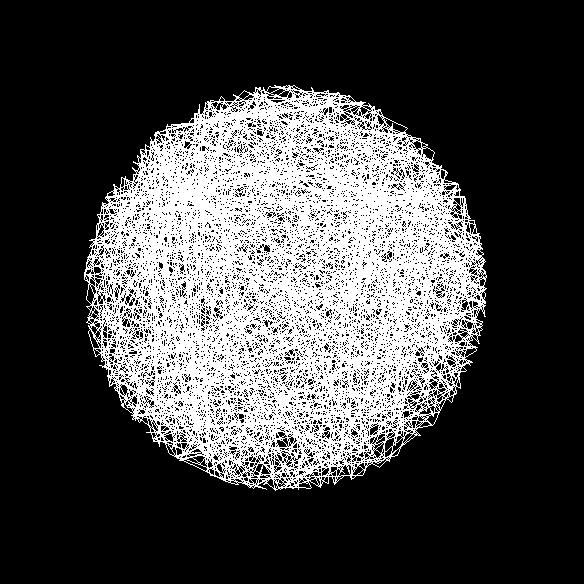
26 3.1: 26 / 28
27 3.10 OpenGL OpenGL 1 OpenGL 2 3 API 2 OpenGL GLUT OpenGL GLUT / 28
28 [1] Mark J. Kilgard. The OpenGL Utility Toolkit (GLUT) programming interface API version 3( ). [2],. OpenGL 3 CG., [3]. GLUT OpenGL. tokoi/opengl/libglut.html. [4] OpenGL / 28
第3章 OpenGL の基礎
 3 OpenGL April 20, 2012 1 / 23 31 ( ) OpenGL OpenGL 2 / 23 32 OpenGL OpenGL OpenGL (Open Graphics Library) Silicon Graphics, Inc 2 3 API (Application Program Interface) [4] UNIX OS Windows Macintosh CAD
( ) 1 1: 1 #include <s t d i o. h> 2 #include <GL/ g l u t. h> 3 #include <math. h> 4 #include <s t d l i b. h> 5 #include <time. h>
 2007 12 5 1 2 2.1 ( ) 1 1: 1 #include 2 #include 3 #include 4 #include 5 #include 6 7 #define H WIN 400 // 8 #define W WIN 300 // 9
1 1. Program 1 OpenCV (OpenCV Sample001) 1 /* 2 - > - > - >VC++ 3 ( ) 4 C:\opencv\build\include 5 ( ) 6 C:\opencv\build\x86\vc10\lib 7 - > - > - > - >
 1 1. Program 1 OpenCV (OpenCV Sample001) 1 /* 2 - > - > - >VC++ 3 ( ) 4 C:\opencv\build\include 5 ( ) 6 C:\opencv\build\x86\vc10\lib 7 - > - > - > - > 8 (240 O p e n C V ) 9 opencv_core240d.lib 10 opencv_imgproc240d.lib
10 B 3. ( ) (3)
 Augus 5, 009 10 B 3. ( ) (3) ( ) 1 OpenGL CG 1 C OpenGL 3 CG 4 OpenGL 1. 1 OpenGL CG 1 C 1.1 I C [1] es.c C es.obj es.exe *.lib *.obj C 1. C I C #include < > in main( ) { reurn 0; } { reurn ; } Hellow
2 2 OpenGL ( ) OpenGL ( ) glclearcolor(glclampf red, GLclampf green, GLclampf
 1 24 (1) OpenGL TA 2012 10 11 1 C OpenGL (3DCG) OS Linux OS 3DCG OpenGL GUI GLUT OpenGL GLUT GLUI 3DCG 3DCG 1.1 1 3DCG 3DCG GUI 2 3DCG 10/10( ) 11/11( ) 3DCG OpenGL OpenGL+GUI(GLUI) 3DCG 3DCG 1.2 TA 2
演算増幅器
 スペースインベーダーもどき 1000 行プログラムの参考として スペースインベーダーもどきのプログラムを配布する いくつか習って いないものもあるので 補足の説明を加えていく 文字列の描画 文字の描画は glutbitmapcharacter() を用いる これは以下のようにして利用する int i; char *str = "Display String"; glcolor3f(0.0, 0.0,
#include <stdio.h> 2 #include <stdlib.h> 3 #include <GL/glut.h> 4 Program 1 (OpenGL GameSample001) 5 // 6 static bool KeyUpON = false; // 7 sta
 1 1. 1 #include 2 #include 3 #include 4 Program 1 (OpenGL GameSample001) 5 // 6 static bool KeyUpON = false; // 7 static bool KeyDownON = false; // 8 static bool KeyLeftON
2 3 OpenGL 2 OpenGL OpenGL(Open Graphics Library) Silicon Graphics (SGI) 3D OpenGL SGI HP, SUN, IBM UNIX Linux, FreeBSD PC UNIX Windows, Mac OS API PD
 1 2015 5-1 2015 6 22 1 3DCG 3DCG 3DCG OpenGL OS Linux(Ubuntu) 1.1 TA 1.2 http://www.cyber.t.u-tokyo.ac.jp/~tani/class/mech_enshu/ 2 3 OpenGL 2 OpenGL OpenGL(Open Graphics Library) Silicon Graphics (SGI)
2 2 OpenGL OpenGL OpenGL(Open Graphics Library) Silicon Graphics (SGI) 3D OpenGL SGI HP, SUN,
 1 20 (1) OpenGL TA 2008 10 20 1 C OpenGL (3DCG) OS Linux (Open SUSE 10.3) 3DCG OpenGL GUI GLUT OpenGL GLUT GLUI USB EyeToy 1.1 1 3DCG 2 3DCG GUI 2 USB EyeToy) 10/20( ) 10/27( ) 3DCG OpenGL OpenGL+GUI(GLUI)
3D グラフィックス処理の一般過程 1. 3D グラフィックス処理の一般過程
 3. 3D ビューイング 1. 3Dグラフィックス処理の一般過程 2. 射影と射影変換 3. ビューボリュームとクリッピング 4. 陰面処理とデプスバッファ 5. ビューポート変換 6. 3Dグラフィックスを描く 7. モデルビュー変換 3D グラフィックス処理の一般過程 1. 3D グラフィックス処理の一般過程 3D グラフィックス処理の一般過程 1. モデリング変換 座標系の異なる複数のオブジェクトを仮想世界に配置し,
OpenGL Programming Course OpenGL Programming Course FAQ
 OpenGL NK EXA Corporation [email protected] [email protected] OpenGL FAQ (http://www.nk-exa.co.jp/mmtech/opengledu/faq.shtml) i 1 OpenGL 1{1 1.1 OpenGL : : : : : : : : : : : : : : : : : : :
準備 計算結果を可視化するために OpenGL を 利用する. 2
 2. 2 次元粒子法シミュレーション (+ 少しだけ OpenGL) 茨城大学工学部 教授乾正知 準備 計算結果を可視化するために OpenGL を 利用する. 2 OpenGL 3 次元コンピュータグラフィックス用の標準的なライブラリ. 特に CAD やアート, アニメーション分野 ( ゲーム以外の分野 ) で広く利用されている. OpenGL は仕様がオープンに決められており, 企業から独立した団体が仕様を管理している.
沼津工業高等専門学校
 VisualStudio2010 を用いた OpenGL(Glut) コンソール アプリケーションの作成方法 初版 : 2007.01.06 藤尾 改訂 : 2010.08.24 秋山 - 1 - - 目次 - Ⅰ. プログラミングの準備 3 Ⅰ.1 はじめに 3 Ⅰ.2 OpenGL の環境設定 3 Ⅱ. プログラミングの第 1 歩 ( 簡単なプログラムの作成 ) 3 Ⅱ.1 プロジェクトの作成と保存
$ ls -l $ ls -l -a $ ls -la $ ls -F $ ls <dirname> <dirname> $ cd <dirname> <dirname> $ cd $ pwd $ cat <filename> <filename> $ less <filename> <filena
 $ pwd /home1/t0/t0903 / / /home1/t0/t0903 / / /home1/t0/t0903 / /... ~ $ ls $ ls -a $ ls -l $ ls -l -a $ ls -la $ ls -F $ ls $ cd $ cd $ pwd $ cat
j x j j j + 1 l j l j = x j+1 x j, n x n x 1 = n 1 l j j=1 H j j + 1 l j l j E
 8 9 7 6 4 2 3 5 1 j x j j j + 1 l j l j = x j+1 x j, n x n x 1 = n 1 l j j=1 H j j + 1 l j l j E a n 1 H = ae l j, j=1 l j = x j+1 x j, x n x 1 = n 1 j=1 l j, l j = ±l l > 0) n 1 H = ϵ l j, j=1 ϵ e x x
/*p7-1-1*/
 1 2 3 4 5 6 7 8 9 10 11 12 13 14 15 16 17 18 19 20 21 22 23 24 25 26 27 28 29 30 31 32 33 34 35 36 37 38 39 40 41 42 43 44 45 46 47 48 49 50 51 52 53 54 55 56 /* e8.c Copyright (c) 2003 by T. HAYASHI and
1) OOP 2) ( ) 3.2) printf Number3-2.cpp #include <stdio.h> class Number Number(); // ~Number(); // void setnumber(float n); float getnumber();
 : : :0757230G :2008/07/18 2008/08/17 1) OOP 2) ( ) 3.2) printf Number3-2.cpp #include class Number Number(); // ~Number(); // void setnumber(float n); float getnumber(); private: float num; ;
2 2 GLUI 2 GLUI 2.1 GLUI GLUI OpenGL OpenGL glut OpenGL glut C++ Linux, Windows (Visual C++, gcc), Macintosh glut glut GUI glut GUI CG glmultmatrix()
 1 20 (2) OpenGL+GUI(GLUI) 3DCG TA 2008 10 27 1 OpenGL OpenGL GUI GLUI 1.1 http://www.cyber.t.u-tokyo.ac.jp/~kuni/enshu2008/ 1.2 TA 1.3 2008/12/4( ) EyeToy 2 2 GLUI 2 GLUI 2.1 GLUI GLUI OpenGL OpenGL glut
OpenGL & GLUTの基本関数の説明
 コンピュータグラフィックス S 演習資料 OpenGL & GLUT の基本関数の説明 1. OpenGL & GLUT 2. GLUT 2.1. GLUT void glutinit( int argc, char ** argv ); glut void glutinitdysplaymode( unsigned int mode ); mode void glutinitwindowsize(
WebGL OpenGL GLSL Kageyama (Kobe Univ.) Visualization / 57
 WebGL 2014.04.15 X021 2014 3 1F Kageyama (Kobe Univ.) Visualization 2014.04.15 1 / 57 WebGL OpenGL GLSL Kageyama (Kobe Univ.) Visualization 2014.04.15 2 / 57 WebGL Kageyama (Kobe Univ.) Visualization 2014.04.15
2 2 OpenGL ( ) 2 OpenGL ( ) glclearcolor(glclampf red, GLclampf green, GLclampf blu
 1 27 (1) OpenGL TA 2015 9 29 1 C OpenGL (3DCG) OS Linux OS 3DCG OpenGL 3DCG 3DCG 1.1 1 3DCG 3DCG 2 3DCG GUI AR 9/29( ) 10/1( ) 3DCG OpenGL 3DCG 3DCG 1.2 TA 1.3 2 2 OpenGL ( ) http://www.cyber.t.u-tokyo.ac.jp/~tani/class/mech_enshu/
2 2 2 OpenGL (R,G,B,A) 2.1 OpenGL (x y) width height pixels void glreadpixels(glint x, GLint y, GLsizei width, GLsizei height, GLenum format, GLenum t
 1 22 (2) OpenGL+GUI(GLUI) 3DCG TA 2010 10 18 1 OpenGL OpenGL GUI GLUI 1.1 http://www.cyber.t.u-tokyo.ac.jp/~kuni/enshu2010/ 1.2 TA 1.3 2010/12/6( ) USB 2 2 2 OpenGL (R,G,B,A) 2.1 OpenGL (x y) width height
1 level Level swtich ButtonPress ButtonRelease Expose Level
 UNIX 4 2D/3D Grahpics,GUI :2-3 - 045708G 045726E 045730C 045735D 045759B 045762B 1 level1 1 11 2 12 4 13 6 14 6 2 Level2 6 21 6 211 swtich 11 212 ButtonPress 11 213 ButtonRelease 12 214 Expose 12 22 12
Microsoft PowerPoint - info_eng3_05ppt.pptx
 インタラクティブシステム構築法 第 5 回 OpenGL と GLUT の使い方 (3) 埼玉大学情報システム工学科小林貴訓 シェーディング 光源の設定を有効にする glenable(gl_lighting); // 光源の設定を有効にする glenable(gl_light0); //0 番目の光源を有効にする (8 個まで設定可能 ) 光源の位置 GLfloat light0pos[] = {
/* drawing function */ function_graph();// drawing graph glflush(); int main(int argc, char **argv ) glutinit( &argc, argv ); glutinitdisplaymode( GLU
 OpenGL ( ) #include #include #define PI 3.14159265 void function_graph() int j; float x, y; glbegin( GL_LINE_STRIP );// sine curve by line glcolor3f( 0.0f, 1.0f, 1.0f );// line color
double float
 2015 3 13 1 2 2 3 2.1.......................... 3 2.2............................. 3 3 4 3.1............................... 4 3.2 double float......................... 5 3.3 main.......................
£Ã¥×¥í¥°¥é¥ß¥ó¥°ÆþÌç (2018) - Â裵²ó ¨¡ À©¸æ¹½Â¤¡§¾ò·ïʬ´ô ¨¡
 (2018) 2018 5 17 0 0 if switch if if ( ) if ( 0) if ( ) if ( 0) if ( ) (0) if ( 0) if ( ) (0) ( ) ; if else if ( ) 1 else 2 if else ( 0) 1 if ( ) 1 else 2 if else ( 0) 1 if ( ) 1 else 2 (0) 2 if else
PowerPoint Presentation
 p.130 p.198 p.208 2 double weight[num]; double min, max; min = max = weight[0]; for( i= 1; i i < NUM; i++ ) ) if if ( weight[i] > max ) max = weight[i]: if if ( weight[i] < min ) min = weight[i]: weight
double rx[natom], ry[natom], rz[natom]; 原子の座標 速度 力 ポテンシャルエ double vx[natom], vy[natom], vz[natom]; ネルギーを受ける配列を準備 double fx[natom], fy[natom], fz[natom
![double rx[natom], ry[natom], rz[natom]; 原子の座標 速度 力 ポテンシャルエ double vx[natom], vy[natom], vz[natom]; ネルギーを受ける配列を準備 double fx[natom], fy[natom], fz[natom](/thumbs/88/115544059.jpg "double rx[natom], ry[natom], rz[natom]; 原子の座標 速度 力 ポテンシャルエ double vx[natom], vy[natom], vz[natom]; ネルギーを受ける配列を準備 double fx[natom], fy[natom], fz[natom") GLUI による MD の GUI 化 前提条件 :GLUI のプログラミング環境が整っていること 3 原子の MD コード ( 下図 ) viewer ウィンドウ内のマウス左クリックで MD 開始 右クリックで MD 停止 control パネルは solid/wireframe を切り替えるチェックボタン 球の滑らかさと半径を決める窓 ( スピナー ) オブジェクトを回転 移動 拡大縮小させるコントローラ
GLUI による MD の GUI 化 前提条件 :GLUI のプログラミング環境が整っていること 3 原子の MD コード ( 下図 ) viewer ウィンドウ内のマウス左クリックで MD 開始 右クリックで MD 停止 control パネルは solid/wireframe を切り替えるチェックボタン 球の滑らかさと半径を決める窓 ( スピナー ) オブジェクトを回転 移動 拡大縮小させるコントローラ
<4D F736F F D B B83578B6594BB2D834A836F815B82D082C88C60202E646F63>
 デザイン言語 Processing 入門 サンプルページ この本の定価 判型などは, 以下の URL からご覧いただけます. http://www.morikita.co.jp/books/mid/084931 このサンプルページの内容は, 初版 1 刷発行当時のものです. Processing Ben Fry Casey Reas Windows Mac Linux Lesson 1 Processing
新版明解C言語 実践編
 2 List - "max.h" a, b max List - max "max.h" #define max(a, b) ((a) > (b)? (a) : (b)) max List -2 List -2 max #include "max.h" int x, y; printf("x"); printf("y"); scanf("%d", &x); scanf("%d", &y); printf("max(x,
C言語によるアルゴリズムとデータ構造
 Algorithms and Data Structures in C 4 algorithm List - /* */ #include List - int main(void) { int a, b, c; int max; /* */ Ÿ 3Ÿ 2Ÿ 3 printf(""); printf(""); printf(""); scanf("%d", &a); scanf("%d",
II ( ) prog8-1.c s1542h017%./prog8-1 1 => 35 Hiroshi 2 => 23 Koji 3 => 67 Satoshi 4 => 87 Junko 5 => 64 Ichiro 6 => 89 Mari 7 => 73 D
 II 8 2003 11 12 1 6 ( ) prog8-1.c s1542h017%./prog8-1 1 => 35 Hiroshi 2 => 23 Koji 3 => 67 Satoshi 4 => 87 Junko 5 => 64 Ichiro 6 => 89 Mari 7 => 73 Daisuke 8 =>. 73 Daisuke 35 Hiroshi 64 Ichiro 87 Junko
WebGL Safari WebGL WebGL Safari Kageyama (Kobe Univ.) / 5
 04 1 2015.05.12 Kageyama (Kobe Univ.) 2015.05.12 1 / 55 WebGL Safari WebGL WebGL http://www.khronos.org/webgl/ http://www.khronos.org/webgl/wiki/demo_repository Safari Kageyama (Kobe Univ.) 2015.05.12
Display 表示の初期化が CAVE 表示の初期化に置き換わり CAVE 用のプログラムに書き換えることが出来る 表 2 1 画面 (Windows LINUX IRIX) 用の OpenGL #include<stdio.h> #include<windows.h> #include<gl/g
 OpenGL による CAVE とファントムへの 3 次元表示 井門俊治 ( いどしゅんじ ) 埼玉工業大学工学部情報システム学科 利用環境 :Windows, LINUX, IRIX, AVS, AVS-MPE, OpenGL,VRML,Java3D 1. 目的 CAVE の表示するためには 従来は OpenGL によるプログラミングが行われていた これに対して 20 00 年末より AVS において
Java演習(4) -- 変数と型 --
 50 20 20 5 (20, 20) O 50 100 150 200 250 300 350 x (reserved 50 100 y 50 20 20 5 (20, 20) (1)(Blocks1.java) import javax.swing.japplet; import java.awt.graphics; (reserved public class Blocks1 extends
/ SCHEDULE /06/07(Tue) / Basic of Programming /06/09(Thu) / Fundamental structures /06/14(Tue) / Memory Management /06/1
 I117 II I117 PROGRAMMING PRACTICE II 2 MEMORY MANAGEMENT 2 Research Center for Advanced Computing Infrastructure (RCACI) / Yasuhiro Ohara [email protected] / SCHEDULE 1. 2011/06/07(Tue) / Basic of Programming
WebGL References Kageyama (Kobe Univ.) Visualization 2013.05.07 *4 2 / 54
 WebGL *1 2013.05.07 *2 *1 X021 2013 LR301 *2 05/08: Kageyama (Kobe Univ.) Visualization 2013.05.07 *3 1 / 54 WebGL References Kageyama (Kobe Univ.) Visualization 2013.05.07 *4 2 / 54 Chrome Firefox http://www.khronos.org/webgl/wiki/demo_repository
£Ã¥×¥í¥°¥é¥ß¥ó¥°ÆþÌç (2018) - Â裶²ó ¨¡ À©¸æ¹½Â¤¡§·«¤êÊÖ¤· ¨¡
 (2018) 2018 5 24 ( ) while ( ) do while ( ); for ( ; ; ) while int i = 0; while (i < 100) { printf("i = %3d\n", i); i++; while int i = 0; i while (i < 100) { printf("i = %3d\n", i); i++; while int i =
ex01.dvi
 ,. 0. 0.0. C () /******************************* * $Id: ex_0_0.c,v.2 2006-04-0 3:37:00+09 naito Exp $ * * 0. 0.0 *******************************/ #include int main(int argc, char **argv) double
r07.dvi
 19 7 ( ) 2019.4.20 1 1.1 (data structure ( (dynamic data structure 1 malloc C free C (garbage collection GC C GC(conservative GC 2 1.2 data next p 3 5 7 9 p 3 5 7 9 p 3 5 7 9 1 1: (single linked list 1
ohp07.dvi
 19 7 ( ) 2019.4.20 1 (data structure) ( ) (dynamic data structure) 1 malloc C free 1 (static data structure) 2 (2) C (garbage collection GC) C GC(conservative GC) 2 2 conservative GC 3 data next p 3 5
Microsoft Word - C.....u.K...doc
 C uwêííôöðöõ Ð C ÔÖÐÖÕ ÐÊÉÌÊ C ÔÖÐÖÕÊ C ÔÖÐÖÕÊ Ç Ê Æ ~ if eíè ~ for ÒÑÒ ÌÆÊÉÉÊ ~ switch ÉeÍÈ ~ while ÒÑÒ ÊÍÍÔÖÐÖÕÊ ~ 1 C ÔÖÐÖÕ ÐÊÉÌÊ uê~ ÏÒÏÑ Ð ÓÏÖ CUI Ô ÑÊ ÏÒÏÑ ÔÖÐÖÕÎ d ÈÍÉÇÊ ÆÒ Ö ÒÐÑÒ ÊÔÎÏÖÎ d ÉÇÍÊ
SystemC言語概論
 SystemC CPU S/W 2004/01/29 4 SystemC 1 SystemC 2.0.1 CPU S/W 3 ISS SystemC Co-Simulation 2004/01/29 4 SystemC 2 ISS SystemC Co-Simulation GenericCPU_Base ( ) GenericCPU_ISS GenericCPU_Prog GenericCPU_CoSim
WinHPC ppt
 MPI.NET C# 2 2009 1 20 MPI.NET MPI.NET C# MPI.NET C# MPI MPI.NET 1 1 MPI.NET C# Hello World MPI.NET.NET Framework.NET C# API C# Microsoft.NET java.net (Visual Basic.NET Visual C++) C# class Helloworld
10/ / /30 3. ( ) 11/ 6 4. UNIX + C socket 11/13 5. ( ) C 11/20 6. http, CGI Perl 11/27 7. ( ) Perl 12/ 4 8. Windows Winsock 12/11 9. JAV
 [email protected] [email protected] http://www.misojiro.t.u-tokyo.ac.jp/ tutimura/sem3/ 2002 12 11 p.1/33 10/16 1. 10/23 2. 10/30 3. ( ) 11/ 6 4. UNIX + C socket 11/13 5. ( ) C 11/20
1 OpenGL OpenGL OpenGL OpenGL
 2008 OpenGL 2009 2 27 1 OpenGL 4 1.1 OpenGL.............................. 4 1.2 OpenGL............... 4 1.2.1............... 4 1.2.2............................. 5 2 OpenGL 6 2.1.......................
複雑系科学演習1 コンピュータグラフィックス
 情報科教育法 担当畔上秀幸情報科学研究科複雑系科学専攻 高等学校学習指導要領 第 章 : 普通教育に関する各教科 - 第 0 節 : 情報 hp://www.mex.go.jp/b_menu/shuppan/sono a/99030/03603/0.hm 情報 B (3) 問題のモデル化とコンピュータを活用した解決 ア モデル化とシミュレーション 身のまわりの現象や社会現象などを通して, モデル化とシミュレーションの考え方や方法を理解させ,
Java updated
 Java 2003.07.14 updated 3 1 Java 5 1.1 Java................................. 5 1.2 Java..................................... 5 1.3 Java................................ 6 1.3.1 Java.......................
programmingII2019-v01
 II 2019 2Q A 6/11 6/18 6/25 7/2 7/9 7/16 7/23 B 6/12 6/19 6/24 7/3 7/10 7/17 7/24 x = 0 dv(t) dt = g Z t2 t 1 dv(t) dt dt = Z t2 t 1 gdt g v(t 2 ) = v(t 1 ) + g(t 2 t 1 ) v v(t) x g(t 2 t 1 ) t 1 t 2
1.ppt
 /* * Program name: hello.c */ #include int main() { printf( hello, world\n ); return 0; /* * Program name: Hello.java */ import java.io.*; class Hello { public static void main(string[] arg)
( CUDA CUDA CUDA CUDA ( NVIDIA CUDA I
 GPGPU (II) GPGPU CUDA 1 GPGPU CUDA(CUDA Unified Device Architecture) CUDA NVIDIA GPU *1 C/C++ (nvcc) CUDA NVIDIA GPU GPU CUDA CUDA 1 CUDA CUDA 2 CUDA NVIDIA GPU PC Windows Linux MaxOSX CUDA GPU CUDA NVIDIA
1 3 2 OpenGL 4 3 OpenGL 5 4 OpenGL 6 OpenGl : : : : : : : : : : : : : : : : : : : : : : : : : : : : : : : 6 : : : : : : : : : : : : : : : : : : : : :
 1999 OpenGL S96M501 S96M596 S96M649 1 3 2 OpenGL 4 3 OpenGL 5 4 OpenGL 6 OpenGl : : : : : : : : : : : : : : : : : : : : : : : : : : : : : : : 6 : : : : : : : : : : : : : : : : : : : : : 7 5 10 OpenGL :
P06.ppt
 p.130 p.198 p.208 2 1 double weight[num]; double min, max; min = max = weight[0]; for( i= 1; i < NUM; i++ ) if ( weight[i] > max ) max = weight[i]: if ( weight[i] < min ) min = weight[i]: weight 3 maxof(a,
program.dvi
 2001.06.19 1 programming semi ver.1.0 2001.06.19 1 GA SA 2 A 2.1 valuename = value value name = valuename # ; Fig. 1 #-----GA parameter popsize = 200 mutation rate = 0.01 crossover rate = 1.0 generation
PC Windows 95, Windows 98, Windows NT, Windows 2000, MS-DOS, UNIX CPU
 1. 1.1. 1.2. 1 PC Windows 95, Windows 98, Windows NT, Windows 2000, MS-DOS, UNIX CPU 2. 2.1. 2 1 2 C a b N: PC BC c 3C ac b 3 4 a F7 b Y c 6 5 a ctrl+f5) 4 2.2. main 2.3. main 2.4. 3 4 5 6 7 printf printf
新・明解C言語 ポインタ完全攻略
 2 1-1 1-1 /* 1-1 */ 1 int n = 100; int *p = &n; printf(" n %d\n", n); /* n int */ printf("*&n %d\n", *&n); /* *&n int */ printf(" p %p\n", p); /* p int * */ printf("&*p %p\n", &*p); /* &*p int * */ printf("sizeof(n)
XcalableMP入門
 XcalableMP 1 HPC-Phys@, 2018 8 22 XcalableMP XMP XMP Lattice QCD!2 XMP MPI MPI!3 XMP 1/2 PCXMP MPI Fortran CCoarray C++ MPIMPI XMP OpenMP http://xcalablemp.org!4 XMP 2/2 SPMD (Single Program Multiple Data)
解きながら学ぶJava入門編
 44 // class Negative { System.out.print(""); int n = stdin.nextint(); if (n < 0) System.out.println(""); -10 Ÿ 35 Ÿ 0 n if statement if ( ) if i f ( ) if n < 0 < true false true false boolean literalboolean
やさしいJavaプログラミング -Great Ideas for Java Programming サンプルPDF
 pref : 2004/6/5 (11:8) pref : 2004/6/5 (11:8) pref : 2004/6/5 (11:8) 3 5 14 18 21 23 23 24 28 29 29 31 32 34 35 35 36 38 40 44 44 45 46 49 49 50 pref : 2004/6/5 (11:8) 50 51 52 54 55 56 57 58 59 60 61
07-二村幸孝・出口大輔.indd
 GPU Graphics Processing Units HPC High Performance Computing GPU GPGPU General-Purpose computation on GPU CPU GPU GPU *1 Intel Quad-Core Xeon E5472 3.0 GHz 2 6 MB L2 cache 1600 MHz FSB 80 GFlops 1 nvidia
1 CUI CUI CUI 1.1 cout cin 1.1.1 redirect.cpp #i n c l u d e <s t r i n g > 3 using namespace std ; 5 6 i n t main ( void ) 7 { 8 s t r i n g s ; 10 c
 C/C++ 007 6 11 1 CUI 1.1....................................... 1................................ 3 1.3 argc argv................................. 5.1.............................................. 5...............................................
£Ã¥×¥í¥°¥é¥ß¥ó¥°(2018) - Âè11²ó – ½ÉÂꣲ¤Î²òÀ⡤±é½¬£² –
 (2018) 11 2018 12 13 2 g v dv x dt = bv x, dv y dt = g bv y (1) b v 0 θ x(t) = v 0 cos θ ( 1 e bt) (2) b y(t) = 1 ( v 0 sin θ + g ) ( 1 e bt) g b b b t (3) 11 ( ) p14 2 1 y 4 t m y > 0 y < 0 t m1 h = 0001
ex01.dvi
 ,. 0. 0.0. C () /******************************* * $Id: ex_0_0.c,v.2 2006-04-0 3:37:00+09 naito Exp $ * * 0. 0.0 *******************************/ #include int main(int argc, char **argv) { double
(Eclipse\202\305\212w\202\324Java2\215\374.pdf)
 C H A P T E R 11 11-1 1 Sample9_4 package sample.sample11; public class Sample9_4 { 2 public static void main(string[] args) { int[] points = new int[30]; initializearray(points); double averagepoint =
Effective Android NDK Advanced Core Engineer
 Effective Android NDK Advanced Core Engineer Effective Android NDK Effective Android NDK NDK NDK NDK JNI Effective Android NDK native java native NDK NDK NDK C, C++ native toolset Android java native NDK
untitled
 II yacc 005 : 1, 1 1 1 %{ int lineno=0; 3 int wordno=0; 4 int charno=0; 5 6 %} 7 8 %% 9 [ \t]+ { charno+=strlen(yytext); } 10 "\n" { lineno++; charno++; } 11 [^ \t\n]+ { wordno++; charno+=strlen(yytext);}