
Creative Sound Blaster Audigy 2 ZS
|
|
|
- れれ はしかわ
- 9 years ago
- Views:
Transcription
1 Creative Sound Blaster Audigy 2 ZS Quick Start Guide This document describes the hardware and software installation of the Creative Sound Blaster Audigy 2 ZS. For more information, refer to the Installation and Application CD. Package contents Sound Blaster Audigy 2 ZS audio card Front audio adapter cable (for HP Workstation xw6000 or xw8000 systems, see the system requirements section) Cable clip Audio connector gasket for digital output Installation and Application CD Regulatory compliance notices Warranty information System requirements HP Workstation xw series (except xw3100) Microsoft Windows XP Service Pack 1 (SP1) or newer operating system Optical drive Empty PCI slot NOTE: If you have an HP Workstation xw8000 or xw6000, you must contact HP support to order the correct front panel adapter cable because the adapter cable in this kit does not support an HP Workstation xw8000 or xw6000. If your system is under warranty, the adapter cable will be provided to you free of charge. For the HP Workstation xw8000, you need the adapter cable with part number For the HP Workstation xw6000, you need the adapter cable with part number To contact support, go to and click the Contact HP link. From there, you can find methods for contacting HP. NOTE: On an HP Workstation xw6000, the rear speaker jack does not automatically mute when a headset, or other speaker, is connected to the front headset port. Warranty information Any warranty information is superseded by the HP warranty term provided in the warranty document.
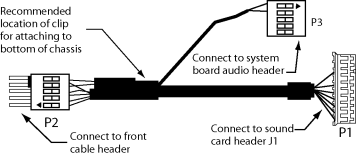
2 Systems with Audigy 2 ZS card preinstalled by factory If your system already has an Audigy 2 ZS card preinstalled, the system already contains a driver for basic functionality. To take full advantage of the audio card features, install the driver and applications that are on the Installation and Application CD. NOTE: If you do not install the driver found on the Installation and Application CD or the latest driver from the HP Support & Drivers Web site ( the rear speaker jack does not automatically mute when a headset, or other speaker, is connected to the front headset port. To install the application, skip to step 12 for software installation instructions. Installing the card and software To install the Audigy 2 ZS card: 1. Turn off your computer and unplug the AC power cable. 2. Open the chassis and remove the rear PCI metal slot cover where you plan to install the sound card. 3. Disconnect the front audio cable from the front audio header on the system board. If your system came with a CD audio cable that connects the optical drive to the system board, disconnect the cable from the system board end only and leave the optical drive end conneted. NOTE: The next several steps involve connecting cables to the system board, but it might be easier to connect the cables to the card before connecting the cables to the system board or installing the card. 4. Connect the CD audio cable from the optical drive to the CD_IN connector of the sound card. Skip this step if your system does not have the CD audio cable. The other end should remain connected to the optical disk drive. 5. Connect the P3 header on the adapter cable to the front audio header on the system board. 6. Connect the P1 header on the adapter cable to the J1 header on the audio card. 7. Connect the P2 header on the adapter cable to the header on the front panel audio cable. (The cable removed in step 3.) 8. Install the sound card and secure the brackets. NOTE: The audio card can be installed in any PCI slot, but HP recommends installing the card in an available PCI 32-bit slot. When the sound card is installed in a 64-bit PCI slot, the entire 64-bits bus runs at 32-bits mode. This action can degrade the system performance if another 64-bit PCI device is installed on the same bus. However, if there is no 32-bit PCI bus available, use PCI-X 133 since it is an isolated 64-bit bus slot. 9. Fasten the adapter cable to the bottom of the chassis with the cable clip included in this kit. 10. Close the chassis side cover.
3 11. Connect the AC power, turn on the computer, and wait for the system to boot. If the new hardware found wizard comes up, click Cancel. 12. Insert the Installation and Application CD into the CD-ROM drive. The installation software starts automatically. Follow the on-screen instructions to install the driver and applications for the sound card. Restart the system when prompted to do so. NOTE: If the application does not start automatically, double-click the setup.exe file in the Installation and Application CD. 13. After you have installed the software, refer to the Online manual or your speaker manufacturer documentation for instructions on how to connect the speaker to your system. To find the online manual, select Start > Programs > Creative > Sound Blaster Audigy 2 ZS > Documentation > Online Manual. NOTE: When the sound card is installed in the system, the internal chassis speaker only functions for diagnostic beeps and does not play any other sound. The rear audio connectors on the system board are also disabled when the Audigy 2 ZS sound card is installed. Use the audio output from the Audigy 2 ZS sound card for audio connection to the external audio device. NOTE: When using the digital out of the sound card, refer to Digital output to prevent Electro Magnetic Interference. Digital output When using the digital output of the sound card, the audio gasket needs to be installed to prevent Electro Magnetic Interference, according to FCC Class B limits. 1. Identify the audio gasket. Audio gasket 2. Install the audio gasket on the audio connector. Audio gasket installed on audio connector (the actual audio connector from the speaker might not look exactly the same as the one in the picture) 3. Now that the audio connector is equipped with the audio gasket, plug the audio connector into the sound card. Audio connector installed into the digital output of the sound card with audio gasket
4
5 Creative Sound Blaster Audigy 2 ZS クイックスタートガイド 本書では Creative Sound Blaster Audigy 2 ZS のハードウェアとソフトウェアのインストールについて説明します 詳細につきましては Installation and Application CD を参照してください パッケージの内容 Sound Blaster Audigy 2 ZS オーディオカード フロントオーディオアダプタケーブル ケーブルクリップ デジタル出力用オーディオコネクタガスケット Installation and Application CD 規制遵守の注意点 保証内容 システム要件 HP Workstation xw シリーズ (xw3100 xw6000 xw8000 を除く ) Microsoft Windows XP SP1 (Service Pack 1) 以降のオペレーティングシステム オプティカルドライブ 空の PCI スロット 保証内容 保証書に記載されている保証条件により保証内容は変わります
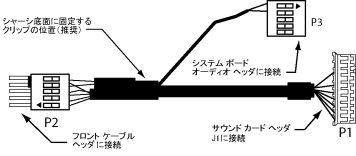
6 工場出荷時に Audigy 2 ZS カードがプリインストール済みのシステム お使いのシステムに Audigy 2 ZS カードがプリインストールされている場合 システムには基本的な機能に対応するドライバが実装されています オーディオカードの機能を最大限に活用するには Installation and Application CD 内のドライバとアプリケーションをインストールしてください 注記 : Installation and Application CD 内にあるドライバ または HP Support & Drivers の Web サイト ( ( 英語 )) に掲載されている最新のドライバをインストールしていないと ヘッドセットやその他のスピーカーがフロントのヘッドセットポートに接続されている場合に リアスピーカージャックが自動的にミュート状態になりません アプリケーションをインストールするには ソフトウェアのインストール手順 12 へお進みください カードおよびソフトウェアのインストール Audigy 2 ZS カードをインストールするには 以下の手順を実行します 1. コンピュータの電源を切り AC 電源ケーブルを抜きます 2. シャーシを開き サウンドカードを取り付ける場所にあるリア PCI メタルスロットカバーを取り外します 3. システムボードのフロントオーディオヘッダからフロントオーディオケーブルを取り外します CD オーディオケーブルでオプティカルドライブとシステムボードを接続している場合は システムボードに接続している側のケーブルのみを取り外し オプティカルドライブに接続している方はそのまま接続しておきます 注記 : 次のいくつかの手順では システムボードへケーブルを接続する操作を行いますが システムボードへのケーブル接続やカード取り付けの前に カードにケーブルを接続しておくとよいでしょう 4. オプティカルドライブに接続しているCD オーディオケーブルをサウンドカードの CD_IN コネクタに接続します システムに CD オーディオケーブルが搭載されていない場合は この手順をスキップしてください もう片方はオプティカルドライブに接続したままにします 5. アダプタケーブルの P3 ヘッダをシステムボードのフロントオーディオヘッダに接続します 6. アダプタケーブルの P1 ヘッダをオーディオカードの J1 ヘッダに接続します
7 7. アダプタケーブルの P2 ヘッダをフロントパネルオーディオケーブルのヘッダに接続します ( 手順 3 で取り外したケーブル ) 8. サウンドカードを取り付けて ブラケットを固定します 注記 : オーディオカードは任意の PCI スロットに取り付けることができますが PCI 32 ビットスロットが利用できる場合は このスロットに取り付けることをおすすめします サウンドカードを 64 ビット PCI スロットに取り付けると すべての 64 ビットバスが 32 ビットモードで動作します このとき 同じバスに 64 ビットの PCI デバイスが実装されていると システムのパフォーマンスが低下します もし 32 ビット PCI バスを利用できない場合は 隔離された 64 ビットバススロットである PCI-X 133 を使用してください 9. 付属のケーブルクリップを使用して アダプタケーブルをシャーシの底面に固定します 10. シャーシのサイドカバーを閉じます 11. AC 電源を接続し コンピュータの電源を入れ システムが起動するのを待ちます [ 新しいハードウェア ] ウィザードが起動した場合は [Cancel] をクリックします 12. Installation and Application CD を CD-ROM ドライブに挿入します インストールソフトウェアが自動的に起動します 画面の指示に従い サウンドカードのドライバとアプリケーションをインストールします システムを再起動するようメッセージが表示されたら 再起動を行います 注記 : アプリケーションが自動的に開始しない場合は Installation and Application CD にある setup.exe ファイルをダブルクリックします 13. システムにスピーカーを接続する方法については ソフトウェアをインストールした後 オンラインマニュアル またはスピーカーの製造元のドキュメントを参照してください [Start] [Programs] [Creative] [Sound Blaster Audigy 2 ZS] [Documentation] [ オンラインマニュアル ] の順にクリックすると オンラインマニュアルを参照できます 注記 : サウンドカードがシステムにインストールされると 内部のシャーシスピーカーは診断ビープ音用としてのみ機能し その他の音は出しません Audigy 2 ZS サウンドカードが取り付けられている場合は システムボードのリアオーディオコネクタも無効になります 外部オーディオ装置とオーディオ接続するには Audigy 2 ZS サウンドカードからオーディオ出力してください 注記 : サウンドカードのデジタル出力を使用する場合は 電磁干渉を防ぐために デジタル出力 を参照してください デジタル出力 サウンドカードのデジタル出力を使用する場合 FCC Class B の制限により 電磁干渉を防ぐため オーディオガスケットを取り付ける必要があります 1. オーディオガスケットを確認します オーディオガスケット 2. オーディオガスケットをオーディオコネクタに取り付けます オーディオコネクタに取り付けられたオーディオガスケット ( スピーカーの実際のオーディオコネクタは写真と異なる場合があります )
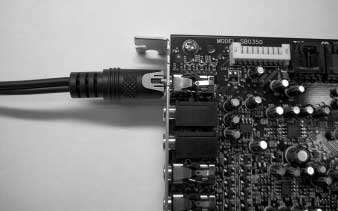
8 3. オーディオガスケットが取り付けられたオーディオコネクタを サウンドカードに接続します オーディオガスケットとサウンドカードがデジタル出力に取り付けられたオーディオコネクタ 2004 Hewlett-Packard Development Company, L.P. The HP Invent logo is a registered trademark of Hewlett-Packard Development Company, L.P
Creative Sound Blaster Audigy 2 ZS Quick Start Guide
 Creative Sound Blaster Audigy 2 ZS Quick Start Guide This document describes the hardware and software installation of the Creative Sound Blaster Audigy 2 ZS. For more information, refer to the Installation
Creative Sound Blaster Audigy 2 ZS クイック スタート ガイド
 Creative Sound Blaster Audigy 2 ZS クイックスタートガイド This document describes the hardware and software installation of the Creative Sound Blaster Audigy 2 ZS. For more information, refer to the Installation
Diskette Drive Installation
 Diskette Drive Installation HP Workstation xw Series This document describes how to install a diskette drive. Kit Contents This product is shipped with the necessary supplies for installing a diskette
Diskette Drive Installation
 Diskette Drive Installation HP xw Series Workstation This document describes how to install a diskette drive. Kit Contents This product is shipped with the necessary supplies for installing a diskette
PCI Express Graphics Products
 PCI Express Graphics Products This graphics card uses the PCI Express hardware interconnect standard. It is designed to work using your PCI Express x16 I/O slot. PCI Express is the successor to the PCI,
PCI Express Sound Blaster X-Fi Titaniumオーディオ カードの取り付け
 PCI Express Sound Blaster X-Fi Titanium オーディオカードの取り付け 概要 このマニュアルでは PCI Express (PCIe) Sound Blaster X-Fi Titanium オーディオカードのハードウェアの取り付けとソフトウェアのインストールについて説明します 詳細については Installation and Application( インストールとアプリケーション
ドライバインストールガイド
 PRIMERGY Single Port ファイバーチャネルカード (8Gbps) Dual Port ファイバーチャネルカード (8Gbps) (PG-FC205/PG-FC205L) (PG-FC206/PG-FC206L) CA092276-8938-01 ドライバインストールガイド i 目次 1. ドライバのインストール / アンインストール方法... 3 1.1. ドライバのダウンロード
Microsoft Word - PrivateAccess_UM.docx
 `````````````````SIRE Page 1 English 3 日本語 7 Page 2 Introduction Welcome to! is a fast, simple way to store and protect critical and sensitive files on any ixpand Wireless Charger. Create a private vault
NSR-500 Installation Guide
 NSR Installation Guide This information has been prepared for the professional installers not for the end users. Please handle the information with care. Overview This document describes HDD installation
警告および注意 警告! 装置の表面または領域にこの記号が貼付されている場合は 高温の表面または高温の部品が存在することを示しています この表面に触れると 火傷をするおそれがあります 高温の部品による火傷の危険を防ぐため 必ず 表面の温度が十分に下がってから手を触れてください 警告! 装置の表面または
 IEEE-1394 カードの取り付け HP xw シリーズワークステーション このマニュアルでは ワークステーションで使用する IEEE-1394 カードの取り付け方法を説明します キットの内容 IEEE-1394 カードキットには次のコンポーネントが含まれています IEEE-1394(A または B) カード Y アダプタ電源ケーブル ( 一部のキットで使用 ) 保証書 インストール手順 お使いになる前に
Creative Sound Blaster X-Fi カードの取り付け
 Creative Sound Blaster X-Fi card installation HP xw Workstation series This document describes the hardware and software installation of the Creative Sound Blaster X-Fi. For more information, refer to
WARNING To reduce the risk of fire or electric shock,do not expose this apparatus to rain or moisture. To avoid electrical shock, do not open the cabi
 ES-600P Operating Instructions WARNING To reduce the risk of fire or electric shock,do not expose this apparatus to rain or moisture. To avoid electrical shock, do not open the cabinet. Refer servicing
Microsoft Word - Win-Outlook.docx
 Microsoft Office Outlook での設定方法 (IMAP および POP 編 ) How to set up with Microsoft Office Outlook (IMAP and POP) 0. 事前に https://office365.iii.kyushu-u.ac.jp/login からサインインし 以下の手順で自分の基本アドレスをメモしておいてください Sign
NSR-500 Create DVD Installer Procedures
 Creating NSR-500 DVD Installer Overview This document describes how to create DVD installer for the NSR-500 series. Applicable Model NSR-500 Series To be required * Windows (XP, Vista or 7) installed PC
fx-9860G Manager PLUS_J
 fx-9860g J fx-9860g Manager PLUS http://edu.casio.jp k 1 k III 2 3 1. 2. 4 3. 4. 5 1. 2. 3. 4. 5. 1. 6 7 k 8 k 9 k 10 k 11 k k k 12 k k k 1 2 3 4 5 6 1 2 3 4 5 6 13 k 1 2 3 1 2 3 1 2 3 1 2 3 14 k a j.+-(),m1
2
 8 24 32C800037C800042C8000 32 40 45 54 2 3 24 40 10 11 54 4 7 54 30 26 7 9 8 5 6 7 9 8 18 7 7 7 40 10 13 12 24 22 22 8 55 8 8 8 8 1 2 3 18 11 54 54 19 24 30 69 31 40 57 23 23 22 23 22 57 8 9 30 12 12 56
HP SkyRoom のハードウェアとソフトウェアのインストール
 はじめに HP SkyRoom のハードウェアとソフトウェアのインストール ヒント : 受け取ったハードウェアキットを確認し 以下の適切な指示に従ってください Installing the webcamwebcam の取り付け 1. Webcam に付属の CD を挿入して Webcam ソフトウェアをインストールします 2. プロンプトが表示されたら 空いている USB ポートに Webcam を接続します
2
 8 23 26A800032A8000 31 37 42 51 2 3 23 37 10 11 51 4 26 7 28 7 8 7 9 8 5 6 7 9 8 17 7 7 7 37 10 13 12 23 21 21 8 53 8 8 8 8 1 2 3 17 11 51 51 18 23 29 69 30 39 22 22 22 22 21 56 8 9 12 53 12 56 43 35 27
Microsoft Windows XP Professional x64 Editionインストール方法説明書
 Microsoft Windows XP Professional x64 Edition インストール方法説明書 HP Business Desktop dx5150 MT シリーズ この度は Microsoft Windows XP Professional x64 Edition アップグレードキット をご購入いただきありがとうございます このガイドでは 同梱のキットを使用して Microsoft
2
 8 23 32A950S 30 38 43 52 2 3 23 40 10 33 33 11 52 4 52 7 28 26 7 8 8 18 5 6 7 9 8 17 7 7 7 38 10 12 9 23 22 22 8 53 8 8 8 8 1 2 3 17 11 52 52 19 23 29 71 29 41 55 22 22 22 22 22 55 8 18 31 9 9 54 71 44
Tab 5, 11 Tab 4, 10, Tab 3, 9, 15Tab 2, 8, 14 Tab 1, 7, 13 2
 COMPANION 20 MULTIMEDIA SPEAKER SYSTEM Owner s Guide Tab 5, 11 Tab 4, 10, Tab 3, 9, 15Tab 2, 8, 14 Tab 1, 7, 13 2 Tab1, 7, 13 Tab 2, 8, 14 Tab 3, 9, 15 Tab 4, 10, Tab 5, 11 This product conforms to all
2 3 12 13 6 7
 2 8 17 42ZH700046ZH700052ZH7000 28 43 54 63 74 89 2 3 12 13 6 7 3 4 11 21 34 63 65 8 17 4 11 4 55 12 12 10 77 56 12 43 43 13 30 43 43 43 43 10 45 14 25 9 23 74 23 19 24 43 8 26 8 9 9 4 8 30 42 82 18 43
 L C -6D Z3 L C -0D Z3 3 4 5 6 7 8 9 10 11 1 13 14 15 16 17 OIL CLINIC BAR 18 19 POWER TIMER SENSOR 0 3 1 3 1 POWER TIMER SENSOR 3 4 1 POWER TIMER SENSOR 5 11 00 6 7 1 3 4 5 8 9 30 1 3 31 1 3 1 011 1
 5 7 3AS40AS 33 38 45 54 3 4 5 4 9 9 34 5 5 38 6 8 5 8 39 8 78 0 9 0 4 3 6 4 8 3 4 5 9 5 6 44 5 38 55 4 4 4 4 5 33 3 3 43 6 6 5 6 7 3 6 0 8 3 34 37 /78903 4 0 0 4 04 6 06 8 08 /7 AM 9:3 5 05 7 07 AM 9
 5 30 B36B3 4 5 56 6 7 3 4 39 4 69 5 56 56 60 5 8 3 33 38 45 45 7 8 4 33 5 6 8 8 8 57 60 8 3 3 45 45 8 9 4 4 43 43 43 43 4 3 43 8 3 3 7 6 8 33 43 7 8 43 40 3 4 5 9 6 4 5 56 34 6 6 6 6 7 3 3 3 55 40 55
19_22_26R9000操作編ブック.indb
 8 19R900022R900026R9000 25 34 44 57 67 2 3 4 10 37 45 45 18 11 67 25 34 39 26 32 43 7 67 7 8 7 9 8 5 7 9 21 18 19 8 8 70 8 19 7 7 7 45 10 47 47 12 47 11 47 36 47 47 36 47 47 24 35 8 8 23 12 25 23 OPEN
FTDI Driver Error and Recovery Procedure Check FTDI driver operation Rev :OK, Rev :NG, Rev :NG May 11, 2017 CHECK FTDI DRIVER
 FTDI Driver Error and Recovery Procedure Check FTDI driver operation Rev. 2.08.02:OK, Rev. 2.08.24:NG, Rev. 2.12.06:NG May 11, 2017 CHECK FTDI DRIVER VERSION 1. Connect FTDI device to PC FTDI デバイスを PC
MIDI_IO.book
 MIDI I/O t Copyright This guide is copyrighted 2002 by Digidesign, a division of Avid Technology, Inc. (hereafter Digidesign ), with all rights reserved. Under copyright laws, this guide may not be duplicated
Z7000操作編_本文.indb
 2 8 17 37Z700042Z7000 46Z7000 28 42 52 61 72 87 2 3 12 13 6 7 3 4 11 21 34 61 8 17 4 11 4 53 12 12 10 75 18 12 42 42 13 30 42 42 42 42 10 62 66 44 55 14 25 9 62 65 23 72 23 19 24 42 8 26 8 9 9 4 11 18
Microsoft Word - DWR-S01D_Updater_取扱説明書_120514A.doc
 DWR-S01D Updater 取扱説明書 発行日 :2012/5/14 目次 概要...3 機能...3 準備するもの...3 本ソフトウェアについて...3 インストール手順...4 USBドライバーのインストール手順...8 デバイスマネージャーからのUSBドライバーのインストール手順...11 アップデート手順...16 アップデート後の確認...17 アップデートに失敗した場合...17
OUTSIDE FRONT COVER Setup Guide セットアップ ガイド C M Y K PMS 3005
 OUTSIDE FRONT COVER Setup Guide セットアップ ガイド C M Y K PMS 3005 Microsoft Surface Hub with 55 display MS Surface Hub Setup Guide English This guide assumes youʼve already unpacked and mounted Microsoft Surface
 6 4 45 7ZS 5 59 7 8 94 05 4 5 6 4 5 5 6 8 8 40 45 48 56 60 64 66 66 68 7 78 80 8 7 8 0 0 0 90 0 57 64 69 66 66 69 0 4 4 4 4 4 0 7 48 5 4 4 5 4 4 4 7 46 46 6 46 8 46 48 46 46 4 46 46 4 4 5 4 6 4 9 9 0
 6 4 4 9RERE6RE 5 5 6 7 8 9 4 5 6 4 4 5 6 8 4 46 5 7 54 58 60 6 69 7 8 0 9 9 79 0 4 0 0 4 4 60 6 9 4 6 46 5 4 4 5 4 4 7 44 44 6 44 8 44 46 44 44 4 44 0 4 4 5 4 8 6 0 4 0 4 4 5 45 4 5 50 4 58 60 57 54
Actual ESS Adapterの使用について
 Actual ESS Adapter SQL External SQL Source FileMaker SQL ESS SQL FileMaker FileMaker SQL FileMaker FileMaker ESS SQL SQL FileMaker ODBC SQL FileMaker Microsoft SQL Server MySQL Oracle 3 ODBC Mac OS X Actual
Steinberg AXR4T Firmware Update Guide
 Steinberg AXR4T Firmware Update Guide (For Windows, Mac) Thank you for choosing a Steinberg product. This document explains how to update the firmware of the device by using a computer connected to the
DWR-S01D Updater 取扱説明書 発行日 :2011/2/28
 DWR-S01D Updater 取扱説明書 発行日 :2011/2/28 目次 概要概要...3 機能機能...3 準備準備するものするもの...3 本ソフトウェアソフトウェアについてについて...3 インストールインストール手順手順...4 USB ドライバーのインストールインストール手順手順...8 デバイスマネージャーデバイスマネージャーからの USB ドライバーのインストールインストール手順手順...11
2
 8 26 38 37Z800042Z800047Z8000 54 65 72 83 101 2 3 4 7 101 53 27 33 7 8 9 5 7 9 22 47 72 8 8 8 8 102 8 13 7 7 7 65 10 67 67 13 71 40 67 67 67 67 43 67 12 55 55 11 104 8 24 26 24 20 25 6 1 2 3 18 46 101
内蔵ハードディスクユニット-20GB (PG-HD2E4H) 内蔵ハードディスクユニット-40GB (PG-HD4E4H)取扱説明書 HARD DISK DRIVE 20GB(PG-HD2E4H) HARD DISK DRIVE 40GB(PG-HD4E4H) USER'S GUIDE
 B7FY-0351-02 J E J 1 J 1 2 3 2 4 J 3 4 Preface Thank you very much for purchasing the hard disk drive. This hard disk drive provides a IDE interface and can be installed in the 3.5-inch storage bay of
by CASIO W61CA For Those Requiring an English/Chinese Instruction
 by CASIO W61CA http://www.au.kddi.com/torisetsu/index.html http://www.au.kddi.com/manual/index.html For Those Requiring an English/Chinese Instruction Manual English/Chinese Simple Manual can be read on
ソフトウェアの更新ユーザーガイド
 ソフトウェアの更新ユーザーガイド Copyright 2009 Hewlett-Packard Development Company, L.P. Windows および Windows Vista は 米国 Microsoft Corporation の米国およびその他の国における登録商標です 製品についての注意事項 このユーザーガイドでは ほとんどのモデルに共通の機能について説明します 一部の機能は
 6 4 45 ZS7ZS4ZS 5 59 7 8 94 05 4 5 6 4 5 5 6 8 8 40 45 48 56 60 64 66 66 68 7 78 80 8 7 8 0 0 0 90 0 0 4 4 4 4 6 57 64 69 66 66 66 69 4 0 7 48 5 4 4 5 4 4 4 7 46 46 6 46 8 46 48 46 46 4 46 46 4 4 5 4
UR28M/UR824/UR44/UR12/UR22mkII Firm UG
 Steinberg UR28M/ UR824/ UR44/ UR12/ UR22mkII Firmware Update Guide (For Windows/Mac) Thank you for choosing a Steinberg product. This document explains how to update the firmware of the device (with the
UR28MUR824UR44UR22mkII Firmware Update Guide
 Steinberg UR28M/ UR824/ UR44/ UR22mkII Firmware Update Guide (For Windows/Mac) Thank you for choosing a Steinberg product. This document explains how to update the firmware of the device (with the UR28M
2
 L C -60W 7 2 3 4 5 6 7 8 9 0 2 3 OIL CLINIC BAR 4 5 6 7 8 9 2 3 20 2 2 XXXX 2 2 22 23 2 3 4 5 2 2 24 2 2 25 2 3 26 2 3 6 0 2 3 4 5 6 7 8 9 2 3 0 2 02 4 04 6 06 8 08 5 05 2 3 4 27 2 3 4 28 2 3 4 5 2 2
警告および注意 警告! 装置の表面または領域にこの記号が貼付されている場合は 感電のおそれがあることを示しています 感電によるけがを防ぐため この記号が貼付されているカバーは開けないでください 警告! 感電または装置の損傷の危険がありますので 次の点を守ってください 必ず電源コードのアース端子を使用
 IEEE-1394b PCI Express カードの取り付け 概要 このマニュアルでは HP シリーズ xw9400 および xw4600 ワークステーションでの IEEE-1394 PCI Express(PCIe) カードの取り付け方法を説明します キットの内容 IEEE-1394b PCIe カード Y アダプタ電源ケーブル 保証に関する情報 インストール手順書 お使いになる前に QuickSpecs
Z200/Z200SFF WinXP 64bit マニュアルインストール手順書
 マニュアルインストール手順発行 2010 年 8 月日本ヒューレット パッカード ( 株 ) Z200,Z200SFF Windows XP 64bit 版 SATA マニュアルインストール手順 対象となる機種 Z200 Z200SFF 本手順は SATA インターフェイスのハードディスクでの方法となります 内蔵 USB メディアカードリーダを装着しており かつ初期化された HDD に OS をインストールしようとすると
TOOLS for UR44 Release Notes for Windows
 TOOLS for UR44 V2.1.2 for Windows Release Notes TOOLS for UR44 V2.1.2 for Windows consists of the following programs. - V1.9.9 - Steinberg UR44 Applications V2.1.1 - Basic FX Suite V1.0.1 Steinberg UR44
HP Remote Graphics Software Receiver and Sender Installation Guide
 HP Remote Graphics Software HP Remote Graphics Software Receiver および Sender 本書は サポート対象の各プラットフォーム (Microsoft Windows Linux HP-UX) に対して Receiver および Sender の両モジュールをインストールする際の概要を記載しています 詳しい手順については Module
クイックスタートガイド [SC-03E]
![クイックスタートガイド [SC-03E]](/thumbs/96/127590290.jpg "クイックスタートガイド [SC-03E]") a L R 2.4 FH1 / DS4 / OF4 / XX8 IEEE802.11b/g/n IEEE802.11a/n J52 W52 W53 W56 g h a i b j c k m n o p q s t u v w t d e f l g a b c d r e f g h i j k l m n o p q r s t u v w x
a L R 2.4 FH1 / DS4 / OF4 / XX8 IEEE802.11b/g/n IEEE802.11a/n J52 W52 W53 W56 g h a i b j c k m n o p q s t u v w t d e f l g a b c d r e f g h i j k l m n o p q r s t u v w x
クイックスタートガイド [SC-06D]
![クイックスタートガイド [SC-06D]](/thumbs/96/127590204.jpg "クイックスタートガイド [SC-06D]") SC-06D a g h a i b j c k m n o p q s t u v w d e f l r g a b c d e f g h i j k l m n o p q r s t u v w x x a ab c 3 1 2 b c d a b 1 2 e a ab c 3 1 2 b c d e f a b c d e f a b
SC-06D a g h a i b j c k m n o p q s t u v w d e f l r g a b c d e f g h i j k l m n o p q r s t u v w x x a ab c 3 1 2 b c d a b 1 2 e a ab c 3 1 2 b c d e f a b c d e f a b
Introduction Purpose This training course describes the configuration and session features of the High-performance Embedded Workshop (HEW), a key tool
 Introduction Purpose This training course describes the configuration and session features of the High-performance Embedded Workshop (HEW), a key tool for developing software for embedded systems that
Broadcom PCI Express NIC Installation
 Broadcom PCI Express NIC Installation This document describes how to install a Broadcom Network Interface Card (NIC) into a PCI Express slot on your workstation. This card uses the third-generation (3GIO)
2 3 12 13 6 7
 02 08 22AV55026AV550 17 25 32 22AV550 26AV550 39 50 2 3 12 13 6 7 3 4 11 8 8 9 9 8 9 23 8 9 17 4 11 4 33 12 12 11 24 18 12 10 21 39 21 4 18 18 45 45 11 5 6 7 76 39 32 12 14 18 8 1 2 32 55 1 2 32 12 54
 02 08 32C700037C700042C7000 17 25 32 39 50 2 3 12 13 6 7 3 4 11 8 8 9 9 8 9 23 8 9 17 4 11 4 33 12 12 11 24 18 12 10 21 39 21 4 11 18 45 5 6 7 76 39 32 12 14 18 8 1 2 31 55 1 2 31 12 54 54 9 1 2 1 2 10
32C2100操作編ブック.indb
 02 08 32C2100 18 24 31 37 2 3 12 13 6 7 68 67 41 42 33 34 3 4 11 8 18 4 11 4 22 13 23 11 23 12 13 14 15 10 18 19 20 20 10 9 20 18 23 22 8 8 22 9 9 4 30 10 10 11 5 13 13 16 15 26 24 37 40 39 6 7 8 1 2 29
FreeSpace.book
 IZA 190-HZ IZA 250-LZ ZA 190-HZ ZA 250-LZ FreeSpace Integrated Zone Amplifier/Zone Amplifier * 1. 2. 3. 4. 5. 6. 7. 8. 9. 2 2 10. 11. 12. 13. 14. 15. 16. 17. 40 C This product conforms to all EU Directive
Z400/Z600 WinXP 64bitマニュアルインストール手順(SATA)ver2
 発行 2010 年 06 月日本ヒューレット パッカード ( 株 ) Z400,Z600 WindowsXP 64bit SATA Ver2.0 対象となる機種 Z400 Z600 本手順は SATA インターフェイスのハードディスクでの方法となります SAS インターフェイスのハードディスクの方法ではありません 事前に搭載しているハードディスクの種類をご確認頂くよう お願い致します SAS インターフェイスのハードディスクでの方法は別の手順書として用意致しております
Broadcom PCI Express NIC Installation
 Broadcom PCI Express NIC Installation This document describes how to install a Broadcom Network Interface Card (NIC) into a PCI Express slot on your workstation. This card uses the third-generation (3GIO)
注意 Caution 1) AMT-KS を溶接ロボット等に取り付ける際には 必ず溶接機の電源を OFF にし 電気が流れていないことを確認した後 作業を行ってください Keep off of the welding power source during AMT-KS installation w
 溶業資 No.012015-L001 溶接ワイヤ用矯正機 Welding wire straightener 取扱説明書 Instruction manual Ver.1.0-1- 注意 Caution 1) AMT-KS を溶接ロボット等に取り付ける際には 必ず溶接機の電源を OFF にし 電気が流れていないことを確認した後 作業を行ってください Keep off of the welding power
2
 L C -24K 9 L C -22K 9 2 3 4 5 6 7 8 9 10 11 12 11 03 AM 04 05 0 PM 1 06 1 PM 07 00 00 08 2 PM 00 4 PM 011 011 021 041 061 081 051 071 1 2 4 6 8 5 7 00 00 00 00 00 00 00 00 30 00 09 00 15 10 3 PM 45 00
HP ThinUpdateを使用したWESシンクライアントイメージリストア手順書
 Technical white paper HP ThinUpdate を使用した Windows Embedded シンクライアント OS のイメージリカバリ手順 2015 年 11 月 目次 HP ThinUpdate とは? 2 対応する機種と OS イメージ 2 HP ThinUpdate のインストール 3 HP ThinUpdate を使用した OS リカバリ用 USB メモリの作成 9
NSR-500 Software Update Installation Procedures
 NSR Software Update Installation Procedures Overview Handle this information with care because this installation procedure is not intended for use by customers. This document describes software update
取扱説明書_KX-PW100CL
 See pages 236 238 for English Guide. KX-PW100CL Ni-MH KX-PW100CL-W KX-FKN100-W 1 2 NTT NTT 1 4 3 4 5 6
Z800 WinXP 64bitマニュアルインストール手順(SATA)ver2
 発行 2010 年 06 月日本ヒューレット パッカード ( 株 ) Z800 WindowsXP 64bit SATA Ver2.0 対象となる機種 Z800 本手順は SATA インターフェイスのハードディスクでの方法となります SAS インターフェイスのハードディスクの方法ではありません 事前に搭載しているハードディスクの種類をご確認頂くよう お願い致します SAS インターフェイスのハードディスクでの方法は別の手順書として用意致しております
z230/z440/z640/z840用Thunderbolt2 Card セットアップ手順書
 発行 2014 年 11 月 28 日 日本ヒューレット パッカード ( 株 ) Thunderbolt 2 PCIe カード設定手順 Ver2.0 - Z230 / Z440 / Z640 / Z840 - 対象となる機種 Z230 Workstation( タワー型および SFF = スリム型 ) Z440 Workstation Z640 Workstation Z840 Workstation
NSR-500 Create USB Installer Procedures
 Creating NSR-500 USB Installer Overview This document describes how to create the USB installer for the NSR- 500 series. Applicable Model NSR-500 Series To Be Required * Windows (XP, Vista or 7) installed
平成29年度英語力調査結果(中学3年生)の概要
 1 2 3 1 そう思う 2 どちらかといえば そう思う 3 どちらかといえば そう思わない 4 そう思わない 4 5 楽しめるようになりたい 6 1 そう思う 2 どちらかといえば そう思う 3 どちらかといえば そう思わない 4 そう思わない 7 1 そう思う 2 どちらかといえば そう思う 3 どちらかといえば そう思わない 4 そう思わない 8 1 そう思う 2 どちらかといえば そう思う
*Ł\”ƒ‚ä(DCH800)
 B B B B B B B B B C * This device can only be used inside Japan in areas that are covered by subscription cable TV services. Because of differences in broadcast formats and power supply voltages, it cannot
*C3200−îŒ{fiI‡È”g‡¢Łû01-07
 2 2 1 2 3 4 a b c d 5 6 7 8 9 10 11 12 13 14 2 2 15 16 I/O ipk 17 18 19 20 LAN! 21 22 23 24 25 26 Web Navi Text To Speech 27 Outlook Intellisync HancomMobileWord/Sheet HancomMobileWord/Sheet 28 29 30 a
Broadcom NetXtreme® Gigabit Ethernet Plus ネットワーク インタフェース カードの取り付け
 Broadcom NetXtreme Gigabit Ethernet Plus ネットワークインタフェースカードの取り付け 概要 このマニュアルでは ワークステーションの PCI Express ( PCIe ) スロットに Broadcom NetXtreme Gigabit Ethernet Plus ネットワークインタフェースカード (NIC) を取り付ける方法を説明します キットの内容 Broadcom
 FCC This product is conform to the FCC standards. FCC Rules (Federal Communications Commission) This product complies with Part15 Subpart B and C of the FCC Rules. FCC ID : MK4TR3XM-SX01 FCC NOTICE This
HP User Manual for the Integrated Intel SATA RAID Controller for Microsoft Windows XP Professional and Windows 2000 Profess...
 Microsoft Windows XP Professional および Windows 2000 Professional 対応の内蔵 Intel SATA RAID コントローラ用 HP ユーザーマニュアル 内蔵 SATA RAID コントローラ... 2 RAID を有効にする最適な方法の選択... 2 HP Recovery Media を使用した RAID のセットアップ... 2 手順
LC304_manual.ai
 Stick Type Electronic Calculator English INDEX Stick Type Electronic Calculator Instruction manual INDEX Disposal of Old Electrical & Electronic Equipment (Applicable in the European Union
セットアップユーティリティユーザガイド
 セットアップユーティリティユーザガイド Copyright 2007, 2008 Hewlett-Packard Development Company, L.P. Windows は米国 Microsoft Corporation の米国およびその他の国における登録商標です 本書の内容は 将来予告なしに変更されることがあります HP 製品およびサービスに関する保証は 当該製品およびサービスに付属の保証規定に明示的に記載されているものに限られます
Installing an IEEE-1394 card
 Installing an IEEE-1394 card Installing an IEEE-1394 card Kit contents This document describes how to install an IEEE-1394 card in your HP workstation. The following components are included in your processor
2 3
 * This device can only be used inside Japan in areas that are covered by subscription cable TV services. Because of differences in broadcast formats and power supply voltages, it cannot be used in overseas
DWT-B01 Updater 取扱説明書 発行日 :2011/3/23
 DWT-B01 Updater 取扱説明書 発行日 :2011/3/23 目次 概要概要...3 機能機能...3 準備準備するものするもの...4 本ソフトウェアソフトウェアについてについて...4 インストールインストール手順手順...5 USB ドライバーのインストールンストール手順手順...9 デバイスマネージャーデバイスマネージャーからの USB ドライバーのインストールインストール手順手順...12
BS・110度CSデジタルハイビジョンチューナー P-TU1000JS取扱説明書
 C S0 CS Digital Hi-Vision Tuner C C C C S0-0A TQZW99 0 C C C C 4 5 6 7 8 9 C C C C C C C C C C C C C C C C C C C C C C C 0 FGIH C 0 FGIH C C C FGIH FG IH FGIH I H FGIH FGIH 0 C C # $ IH F G 0 # $ # $
仮想 COM ポートドライバーインストールマニュアル 仮想 COM ポートドライバーをパソコンにインストールすることにより FTDX3000 シリーズとパソコンとを USB ケーブルで接続して CAT 通信 TX 制御 (PTT KEY FSK) および ファームウェアのアップデートを行う事ができま
 仮想 COM ポートドライバーインストールマニュアル 仮想 COM ポートドライバーをパソコンにインストールすることにより FTDX3000 シリーズとパソコンとを USB ケーブルで接続して CAT 通信 TX 制御 (PTT KEY FSK) および ファームウェアのアップデートを行う事ができます FTDX3000 シリーズには 2 つの仮想 COM ポートを搭載しておりますので CAT 通信および各種
Yamaha Steinberg USB Driver Release Notes for Mac
 Yamaha Steinberg USB Driver V1.9.10 for Mac Release Notes Contents System Requirements for Software Main Revisions and Enhancements Legacy Updates System Requirements for Software - Note that the system
Z400/Z600 WinXP 64bitマニュアルインストール手順(SAS)ver3
 発行 2011 年 02 月日本ヒューレット パッカード ( 株 ) Z400,Z600 WindowsXP 64bit SAS Ver3.0 (LSI 9212-4i 4 ポート SAS コントローラカード ) 対象となる機種 Z400 Z600 本手順は LSI 9212-4i 4 ポート SAS(6GBb/s) コントローラカードと SAS インターフェイスのハードディスクを使用した場合の方法となります