
2008 e-learning T050050
|
|
|
- いとは いんそん
- 9 years ago
- Views:
Transcription
1 e-learning T e-learning B NintendoDS e-learning html 1 e-learning Java Applet html 2

2 2008 e-learning T050050

3 / Cloze html e-learning e-learning Java

4 e-learning NintendoDS 1

5 Yes 1 Yes No Yes No 2

6 2.2 [1] [3] html 0 html / / 2 3

7 Yes html Cloze 1 4

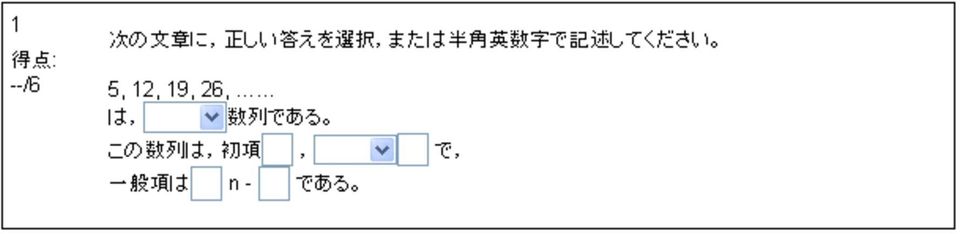
8 1: Cloze {1:MULTICHOICE: = {1:SHORTANSWER: = {name 1 100% 5
9 html

10 2.3 html x 2 a n N html [7] n= <table> <tr> <td>a</td> <td>b</td> </tr> </table> <table> <\tabale> <tr> 1 <\tr> 1 <td> 1 <\td> 1 2 A B 7

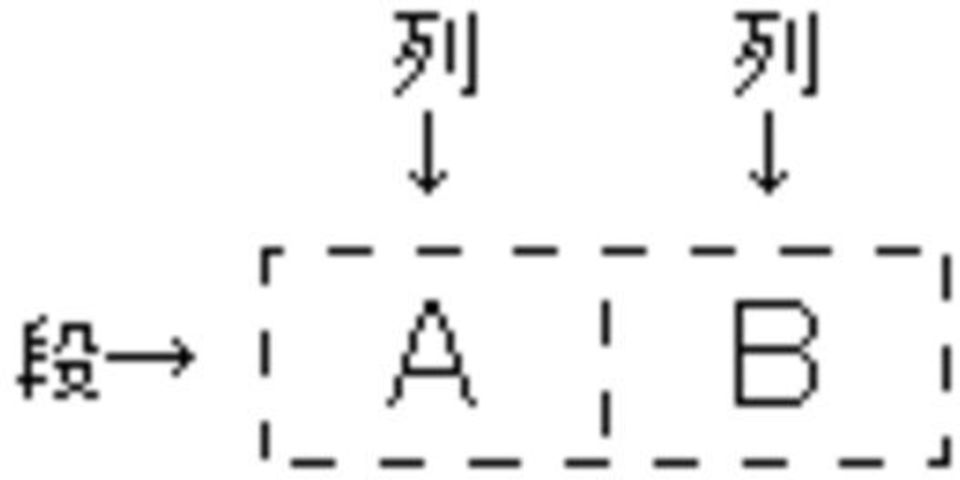
11 2: <td align="center"></td> center left right <td valign="middle"></td> middle top bottom = N n=1 <td colspan="x"></td> x <td rowspan="x"></td> 8
12 2.4 e-learning e-learning e-learning e-learning

13 n n 2 4. N n=

14 e-learning e-learning e-learning Java Applet [2] [4] [5] [6] 3.2 Java 11
15 Button = new Button(" "); ActionListener GridLayout(1, 3) 1 3 BorderLayout.SOUTH MouseMotionListener 3 3: 12

16 MouseListener MouseListener 2 Java Applet import java.applet.*; import java.awt.event.*; import java.awt.*; public class Note extends Applet implements MouseListener, MouseMotionListener, ActionListener{ Image imgbuf; Graphics gbuf; //java int x, y; // int ox, oy; // int w, h; // int type; // Button btn1 = new Button(" "); Button btn2 = new Button(" "); Button btn3 = new Button(" "); // public void init(){ // ( ) this.setlayout(new BorderLayout()); // 13

17 Panel pnl = new Panel(new GridLayout(1, 3)); // pnl.add(btn1); pnl.add(btn2); pnl.add(btn3); // this.add(pnl, BorderLayout.SOUTH); // Dimension size = getsize(); w = size.width; h = size.height; // imgbuf = createimage(w, h); gbuf = imgbuf.getgraphics(); //java type = 1; // addmouselistener(this); addmousemotionlistener(this); btn1.addactionlistener(this); btn2.addactionlistener(this); btn3.addactionlistener(this); public void paint(graphics g){ g.drawimage(imgbuf, 0, 0, this); //java public void update(graphics g){ paint(g); public void mouseentered(mouseevent e){ public void mouseexited(mouseevent e){ public void mousepressed(mouseevent e){ ox = e.getx(); // // // 14

18 oy = e.gety(); // public void mouseclicked(mouseevent e){ // x = e.getx(); y = e.gety(); // if(type == 1){ // gbuf.setcolor(color.black); gbuf.drawoval(x, y, 1, 1); //java else if(type == 2){ // gbuf.setcolor(color.white); gbuf.filloval(x-5, y-5, 10, 10); //java repaint(); public void mousereleased(mouseevent e){ // public void mousedragged(mouseevent e){ // x = e.getx(); y = e.gety(); // if(type == 1){ // gbuf.setcolor(color.black); gbuf.drawline(ox, oy, x, y); //java ox = x; oy = y; // else if(type == 2){ // gbuf.setcolor(color.white); gbuf.filloval(x-5, y-5, 10, 10); //java repaint(); 15

19 public void mousemoved(mouseevent e){ // public void actionperformed(actionevent e){ // if(btn1 == e.getsource()){ // type = 1; // else if(btn2 == e.getsource()){ // type = 2; // else if(btn3 == e.getsource()){ // type = 1; // gbuf.clearrect(0, 0, w, h); //java repaint(); 3.3 Java Applet html <applet code="name.class" width="width" height="height"></applet> Applet name.class Java class width height Applet e-learning html class codebase= class 2 e-learning 16
20 html 4 <center> // <p> // <table border="1"> // <tr> <td> <applet height="500" width="500" code="note.class" codebase=" Note.class "></applet> </td> <td> <applet height="500" width="500" code="note.class" codebase=" Note.class "></applet> </td> </tr> </table> </p> // // // <font color="#800000"><big> </big> <font color="#000000"> <table> <tr> <td> </td> <th> </th> <td> </td> </tr> <tr> <td> </td> <th> </th> <td> </td> </tr> <tr> <td> </td> <th> </th> <td> </td> </tr> </table> </center> 17

21 4: 4 e-learning Java 18
22 5 [1] B 2003 [2] Java 2003 [3] 2007 [4] Java JavaDrive [5] Java [6] ecb/index.html [7] bigblock/index.html 19
Assignment_.java /////////////////////////////////////////////////////////////////////// // 課題 星の画像がマウスカーソルを追従するコードを作成しなさい 次 ///////////////////
 Assignment_.java 0 0 0 0 0 /////////////////////////////////////////////////////////// // 課題 次のようにマウスのカーソルに同期しメッセージを /////////////////////////////////////////////////////////// class Assignment_ extends
I. (i) Foo public (A). javac Foo.java java Foo.class (C). javac Foo java Foo (ii)? (B). javac Foo.java java Foo (D). javac Foo java Foo.class (A). Jav
 2018 06 08 11:00 12:00 I. I III II. III. IV. ( a d) V. VI. 80 40 40 100 60 : A ActionListener aa addactionlistener AE ActionEvent K KeyListener ak addkeylistener KE KeyEvent M MouseListener am addmouselistener
次の演習課題(1),(2)のプログラムを完成させよ
 次の演習課題 (1),(2) のプログラムを作成せよ. 課題 (1) ボタン押下時の処理を追加し以下の実行結果となるようにプログラムを作成しなさい ( ボタン押下時の処理 ) import java.lang.*; class Figure extends JFrame implements ActionListener{ JPanel panel; JScrollPane scroll; JTextArea
Microsoft PowerPoint prog1_doc2x.pptx
 アプレット public class extends Applet { public void paint(graphics g) { // アプレット描画 g.drawstring( Hello World, 10, 20 ); page 1 アプレット : 色 public class extends Applet { Color col; // カラークラス int red, grn, blu;
KeyListener init addkeylistener addactionlistener addkeylistener addkeylistener( this ); this.addkeylistener( this ); KeyListener public void keytyped
 KeyListener keypressed(keyevent e) keyreleased(keyevent e) keytyped(keyevent e) MouseListener mouseclicked(mouseevent e) mousepressed(mouseevent e) mousereleased(mouseevent e) mouseentered(mouseevent e)
Chapter JDK KeyListener keypressed(keyevent e ) keyreleased(keyevent e ) keytyped(keyevent e ) MouseListener mouseclicked(mouseeven
 Chapter 11. 11.1. JDK1.1 11.2. KeyListener keypressed(keyevent e ) keyreleased(keyevent e ) keytyped(keyevent e ) MouseListener mouseclicked(mouseevent e ) mousepressed(mouseevent e ) mousereleased(mouseevent
I 4 p.2 4 GUI java.awt.event.* import /* 1 */ import mouseclicked MouseListener implement /* 2 */ init addmouselistener(this) this /* 3 */ this mousec
 I 4 p.1 4 GUI GUI GUI 4.1 4.1.1 MouseTest.java /* 1 */ public class MouseTest extends JApplet implements MouseListener /* 2 */ { int x=50, y=20; addmouselistener(this); /* 3 */ public void mouseclicked(mouseevent
Microsoft PowerPoint prog1_doc2.pptx
 2011 年 12 月 6 日 ( 火 ) プログラミング Ⅰ Java Applet プログラミング 文教大学情報学部経営情報学科堀田敬介 アプレット Applet public class クラス名 extends Applet { public void paint(graphics g) { // アプレット描画 g.drawstring( Hello World, 10, 20); 10
Java演習(9) -- クラスとメソッド --
 Java (9) Java (9) Java (9) 3 (x, y) x 1 30 10 (0, 50) 1 2 10 10 (width - 10, 80) -2 3 50 10 (width / 2, 110) 2 width 3 (RectMove4-1.java) import javax.swing.japplet; import javax.swing.timer; import java.awt.graphics;
Applet java.lang.object java.awt.component java.awt.container java.awt.panel java.applet.applet
 13 Java 13.9 Applet 13.10 AppletContext 13.11 Applet java.lang.object java.awt.component java.awt.container java.awt.panel java.applet.applet Applet (1/2) Component GUI etc Container Applet (2/2) Panel
JAVA入門
 JAVA 入 門 後 期 3 JAVAのGUI (JavaのGUI 基 本 構 造 いろいろなアプレット) 1.GUI 構 造 GUI 構 造 JAVAでGUIを 構 築 するクラスとして 下 記 のがあります 1アプレットパッケージ 2AWT 3Swing 特 に2 3はコンポーネント パッケージを 利 用 1アプレット 概 要 特 徴 GUI 構 造 1. 最 初 から GUI 環 境 が 用
19 3!! (+) (>) (++) (+=) for while 3.1!! (20, 20) (1)(Blocks1.java) import javax.swing.japplet; import java.awt.graphics;
 19 3!!...... (+) (>) (++) (+=) for while 3.1!! 3.1.1 50 20 20 5 (20, 20) 3.1.1 (1)(Blocks1.java) public class Blocks1 extends JApplet { public void paint(graphics g){ 5 g.drawrect( 20, 20, 50, 20); g.drawrect(
Java言語 第1回
 Java 言語 第 10 回ウインドウ型アプリケーション (1) 知的情報システム工学科 久保川淳司 [email protected] 前回の課題 (1) ボーダーレイアウト, グリッドレイアウト, パネルを使用して, 電卓風のボタンを実現する BorderLayout で NORTH, CENTER, SOUTH に分割 NORTHにはテキストフィールドを設定 CENTERにはパネルを使って9つのボタンを設定
< F2D82518CC282CC D2E6A7464>
 2 個のさいころ 1. はじめに [Java アプレット ] [Java アプリケーション ] 2 個のさいころを同時に投げたときの目の出方を考えてみましょう この 2 個のさいころをそれぞれ さいころ Ⅰ さいころ Ⅱ とすると その目の出方は順に 1 1 2 1 3 1 4 1 5 1 6 1 1 2 2 2 3 2 4 2 5 2 6 2 1 3 2 3 3 3 4 3 5 3 6 3 1 4
< F2D82518E9F8AD CC834F CC8CFC82AB82C68D4C>
 2 次関数のグラフの向きと広がり [Java アプレット ] [Java アプリケーション ] 1. はじめに 2 2 y=ax のグラフについて x の係数 aが正のときと負のときでは グラフにどのような違いがあるでしょうか 2 2 y=ax のグラフについて x の係数 aが正のとき 係数 aの値が大きくなるにつれて グラフの広がりはどうなるでしょうか 2 2 y=ax のグラフについて x の係数
Java言語 第1回
 Java 言語 第 8 回ウインドウ部品を用いる (1) 知的情報システム工学科 久保川淳司 [email protected] 前回の課題 (1) マウスを使って, 前回課題で作成した 6 4 のマスの図形で, \ をマウスクリックによって代わるようにしなさい 前回の課題 (2) import java.applet.applet; import java.awt.*;
IE6 2 BMI chapter1 Java 6 chapter2 Java 7 chapter3 for if 8 chapter4 : BMI 9 chapter5 Java GUI 10 chapter6 11 chapter7 BMI 12 chap
 1-1 1-2 IE6 2 BMI 3-1 3-2 4 5 chapter1 Java 6 chapter2 Java 7 chapter3 for if 8 chapter4 : BMI 9 chapter5 Java GUI 10 chapter6 11 chapter7 BMI 12 chapter8 : 13-1 13-2 14 15 PersonTest.java KazuateGame.java
< F2D A839382CC906A2E6A7464>
 ビュホンの針 1. はじめに [Java アプレット ] [Java アプリケーション ] ビュホン ( Buffon 1707-1788) は 針を投げて円周率 πを求めることを考えました 平面上に 幅 2aの間隔で 平行線を無数に引いておきます この平面上に長さ2bの針を落とすと この針が平行線と交わる確立 pは p=(2b) (aπ) 1 となります ただし b
< F2D F B834E2E6A7464>
 ランダムウォーク [Java アプレット ] [Java アプレリケーョン ] 1. はじめに 酔っぱらいは前後左右見境なくふらつきます 酔っぱらいは目的地にたどり着こうと歩き回っているうちに何度も同じところに戻って来てしまったりするものです 今 酔っぱらいが数直線上の原点にいるとします 原点を出発して30 回ふらつくとき 30 回目に酔っぱらいがいる位置は 出発点である原点からどれくらい離れてしまっているのでしょうか
< F2D825282CC947B909482CC A815B83682E6A>
 3 の倍数のトランプカード 1. はじめに [Java アプレット ] [Java アプリケーション ] ここにトランプが 1 組あります ジョーカー 2 枚を除いて 52 枚を使います 3 の倍数は スペード クローバ ダイヤ ハートに それぞれ 3 と 6 と 9 と 12 の 4 枚ずつあるので 4 4=16 枚あります この 52 枚のトランプから 1 枚引いたとき そのカードが 3 の倍数である確率を考えます
< F2D82518E9F8AD CC95BD8D7388DA93AE2E6A7464>
 2 次関数のグラフの平行移動 [Java アプレット ] [Java アプリケーション ] 1. はじめに 2 2 y=ax のグラフとy=a(x-b) +c のグラフは 位置は違うけれど 形も広がりも全く同じです 2 2 y=a(x-b) +c のグラフは y=ax のグラフをx 軸方向に ( 右方向に ) +b y 軸方向に ( 上方向に ) +c だけ平行移動したものです 2 シミュレーションソフト
II Java :30 12:00 I. I IV II. III. IV. ( a d) V. : this==null, T == N A ActionListener C class D actionperformed G getsource I implements K
 II Java 09 2 13 10:30 12:00 I. I IV II. III. IV. ( a d) V. : this==null, T == N A ActionListener C class D actionperformed G getsource I implements K KeyListener J JApplet L addmouselistener M MouseListener
Java言語 第1回
 Java 言語 第 11 回ウインドウ型アプリケーション (2) 知的情報システム工学科 久保川淳司 [email protected] メニュー (1) メニューを組み込むときには,MenuBar オブジェクトに Menu オブジェクトを登録し, その Menu オブジェクトに MenuItem オブジェクトを登録する 2 つの Menu オブジェクト File New
アプレットの作成
 - 1 - import java.applet.applet; import java.awt.graphics; public class HelloWorld extends Applet { public void init() { resize(150,60) ; public void paint ( Graphics g ) { g.drawstring("hello, world!",
Java 2 - Lesson01
 第 2 回 GUI コンポーネントのイベント処理 GUI Component Event Handling キーポイント イベント イベントリスナー イベント処理とは何か? ActionEventとActionListenerについて ItemEventとItemListenerについて TextEventとTextListenerについて KeyEventとKeyListenerについて AdjustmentEventとadjustmentListenerについて
Local variable x y i paint public class Sample extends Applet { public void paint( Graphics gc ) { int x, y;... int i=10 ; while ( i < 100 ) {... i +=
 Safari AppletViewer Web HTML Netscape Web Web 13-1 Applet Web Applet init Web paint Web start Web HTML stop destroy update init Web paint start Web update Event Driven paint Signature Overwriting Overriding
I. (i) Java? (A). Foo_Bar (B). G day (C). 999 (D). Golgo13 (ii)? (A). Java public (B). Java (C). Java JavaScript (D). Java C Java C (iii)? (A). Java (
 2016 07 29 10:30 12:00 I. I V II. III. IV. ( a d) V. VI. 80 100 60 : A ActionListener aa addactionlistener AE ActionEvent K KeyListener ak addkeylistener KE KeyEvent M MouseListener am addmouselistener
 3D 描画 Step2 マウスで回転できるようにする ベクトル (a, b, c) を軸として右回りに rot 度の回転は glrotatef(rot, a, b, c); で実行される 従って 座標軸の回転はそれぞれ x 軸まわり,y 軸まわりの回転量 (degree で表す ) を rotx, roty をとすると x 軸まわりの回転は glrotatef(rotx, 1.0f, 0.0f, 0.0f);
Object MenuComponent MenuBar MenuItem Menu CheckboxMenuItem
 Java Object MenuComponent MenuBar MenuItem Menu CheckboxMenuItem 2 MenuComponent MenuComponent setfont() void setfont(font f) MenuBar MenuBar MenuBar() MenuBar add() Menu add(menu m) Menu Menu Menu String
r3.dvi
 10 3 2010.9.21 1 1) 1 ( 1) 1: 1) 1.0.1 : Java 1 import java.awt.*; import javax.swing.*; public class Sample21 extends JPanel { public void paintcomponent(graphics g) { g.setcolor(new Color(255, 180, 99));
:30 12:00 I. I VII II. III. IV. ( a d) V. VI : this==null, T == N A ActionListener A addactionlistener C class D actionperforme
 2014 8 01 10:30 12:00 I. I VII II. III. IV. ( a d) V. VI. 80 100 60 : this==null, T == N A ActionListener A addactionlistener C class D actionperformed E ActionEvent G getsource I implements J JApplet
Java演習(4) -- 変数と型 --
 50 20 20 5 (20, 20) O 50 100 150 200 250 300 350 x (reserved 50 100 y 50 20 20 5 (20, 20) (1)(Blocks1.java) import javax.swing.japplet; import java.awt.graphics; (reserved public class Blocks1 extends
 15 Java 15.5 15.6 15.7 Checkbox() Checkbox(String str) Checkbox(String str, boolean state) Checkbox(String str, boolean state, CheckboxGroup grp) Checkbox(String str, CheckboxGroup grp, boolean state)
4.10 AddCardRow.java AddCardSet.java
 presented by adp 2006 10 14 1 3 1.1.............................................. 3 1.2.......................................... 4 2 5 3 6 3.1 SpiderSolitia.java.........................................
try catch Exception Java try catch try { } catch ( Exception e ) { } e 16-1 try catch 0 try { int x = 0; int y = 10 / x; } catch ( Exception e ) { Sys
 try catch Exception Java try catch catch ( Exception e ) { e 16-1 try catch 0 int x = 0; int y = 10 / x; catch ( Exception e ) { System.err.println( " " ); Copyright by Tatsuo Minohara 2004 Rev. C on Dec.
< F2D BCA82CC978E89BA82CC8EC08CB12E6A7464>
 パチンコ玉の落下の実験 [Java アプレット ] [Java アプリケーション ] 1. はじめに 1 個のパチンコ玉が釘に当たって左右に分かれながら落下するとき パチンコ玉はどこに落下するのでしょうか ただし パチンコ玉が釘に当たって左右に分かれるとき その分かれ方は左右半々であるとします パチンコ玉が落下し易い場所はあるのでしょうか それとも どこの場所も同じなのでしょうか シミュレーションソフト
r3.dvi
 00 3 2000.6.10 0 Java ( 7 1 7 1 GSSM 1? 1 1.1 4 4a 4b / / 0 255 HTML X 0 255 16 (0,32,255 #0020FF Java xclock -bg #0020FF xclock ^C (Control C xclock 4c 1 import java.applet.applet; import java.awt.*;
10/31 Java AWTの基本構造(Frameクラスの継承) 演習課題資料
 10/28 Java AWT の基本構造 (Frame クラスの継承 ) 演習課題資料以下のプログラムを完成せよ 共通課題 1.Frame を生成するプログラム // Frame クラスを継承して 終了ボタンのみを定義した クラスの定義 class WhiteWindow 1 { // Frame クラスの継承をする (Frame クラスの拡張 ) WhiteWindow (String title){
HTML HTML HTML 4.1 4.2 4.3 4.4 14 15 16 17
 1 11 13 2 11 27 3 12 11 HTML HTML HTML 4.1 4.2 4.3 4.4 14 15 16 17 WWW(World Wide Web) HTML(HyperText Markup Language) HTML HTML HTML HTML - 1 - .1 HTML (V)(C) HTML - 2 - HTML HTML OS Windows 2.1 HTML
5 p Point int Java p Point Point p; p = new Point(); Point instance, p Point int 2 Point Point p = new Point(); p.x = 1; p.y = 2;
 5 p.1 5 JPanel (toy example) 5.1 2 extends : Object java.lang.object extends... extends Object Point.java 1 public class Point { // public int x; public int y; Point x y 5.1.1, 5 p.2 5 5.2 Point int Java